OperationModel 2500 83
© 2015-2017 Distek, Inc. All Rights Reserved
5.4.3 2500 Select
This section describes how to use the Model 2500 with Wireless Sensors in Manual Run.
Every time a method is started, the instrument will verify that each shaft were not
moved or replaced. If there are changes, the application will alert the operator that
changes were made.
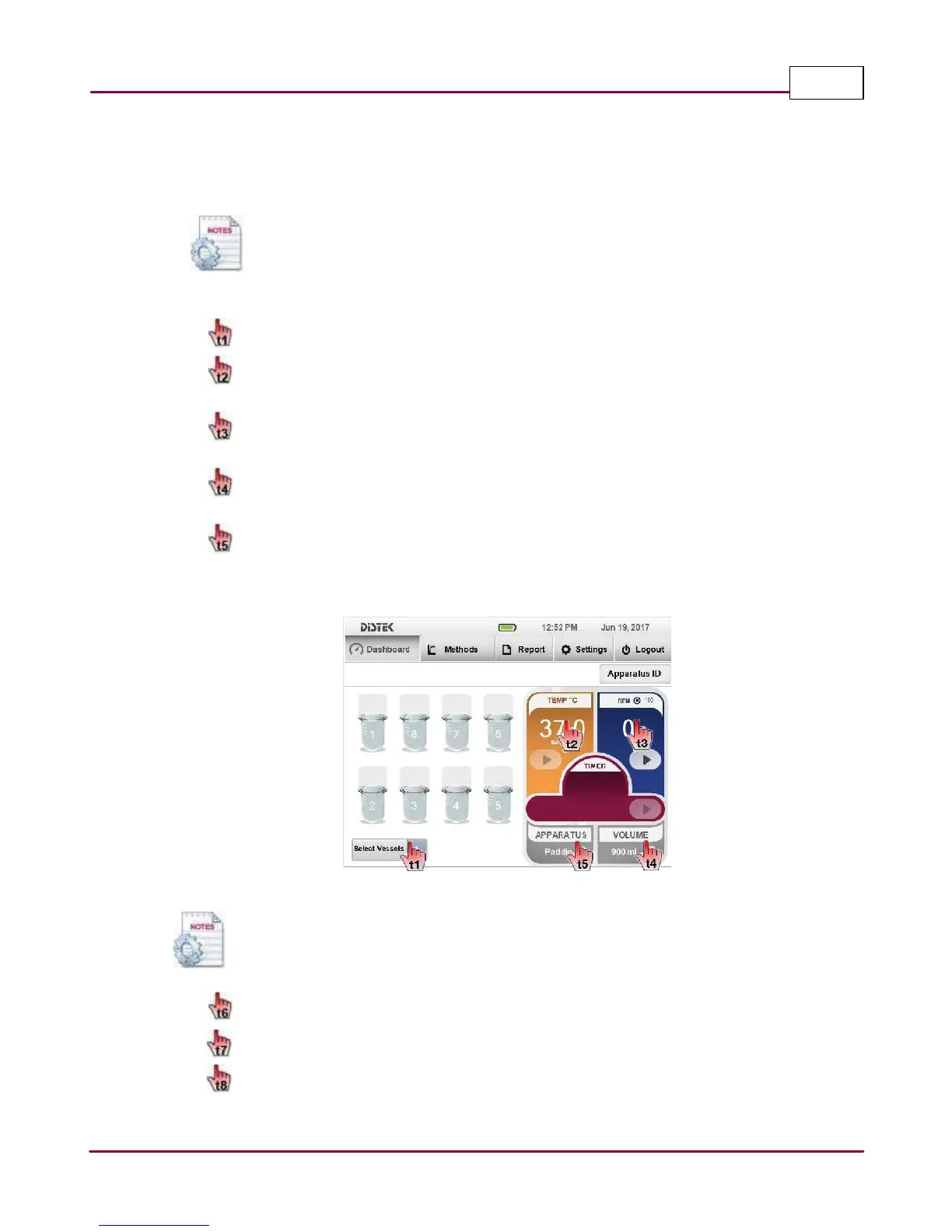
1 From the Dashboard, click Select Vessels to enable desired number of vessels.
Set the temperature by selecting
TEM P °C
gauge.
Enter the desired temperature using the on-screen keypad.
Set the stirring speed by selecting
RPM
gauge.
Enter the desired RPM using the on-screen keypad.
Set the vessel volume by selecting
V OLU M E
gauge.
Enter the desired volume using the on-screen keypad.
Set which apparatus will be use by selecting
APPA RATU S
gauge.
Select the desired apparatus in the pop up window.
Manual Run
Operator has the ability to change the stirring speed anytime.
2 Start stirring by selecting the RPM
Pla y
button.
Start heating by selecting the TEMP°C
Pla y
button.
If a timer is needed during Manual Run, select the TIMER
Pla y
button.



 To Next Page