Overview
34 Instructions for use Fabius Tiro SW 3.n
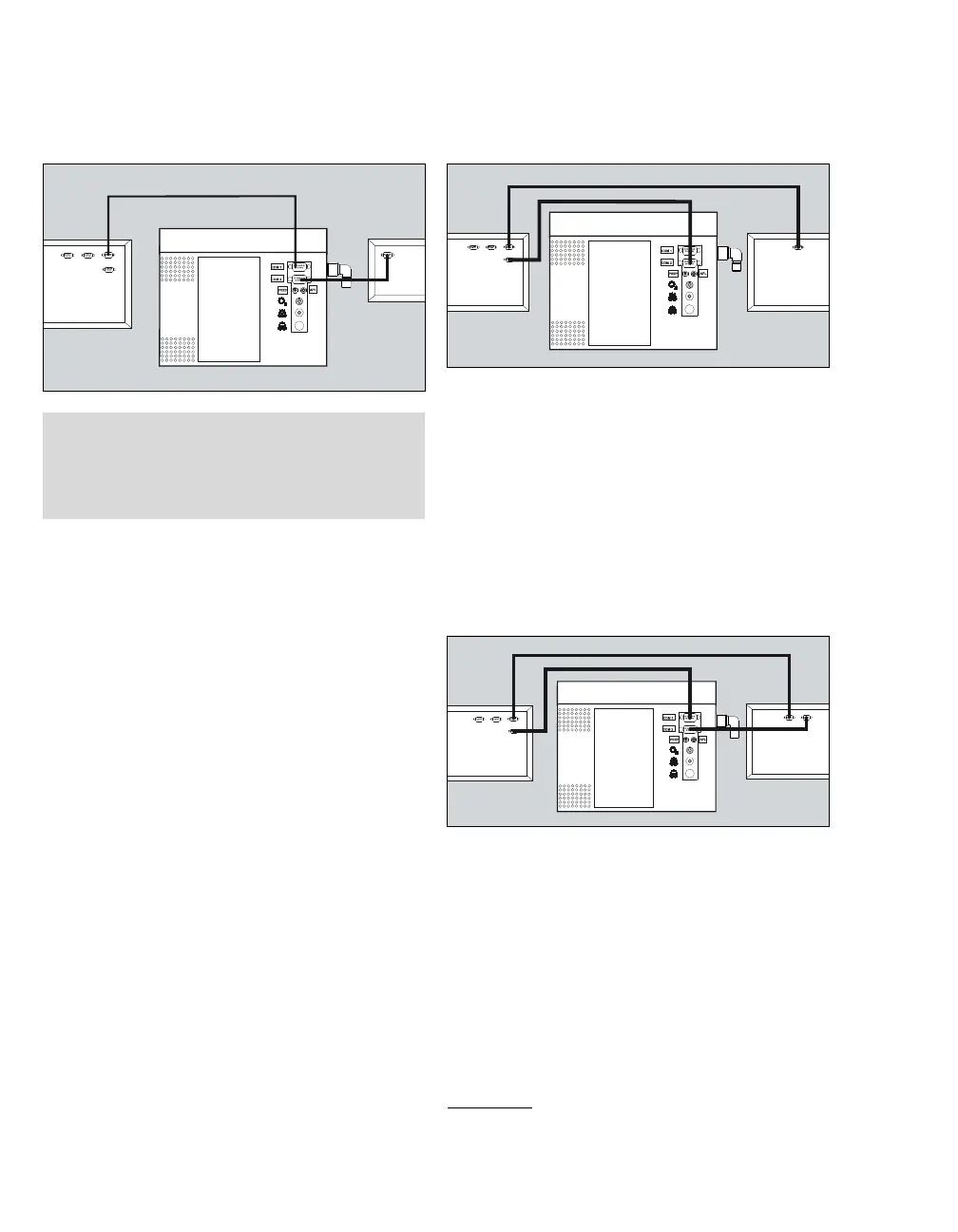
Configuration 4
–Fabius
– Breathing gas monitor (Vamos)
– Automatic anesthesia protocol system
1 Connect the breathing gas monitor to
COM 2(E).
2 Connect the anesthesia protocol system to
COM 1 (F).
Configuration 5
– Fabius
– Multiparameter monitor with a COM interface
– Automatic anesthesia protocol system
1 Connect monitor (G) to the anesthesia protocol
system.
2 Connect the anesthesia protocol system to
COM 1 (H) or COM 2*
*
.
Configuration 6
– Fabius
– Multiparameter monitor with 2 COM interfaces
– Automatic anesthesia protocol system
1 Connect monitor (I) to the anesthesia protocol
system.
2 Connect the anesthesia protocol system to
COM 1 (J).
3 Connect monitor to COM 2 (K).
20959
NOTE
The data transmission of the gas analysis data
must be activated by DrägerService or the
authorized local service partner.
20962
*optional
20963



 To Next Page