DESCRIPTION AND INSTALLATION
2-42 25364 Issue 8 March 2018
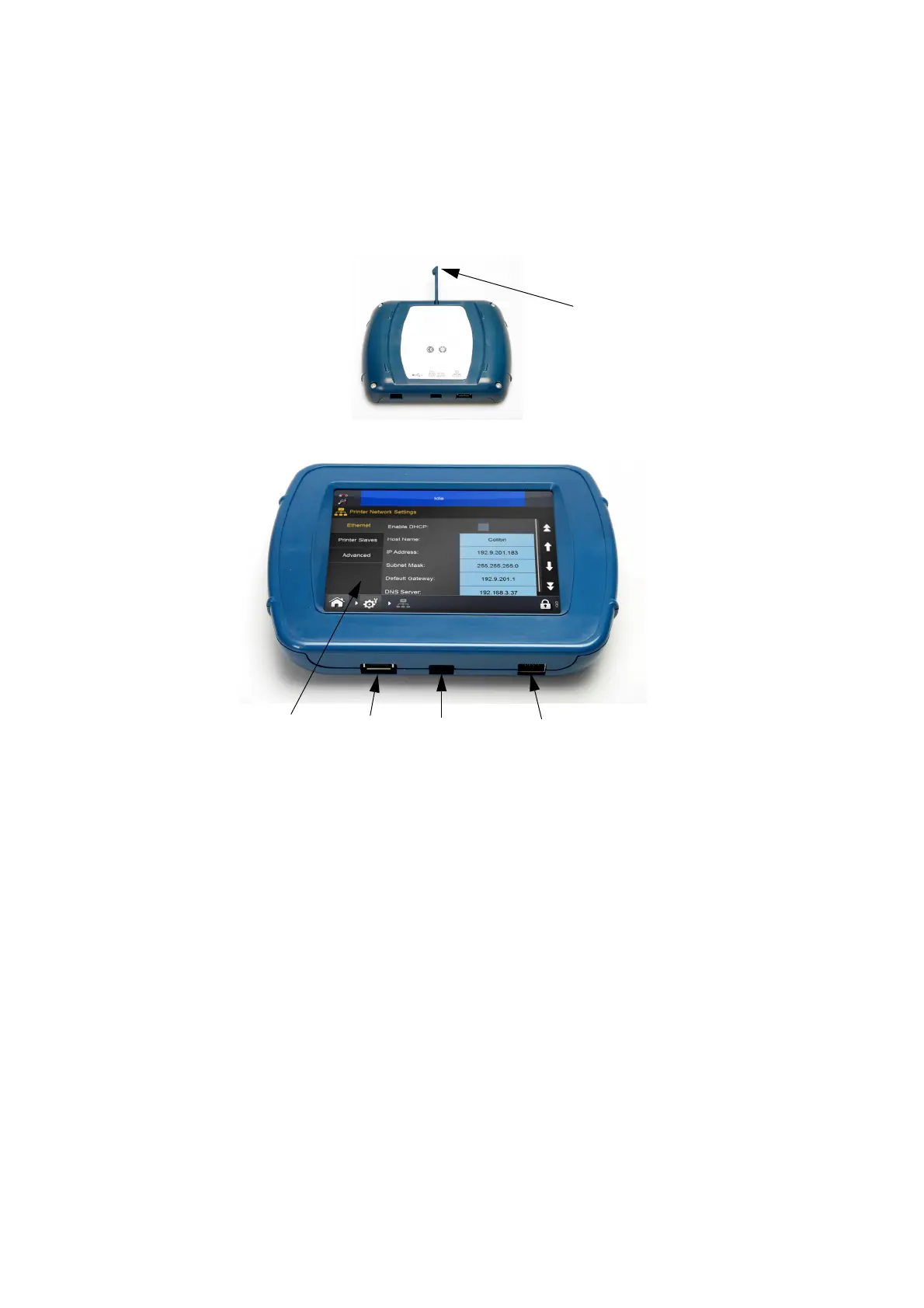
Compact Touchscreen
Notes: (1) The Compact Touchscreen is optional and may not be supplied
with the printer.
(2) USB connection is not suitable for the Communicator II.
Compact
Touchscreen
LCD Panel
USB A
Port
Mini-USB
Port
Ethernet
Port
Front View
Stylus
Rear View
CAUTION: Due to limitations in the USBA connection, do not
attach devices consuming power above 100mA to
the USB port of the Compact Touchscreen. If this is
a requirement, use a powered USB hub.
• If a retained connection is required between the Compact Touchscreen
a
nd the USB cable, the mini USB plug lead can be secured in place by
removing the rear cover of the Compact Touchscreen and fitting a
small cable tie to the mini USB plug
• The Compact Touchscreen USB cable supplied is 2m in length. A
m
aximum cable length of 3m can be used by either (a) fitting a 1m
extension or using a new 3m cable
Note: Extensions and new cables must be sourced locally.
• Press the reset button on the printer to turn on the printer and
C
ompact Touchscreen.



 To Next Page