28-1
Chapter 28: Address Table Commands
These commands are used to configure the address table for filtering specified
addresses, displaying current entries, clearing the table, or setting the aging time.
mac-address-table static
This command maps a static address to a destination port in a VLAN. Use the no
form to remove an address.
Syntax
mac-address-table static mac-address interface interface
vlan vlan-id [action]
no mac-address-table static mac-address vlan vlan-id
• mac-address - MAC address.
• interface
• ethernet unit/port
- unit - Stack unit. (Range: 1)
- port - Port number. (Range: 1-28)
• port-channel channel-id (Range: 1-32)
• vlan-id - VLAN ID (Range: 1-4093)
• action -
- delete-on-reset - Assignment lasts until the switch is reset.
- permanent - Assignment is permanent.
Default Setting
No static addresses are defined. The default mode is permanent.
Command Mode
Global Configuration
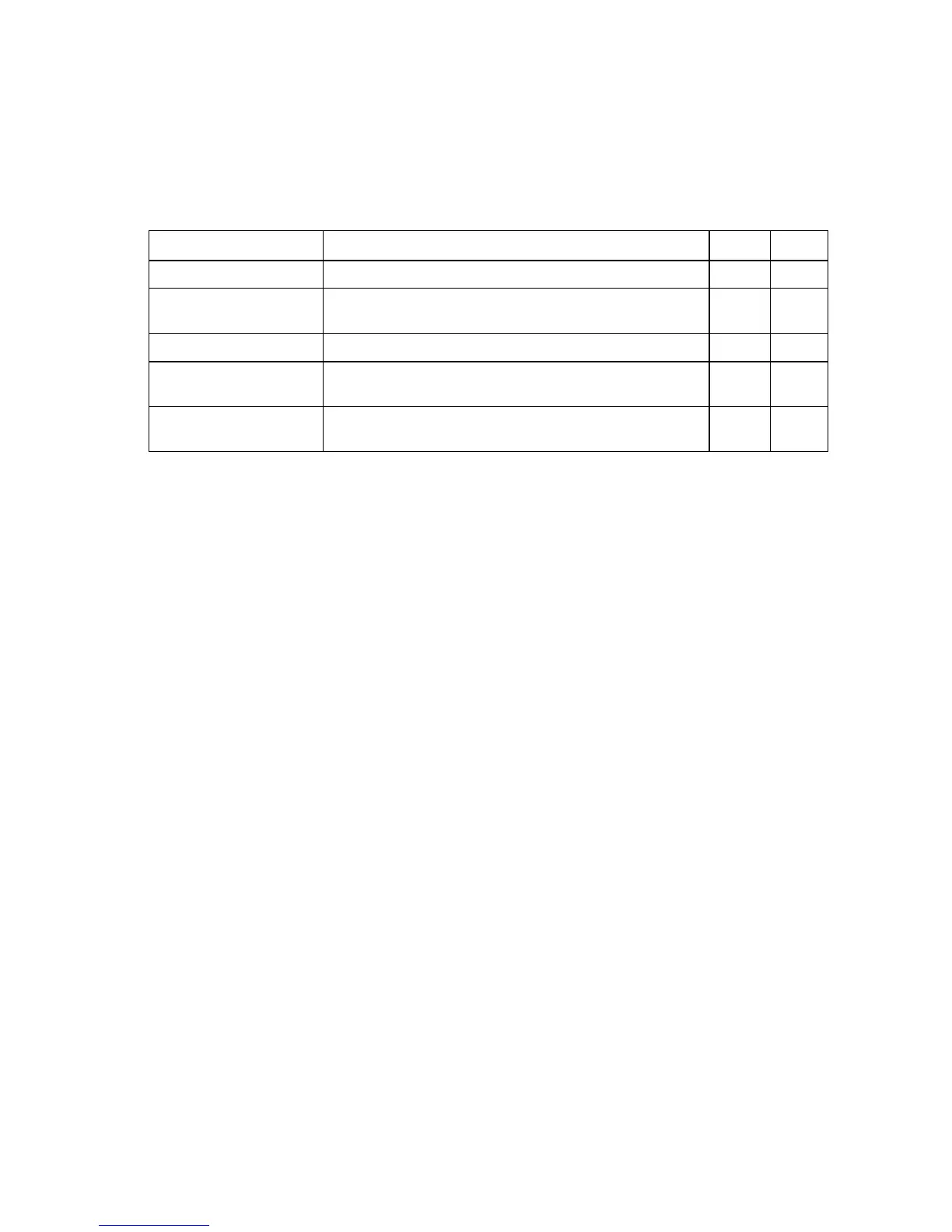
Table 28-1 Address Table Commands
Command Function Mode Page
mac-address-table static Maps a static address to a port in a VLAN GC 28-1
clear mac-address-table
dynamic
Removes any learned entries from the forwarding database PE 28-2
show mac-address-table Displays entries in the bridge-forwarding database PE 28-3
mac-address-table
aging-time
Sets the aging time of the address table GC 28-4
show mac-address-table
aging-time
Shows the aging time for the address table PE 28-4



 To Next Page
 Loading...