Telnet Settings
4-19
4
• Password
2
– Specifies a password for the line connection. When a connection is
started on a line with password protection, the system prompts for the password.
If you enter the correct password, the system shows a prompt. (Default: No
password)
• Login
2
– Enables password checking at login. You can select authentication by a
single global password as configured for the Password parameter, or by
passwords set up for specific user-name accounts. (Default: Local)
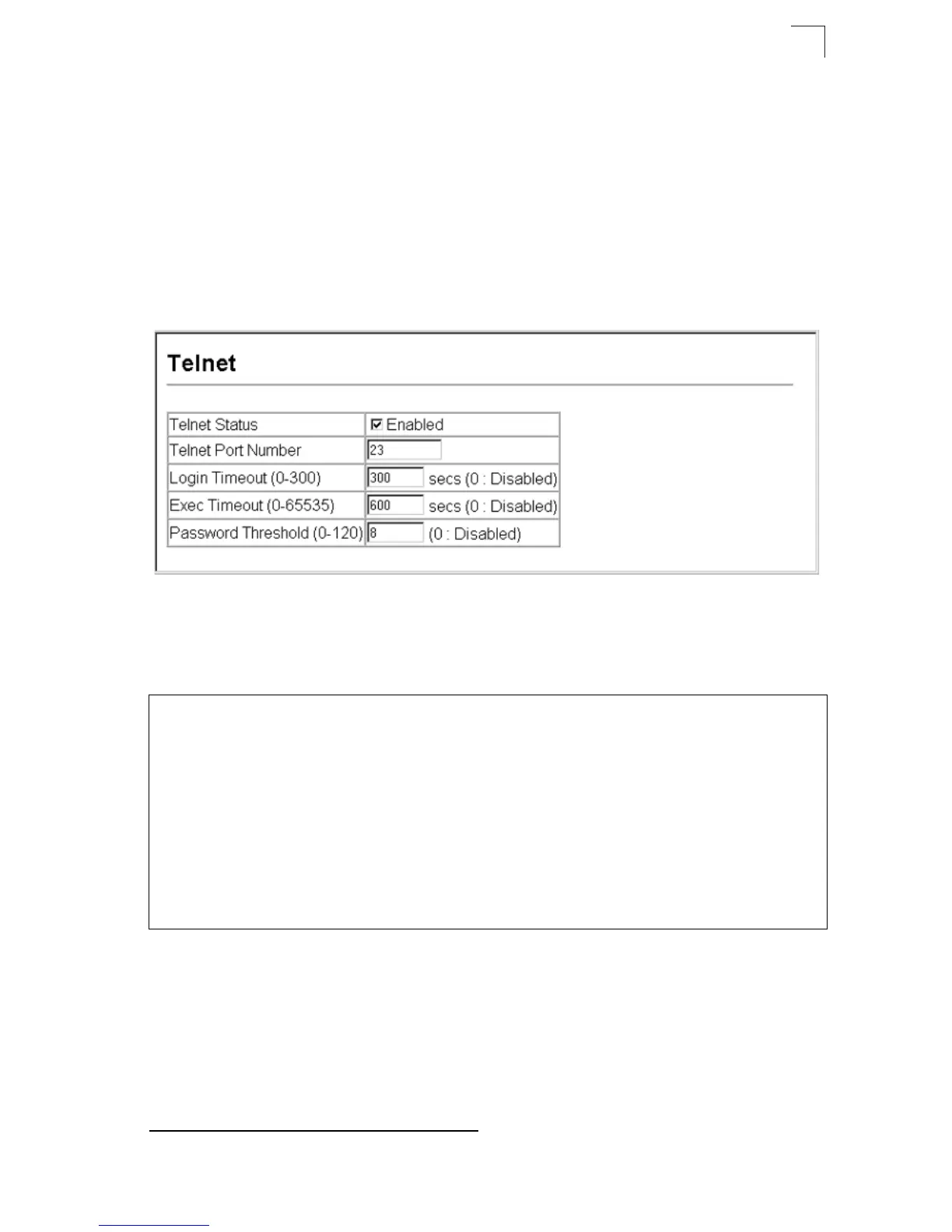
Web – Click System, Line, Telnet. Specify the connection parameters for Telnet
access, then click Apply.
Figure 4-15 Configuring the Telnet Interface
CLI – Enter Line Configuration mode for a virtual terminal, then specify the
connection parameters as required. To display the current virtual terminal settings,
use the show line command from the Normal Exec level.
2. CLI only.
Console(config)#line vty 19-19
Console(config-line)#login local 19-20
Console(config-line)#password 0 secret 19-21
Console(config-line)#timeout login response 300 19-22
Console(config-line)#exec-timeout 600 19-22
Console(config-line)#password-thresh 3 19-23
Console(config-line)#end
Console#show line vty 19-27
VTY configuration:
Password threshold: 3 times
Interactive timeout: 600 sec
Login timeout: 300 sec
Console#



 To Next Page
 Loading...