6. Diagnostics and optimization
6−52
Festo P.BE−SPC200−WIN−PISA−CD−EN en 0901d
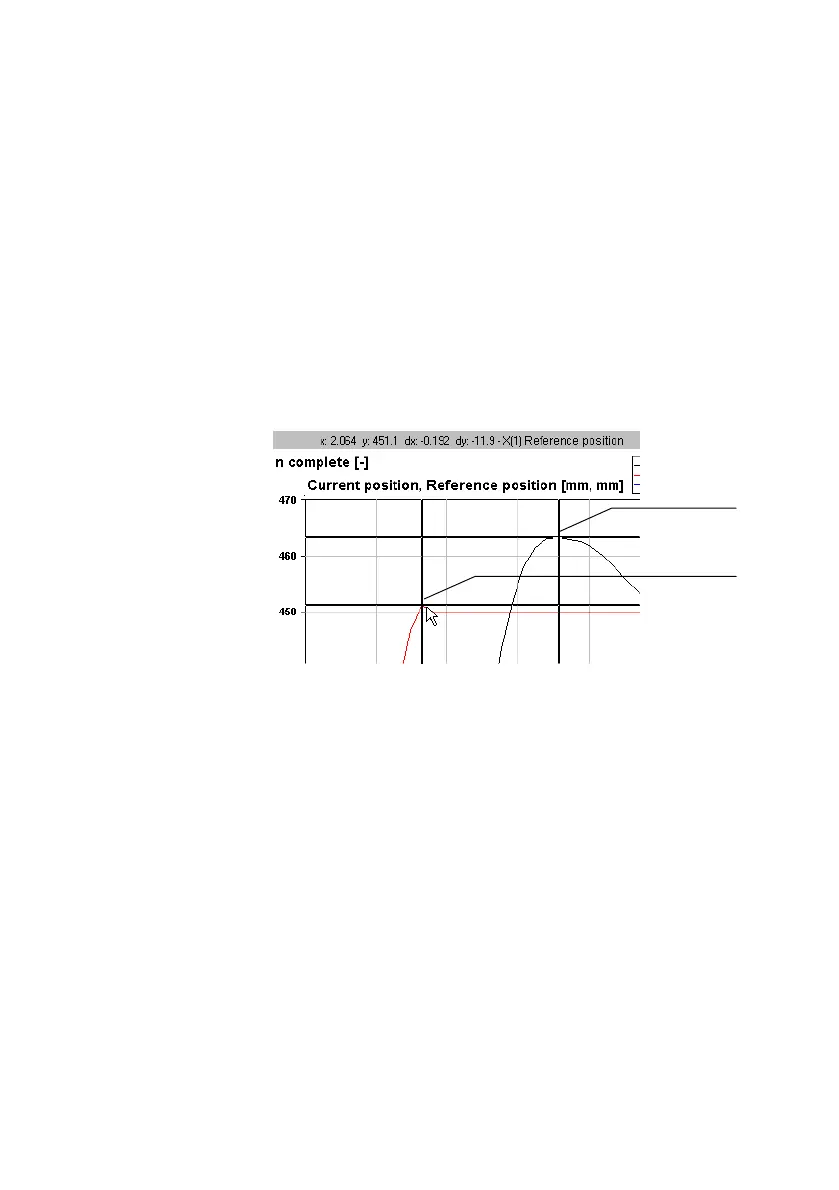
To set a reference cursor, move the data cursor to the
measurement value to which you want to relate. Then select
[Setreference cursor] from the [Graphic] menu.
Once you have set a reference cursor, co−ordinates relative to
the reference cursor will be displayed for the data cursor, in
addition to absolute co−ordinates. The
relative co−ordinates
can be recognised by the letter d" in front of the axis ident
ifier.
1 Reference cursor
2 Data cursor
1
2
Fig.6/27: Reference cursor
Select [Reset reference cursor] from the [Graphic] menu to
remove a reference cursor.
Example
You wish to determine both the time for a positioning process
and the extent of overswing on a single axis system. Measure
ment recording has been implemented for the positioning
process. A graph has been created from the
Current position",
Reference position" and Motion Complete" variables.









 To Next Page