EasyManua.ls Logo

Fostex DMT-8VL - Page 17

Fostex DMT-8VL
158 pages
Print Icon
To Next Page IconTo Next Page
To Previous Page IconTo Previous Page
Loading...
DMT-8VL
Owner's
Manual
(Names
and
Functions)
17.
H
old/Digit
Move
key
[HOUY>J
Pressing
this
key
while
the
recorder
transport
is
operating
will
hold
the
time
value
(or
Bar/Bcat/Clock
value),
display
the
value
on
the
screen,
and
will
place
the
unit
Into
edit
mode.
(If
you
press
this
key
while
the
recorder
section
is
stopped,
the
DMT-8
vl
will
enter
edit
mode.)
Pressing
this
key
repeatedly
allows
you
to
select
the
digit
(column)
to
edit.
To
cancel
edit
mode,
press
the
STOP
button,
DISP
SEL
key,
or
EXIT/NO
key.
Pressing
the
STORK
key
while
holding
down
the
HOLD/>
key
will
change
a
Program.
Rafor
to
pages
*50*.
*78*
and
‘B9*
lor
mere
rformatton
about
using
this
hey
I
Rater
to
poga
#
45*
ter
more
mtormanen
about
Program
Change
kjnedon
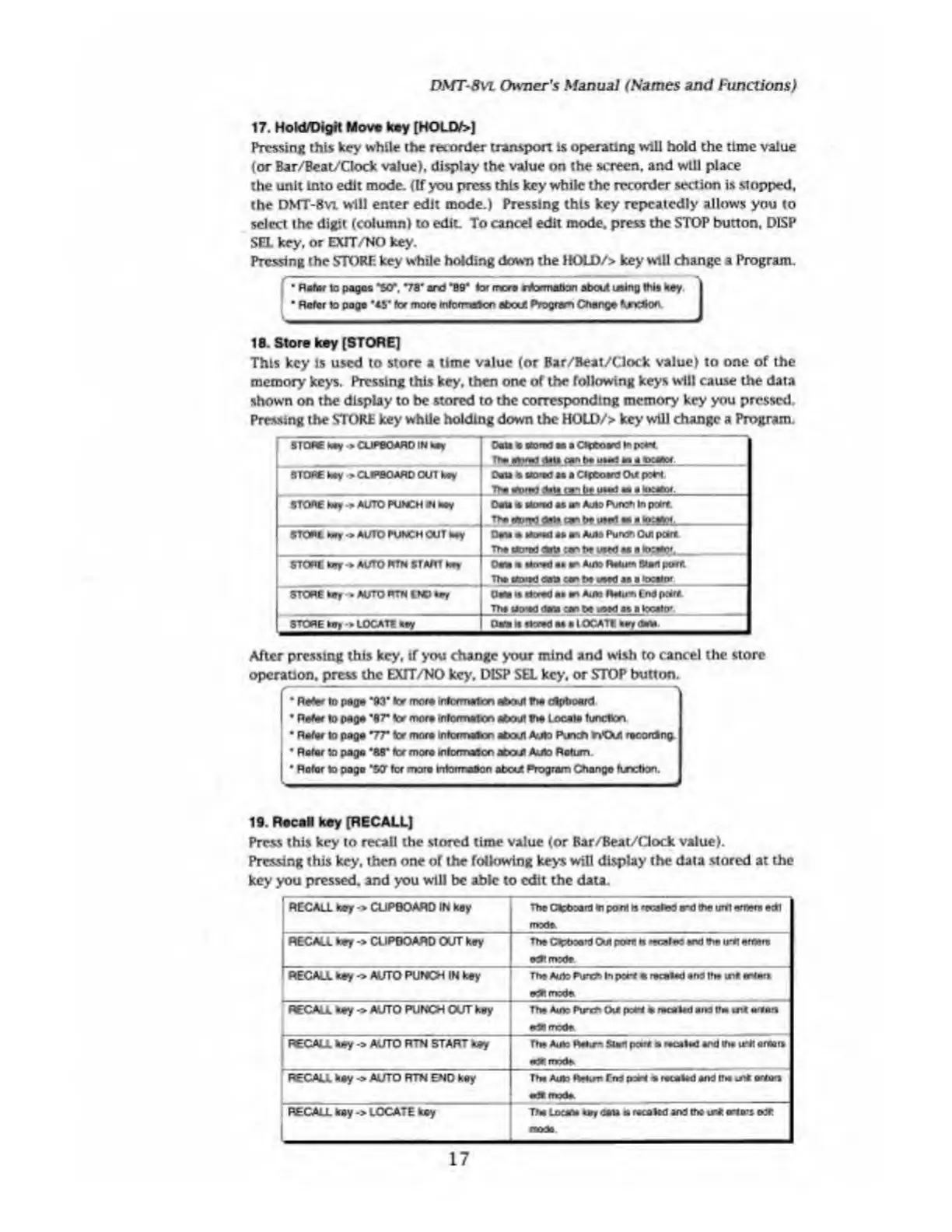
18.
S
tore
key
[STORE]
This
key
is
used
to
store
a
time
value
(or
Bar/Beat/Clock
value)
to
one
of
the
memory
keys.
Pressing
this
key,
then
one
of
the
following
keys
will
cause
the
data
shown
on
the
display
to
be
stored
to
the
corresponding
memory
key
you
pressed.
Pressing
the
STORE
key
while
holding
down
the
HOLD/>
key
will
change
a
Program.
STORE
hay
>
CUPBOARD
IN
hay
Dan
la
fl'D'td
ao
a
CHboard
to
p:*i
Urn
g
data
aan
to
uua
a*
a
moot
STORE
hay
>
CLIPBOARD
OUT
koy
Oeta
a
Bored
as
a
Clpboard
Out
port
TH?
riirwl
Alla
r»n
to
him!
a*,
a
STORE
koy
•>
AUTO
PUNCH
iN
hay
Oaia
«
u
o*
ad
as
an
Auto
Pure*
In
potrt.
Tto
ate*tfl
data
&
to
Art
•«
a
h*aS>r_
STC*t
tory
•*
AUTO
PUNCH
OUT
hay
Oaia
*
*o*d
as
an
Auto
Pure*
Oui
poire
The
cto'td
dots
:r
to
uwd
aa
a
locator,
STORE
toy
*
AUTO
RTN
START
hay
Ocm
m
a*n-ad
as
an
Auto
Ralum
Start
port
Tha
ktoiad
etna
ran
to
uaad
as
a
locator
STORE
toy
»
AUTO
RTN
END
Clara
it
Breed
aa
an
Auto
Ratum
End
peart
Tha
uo'Kl
<:aa
.ar
to
t^ed
as
a
tocato*
STORE
toy-»
LOCATE
toy
(Mi
it
Breed
aa
a
IOCAT1
After
pressing
this
key,
if
you
change
your
mind
and
wish
to
cancel
the
store
operation,
press
the
EXTT/NO
key,
DISP
SEL
key,
or
STOP
button.
Rater
to
page
“93*
ter
more
toformaicn
about
the
dlpboerd
Rater
to
page
*87"
lor
more
inlormafco
afeoul
the
Locale
function
Rater
to
paga
V7*
ter
more
informaton
about
Auto
Runet)
nOi
racorOIng.
I
Rater
to
paga
'88*
tor
mora
mtormaicn
about
Auto
Return
Rotor
to
pogo
"5CT
ter
mora
tntorrraOon
atcut
Program
Change
function.
19.
R
tcaN
key
[RECALL]
Press
this
key
to
recall
the
stored
time
value
(or
Bar/Beat/Gock
value).
Pressing
this
key.
*hen
one
or
the
following
keys
will
display
the
data
stored
at
the
key
you
pressed,
and
you
will
be
able
to
edit
the
data.
'
RECALL
toy
->
CUPBOARD
IN
k
B
y
The
CteboanJ
to
pant
n
'iwlrt
rxt
toe
uret
entor*
edl
mode
RECALL
key
->
CUPBOARD
OUT
key
The
Ctehoant
Out
prert
n
••r.iir
«nd
toeirrt
erttoce
ecRmrete
RECALL
key
->
AUTO
PUNCH
IN
key
Tha
Auto
Pun*»
In
port
*
recalad
and
tto
wn«
enters
reBt
mode
RECALL
key->
AUTO
PUNCH
OLfT
key
l-
-
:
:-
—-
Tha
Auto
Pure*
0\*
po*i
a
recalad
end
(ha
urt
mrtmrt
edBmode
RECALL
hay
AUTO
RTN
START
toy
•P
nwde
RECALL
hay
->
AUTO
RTN
END
key
Tha
Auto
RBun
Tito
poa*
s
recalad
and
if*
re*
orto*i
«
imh.
.
RECALL
hay
->
LOCATE
hay
Tha
locum
u
r
data
a
recakd
and
the
re*
ario-s
o:r
mod*
17

Table of Contents

Related product manuals