EasyManua.ls Logo

Fostex DMT-8VL - Page 20

Fostex DMT-8VL
158 pages
Print Icon
To Next Page IconTo Next Page
To Previous Page IconTo Previous Page
Loading...
DMT
-Svi
Owner's
Manual
(Names
and
Functions)
29.
Fast
Forward
button
[F
FWDJ
Pressing
this
button
while
the
recorder
section
is
stopped
will
fast
forward
data
at
30
times
speed.
Pressing
this
button
in
Play
mode
will
cue
data
(you
can
hear
sound
dunng
the
fast
forward
operation)
at
five
times
speed.
Pressing
this
button
while
holding
down
the
STOP
button
will
initiate
the
"LOCATE
ABS
END"
operation,
and
immediately
locate
the
end
of
the
recorded
data
on
the
hard
disk
(ABS
END).
(Refer
to
the
"STOP
button"
section
for
more
information
about
LOCATE
ABS
END.)
30.
Rewind
button
[REWIND]
Pressing
this
button
while
the
recorder
section
is
stopped
will
rewind
data
at
30
times
speed.
Pressing
this
button
in
Play
mode
will
cue
data
(you
can
hear
sound
while
rewinding)
at
five
times
speed.
Pressing
this
button
while
holding
down
the
STOP
button
will
perform
the
"LOCATE
ABS
0"
operation,
and
immediately
locate
the
beginning
of
the
hard
disk
(ABS
TIME;
OOMrOOSiOOF).
(Refer
to
the
"STOP
button"
section
for
more
information
about
LOCATE
ABS
0.)
31.
Play
button
[PLAY]
Pressing
this
button
will
start
playback
on
the
recorder
section.
Pressing
the
RECORD
button
while
holding
down
this
button
will
start
recording.
Pressing
this
button
while
holding
down
the
STOP
button
will
execute
the
Clipboard
Hay
operation.
(Refer
to
the
"STOP
button:"
section
for
more
information
about
the
Clipboard
Play
operation.)
Pressing
the
this
button
during
recording
will
stop
recording
(Punch
Out).
32.
Stop
button
[STOP]
Pressing
this
button
will
stop
playback
of
the
recorder
section.
Pressing
the
PLAY,
REWIND,
or
F
FWD
button
while
holding
down
this
button
will
execute
the
following
operation:
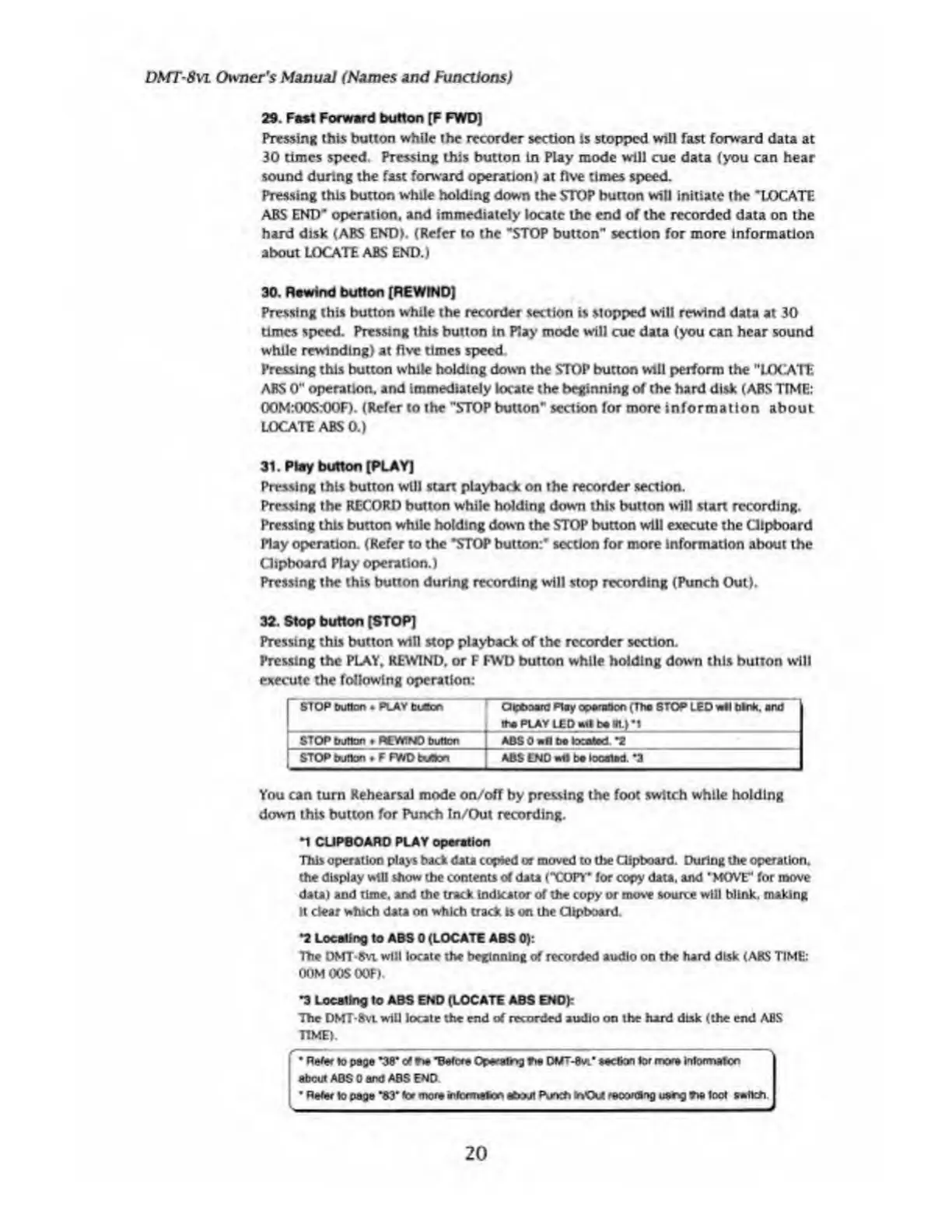
p
STOP
button
.
PLAY
buacn
Clipboard
Play
operation
(Ttia
STOP
LED
wtl
tank,
and
the
PLAY
LED
Ml
be
lit.)
*1
|
STOP
button
REWIND
button
ABS
0
be
tocafted
*2
STOP
button
.
F
FWD
buton
ABS
END
wtl
to
located.
*3
You
can
turn
Rehearsal
mode
oo/off
by
pressing
the
foot
switch
while
holding
down
this
button
for
Punch
In/Out
recording.
1
CLIPBOARD
PLAY
operation
This
operation
plays
back
data
copied
or
moved
to
the
Clipboard.
During
the
operation,
the
display
wtll
show
the
contents
of
data
('COPY*
for
copy
data,
and
'MOVE'
for
move
data)
and
time,
and
the
track
indicator
of
the
copy
or
move
source
will
blink,
making
It
clear
which
data
on
which
track
is
on
the
Clipboard.
•2
Locating
to
ABS
0
(LOCATE
ABS
0):
The
DMT-Bvi
will
locate
the
beginning
of
recorded
audio
on
the
hard
disk
(ABS
TIME:
OOMMSOSF)
"3
Locating
to
ABS
END
(LOCATE
ABS
ENO):
The
DMT-Svt
will
locate
the
end
of
recorded
audio
on
the
hard
disk
(the
end
ABS
TIME).
Refer
to
page
*38"
of
N
"Before
Operating
?*e
OMT-Bvi’
eeefton
lor
mora
inkxmafcn
about
ABS
0
and
ABS
END
*
Refer
to
page
*83*
tor
more
infocmeton
about
Punch
irVOA
recording
uang
**
loot
aefleh
I
20

Table of Contents

Related product manuals