190-01115-01 G3X™/G3X Touch™ Avionics Installation Manual
Rev. AV Page 30-84
5. Press the AP button to engage the autopilot in HDG/PIT modes, then press HDG to engage HDG
mode laterally.
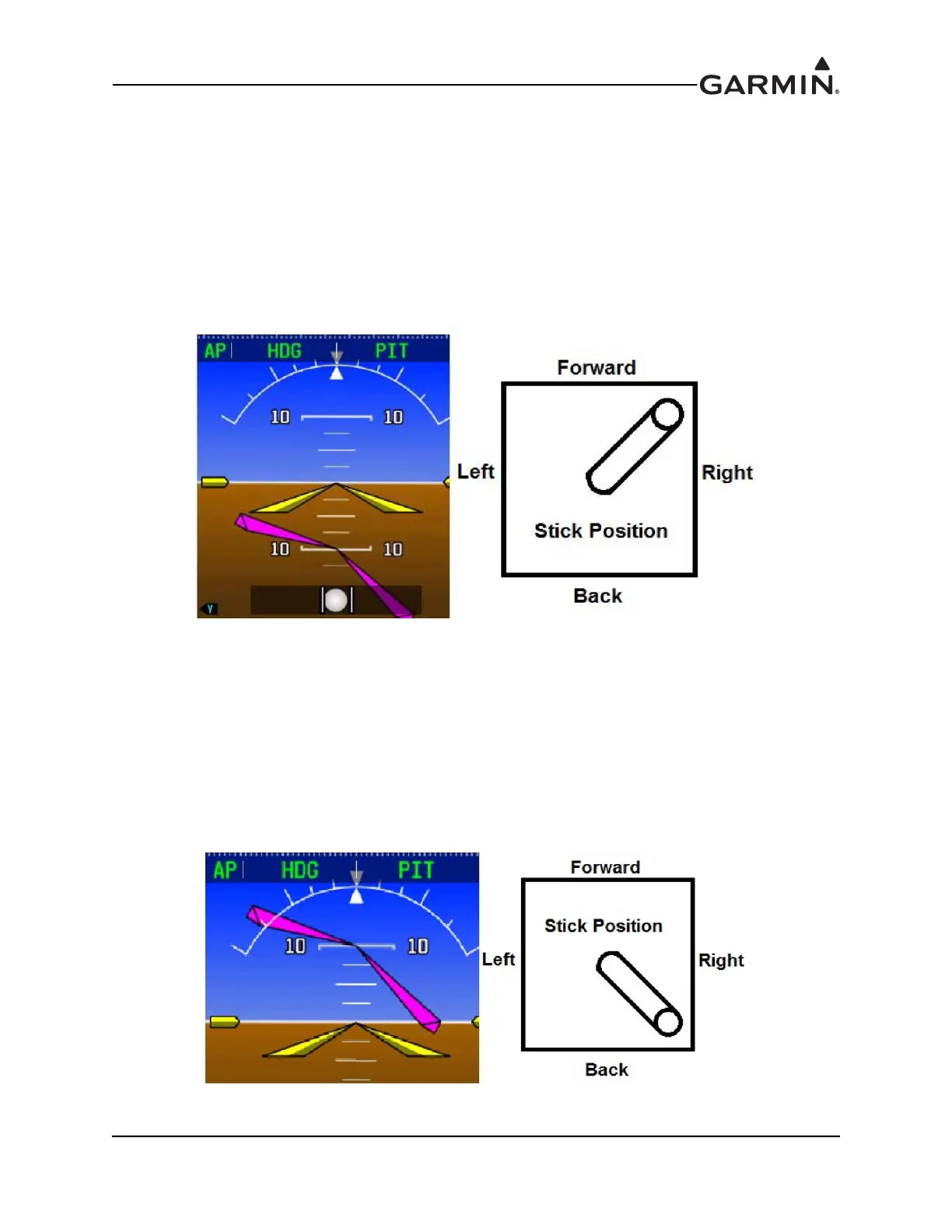
6. Command a nose down, right bank (per the following).
a) Press the Heading knob on the PFD to center the HDG bug
b) Turn the Heading knob on the PFD clockwise to command a right turn
c) Use the Nose Down button or the wheel on the GMC Mode Controller to command a pitch
down
7. Verify the stick properly moves toward the nose and toward the right wing smoothly with no
control system binding.
Figure 30-30 Nose Down, Right Bank
8. Press the AP button to engage the autopilot in HDG/PIT modes, then press HDG to engage HDG
mode laterally.
9. Command a nose up, right bank (per the following).
a) Press the Heading knob on the PFD to center the HDG bug
b) Turn the Heading knob on the PFD clockwise to command a right turn
c) Use the Nose Up button or the wheel on the GMC Mode Controller to command a pitch up
10. Verify the stick properly moves toward the tail and toward the right wing smoothly with no control
system binding.
Figure 30-31 Nose Up, Right Bank



 To Next Page