190-01115-01 G3X™/G3X Touch™ Avionics Installation Manual
Rev. AV Page H-55
4. Engage the yaw damper and verify it can be overpowered in yaw axis using rudder pedal inputs. If
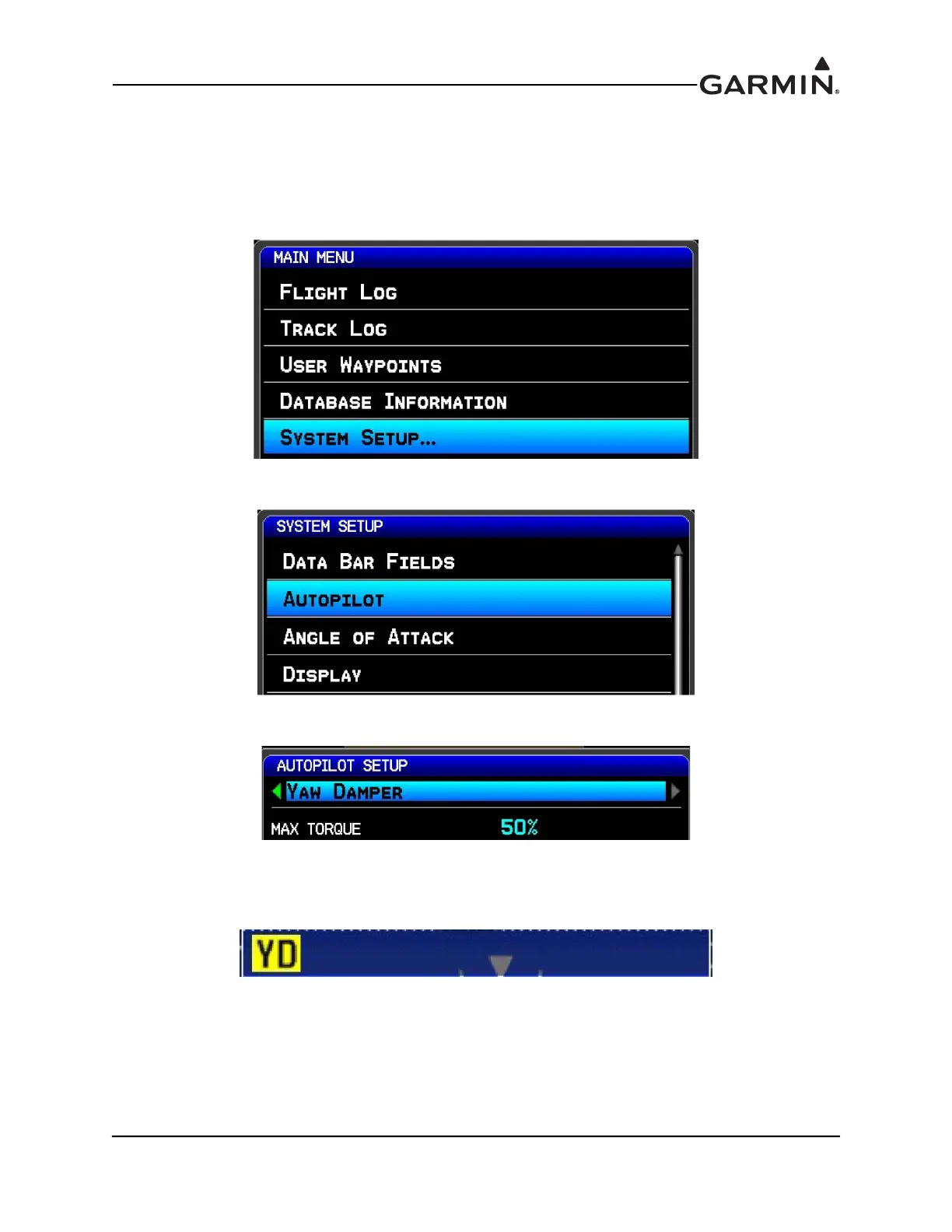
the autopilot cannot be overpowered, use the Autopilot Setup screen to reduce the MAX TORQUE
setting for the yaw damper servo:
a) Press MENU two times on the GDU to enter the MAIN MENU page.
b) Select the SYSTEM SETUP page.
c) Select the AUTOPILOT page.
d) Select YAW DAMPER and set the MAX TORQUE.
5. The CWS/DISCONNECT input can optionally be connected to the Yaw Damper. If this
connection was made, engage the yaw damper and verify that is properly disconnects with a short
press and release of the CWS/DISCONNECT button.
a) If the audio output of the G3X system is connected to the aircraft audio system, verify the
pilot hears an autopilot disconnect tone when disconnecting the autopilot.


 To Next Page