1
Introduction
How to use these instructions for use
10 / 92
1009.25B0
IFU 1009.25 EN 01
1.1.3.5 Definition of patient orientation
WARNING!
Risk of injury!
If the selected patient orientation is not correct, this may result in the OR
table adjusting unintentionally during operation.
Check correct patient orientation prior to each adjustment.
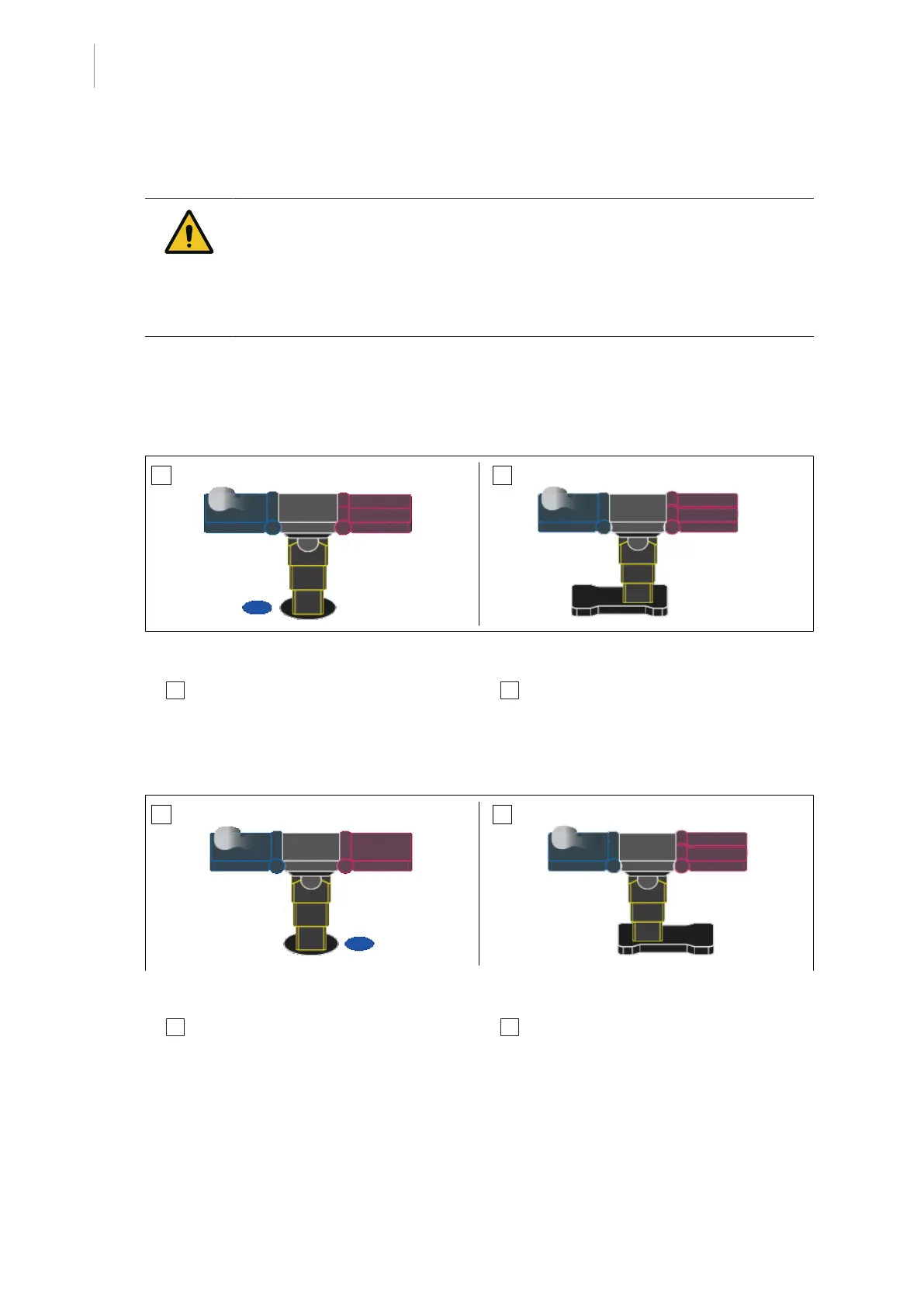
The patient orientation is shown on the touchscreen of the control device.
The patient orientation defines the direction in which the patient is positioned with regard to the
table top. NORMAL and REVERSE patient orientation are differentiated.
NORMAL patient orientation
Fig.3: NORMAL patient orientation
1 The blue dot is located on the touchscreen of
the control device to the left of the operating
table column.
2 The upper part of the patient's body is loc-
ated above the longer section of the operat-
ing table base.
REVERSE patient orientation
Fig.4: REVERSE patient orientation
1 The blue dot is located on the touchscreen of
the control device to the right of the operating
table column.
2 The legs are located above the longer sec-
tion of the operating table base.



 To Next Page