4
Operation and use
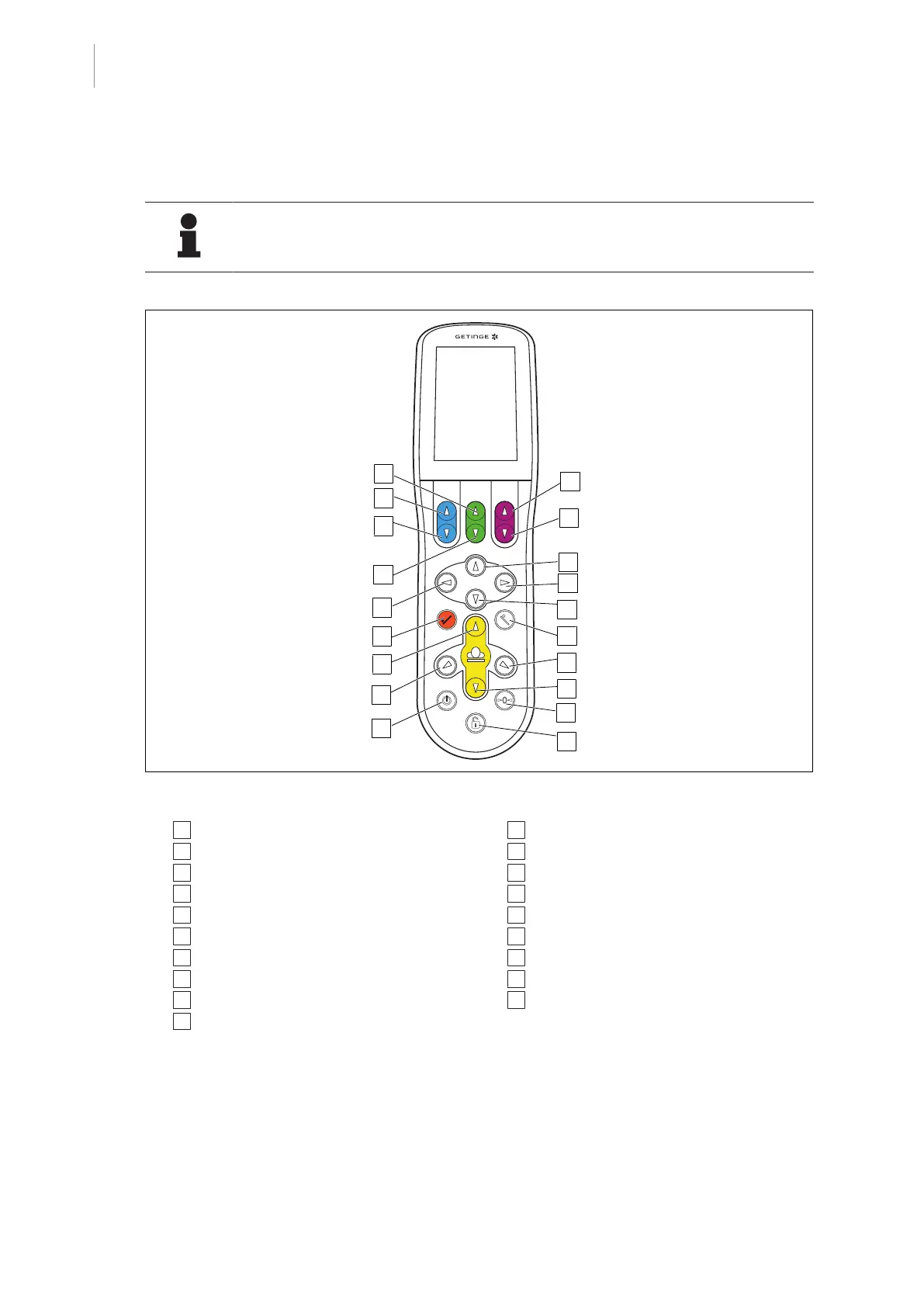
Overview control device
26 / 92
1009.25B0
IFU 1009.25 EN 01
4.4.1 Button assignment and functions
NOTIC E
Buttons light up for active functions.
* Button assignments and functions correspond to operation with a NORMAL patient orientation.
1
2
10
7
4
11
13
15
14
3
6
5
9
17
8
16
12
18
19
Fig.13: Button assignment and functions of the control device
1 [Special function up] button*
2 [Blue joint up] button
3 [Blue joint down] button
4 [Special function down] button*
5 Multifunctional button left
6 [Trendelenburg] button
7 [Table top up] button
8 [Lateral tilt left] button
9 [Stand-by] button
10 [Magenta joint up] button
11 [Magenta joint down] button
12 Multifunctional button up
13 Multifunctional button right
14 Multifunctional button down
15 [Reverse Trendelenburg] button
16 [Lateral tilt right] button
17 [Table top down] button
18 [Zero.position] button
19 [UNLOCK] button / Lock OR table quick ac-
cess menu
* see the display on the touch screen



 To Next Page