Initial operation
Charge the control device
3
1009.25B0
IFU 1009.25 EN 01
21 / 92
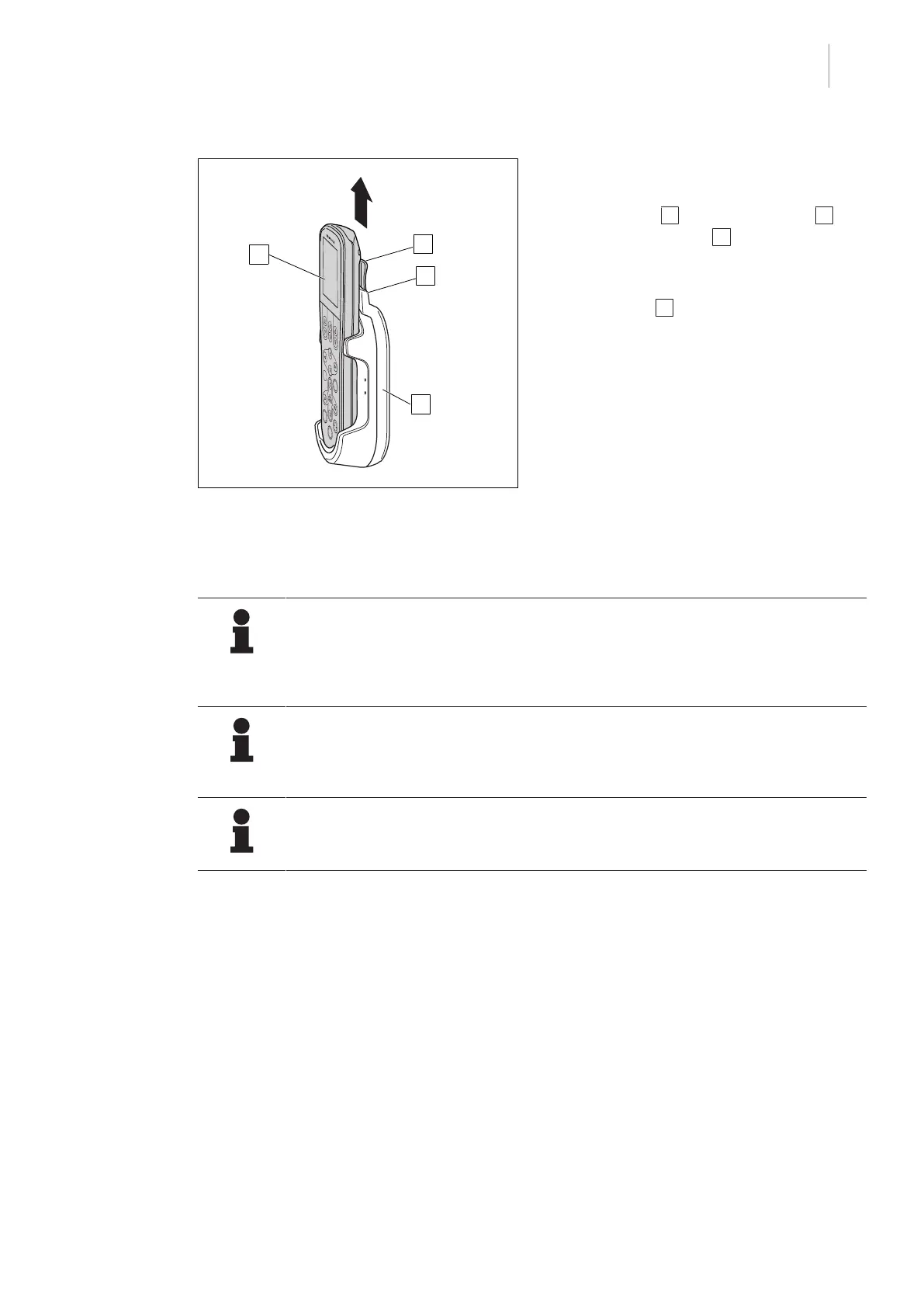
Fig.8: Removing the control device
Removing the control device
1. Hold the control device at the height of the
touchscreen 1 and pull the holder 2 up-
wards off the holder 3 of the stationary
charging station.
2. Remove the control device from the char-
ging station 4 by pulling up at an angle.
3.2.3 Charging the control device via the cable
NOTE
The function Active Cable Charging may be used only if no operation is carried
out. Charging is interrupted as soon as a movement of the operating table is detec-
ted. In this case, the slider in the menu item Active Cable Charging is on the left
side once again and is greyed out (inactive).
NOTE
The connection of the cable differs depending on the connected OR table. For fur-
ther information on the position of the connection socket of the cable, refer to the
OR table's instructions for use.
NOTIC E
Depending on the connected operating table, the function Active Cable Charging
is displayed on the control device.
If the control unit is connected to the socket of the OR table with the cable (1009.27A0), the bat-
tery of the control device can be charged. As long as the control device is connected via the
cable, the external power supply icon is displayed on the touchscreen [8Page29].
If the rechargeable battery of the control device is defective, the control device can continue to be
used as a corded control device.



 To Next Page