5
Operating menu
Displacing / locking the OR table
70 / 92
1009.25B0
IFU 1009.25 EN 01
5.9.3 Moving the OR table using autodrive [UNLOCK]
NOTE
The operating table can be moved in both longitudinal and transverse directions.
The swivel castors set themselves to the direction of the most recent motion. If the
OR table is to be moved at an angle of 90° to the most recent direction of motion,
increased exertion of force is required, since the swivel castors are positioned
across the desired direction of travel. If the swivel castors are positioned across the
required direction of travel, it is easier to move the OR table if you start off diagon-
ally to the required direction of travel (angle of approximately 45°).
The assistance of a second person might be required here.
NOTIC E
The swivel castors on the OR table can only be extended if this will not place the
OR table in a critical range.
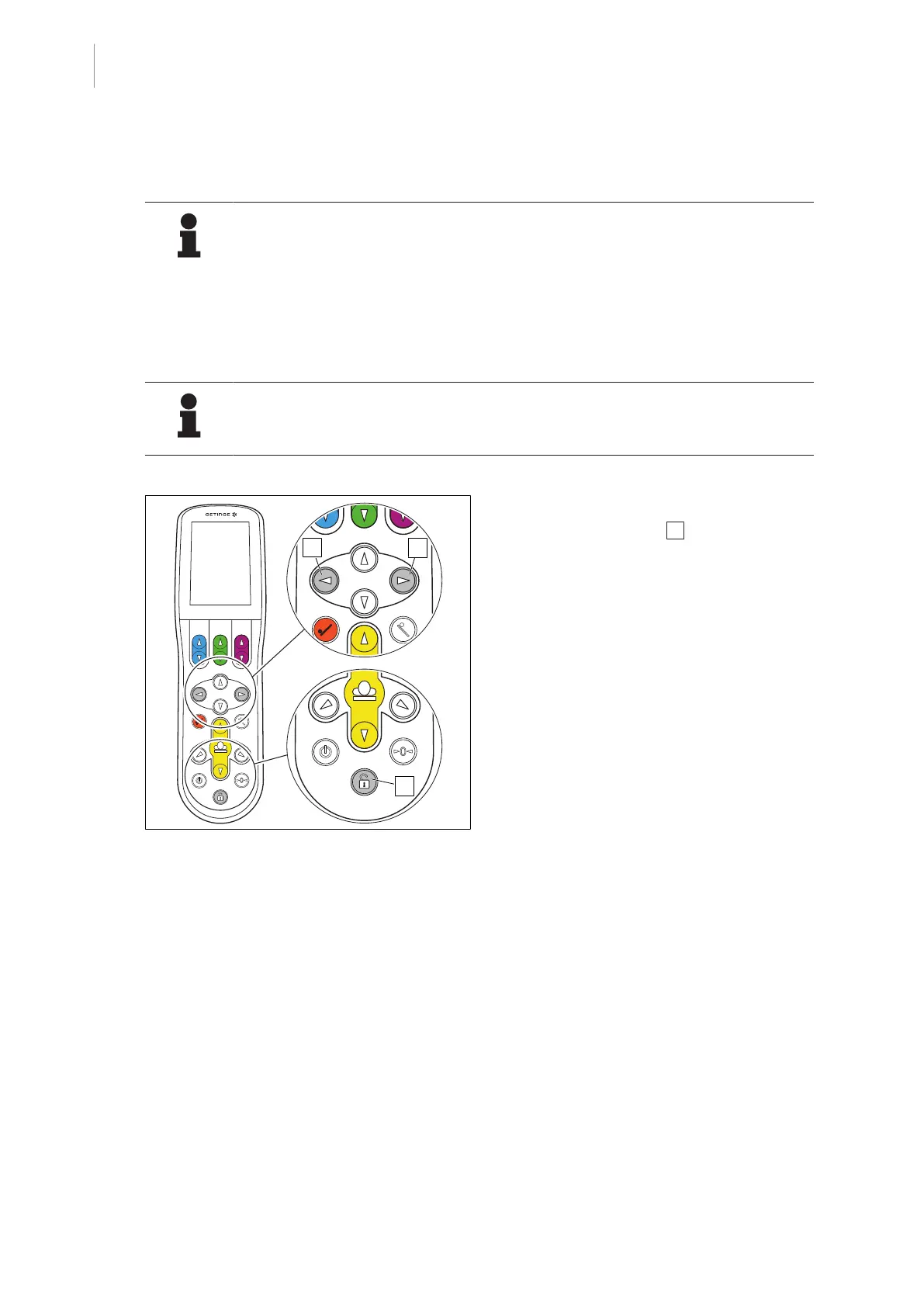
Fig.73: Moving the operating table using the
motor
Extend the swivel castors (UNLOCK)
1. Press the [UNLOCK] 1 button until the
swivel castors are extended.
Ø The swivel castors extend automatic-
ally.
Ø The Drive menu will open on the con-
trol device.
Ø The LED below the [UNLOCK] button
on the override control panel will light
up.
Ø The OR table can be moved.
Ø Hold the OR table with at least one
hand.



 To Next Page