5 June 2020 CasTemp Wireless including CasTemp Superheat Page 16
4 Measuring the temperature
This section describes what has to be done to take a continuous measurement and to pair and unpair
the CasTemp Wireless instrument with the QUBE CTW module. The CasTemp Wireless User Guide
(Figure 4: CTW User Guide) shows this process and the User Guide should remain close to the
CasTemp Wireless instrument in the appropriate holder for ready reference.
4.1 Measurement screen in standard mode
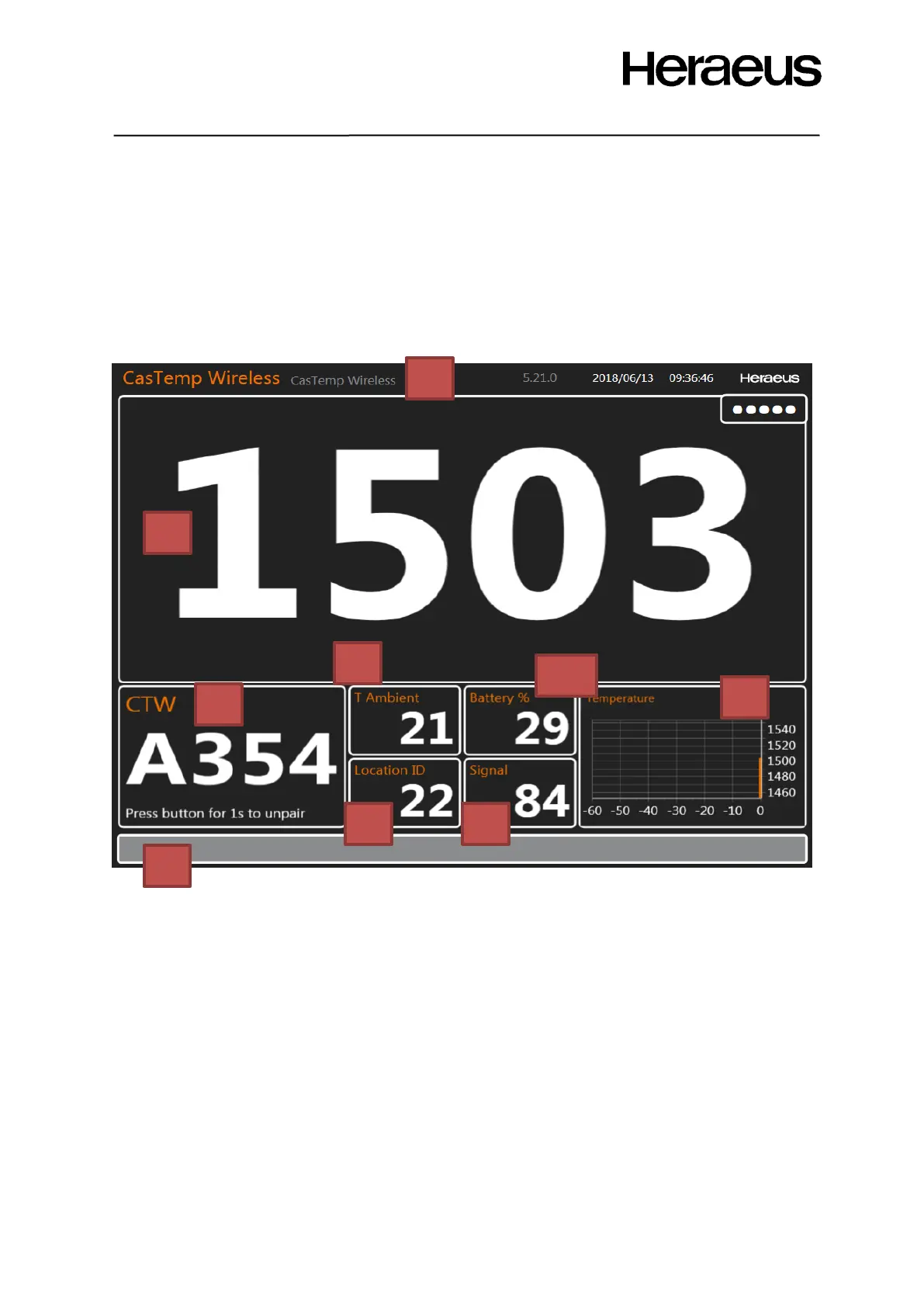
When a measurement is ongoing, the screen of Figure 15: CTW measurement screen Figure 15: CTW
measurement screen. The screen contains the following elements:
Figure 15: CTW measurement screen
1. Actual temperature of the liquid steel: This is the last measured temperature that is
transmitted to the instrument. Transmission rate is fully configurable.
2. ID of QUBE CTW module that is paired with the CasTemp Wireless instrument.
3. Progress bar: This bar indicates when the next message with temperature data from the
QUBE CTW module is expected. When the timeout is exceeded, there is no message
received and the bar will become red. This indicates a missed transmission.
4. Ambient temperature of the QUBE CTW module.
5. The Location ID of the measurement. This number must be unique for every tundish where an
instrument is placed (configurable) and for every Heraeus Electro-Nite Qube system.
• The local HEN representative can advise on the appropriate settings.
6. The signal strength in percentages of the wireless signal.
7. Temperature evolution graph showing the temperature evolution over the last period (in
minutes) (configurable). The graph is updated every time a new measurement is taken.
8. Name of the instrument (configurable).
9. Battery level percentage of the QUBE CTW module







 To Next Page