5 June 2020 CasTemp Wireless including CasTemp Superheat Page 48
6.2.1 TCP/IP Client
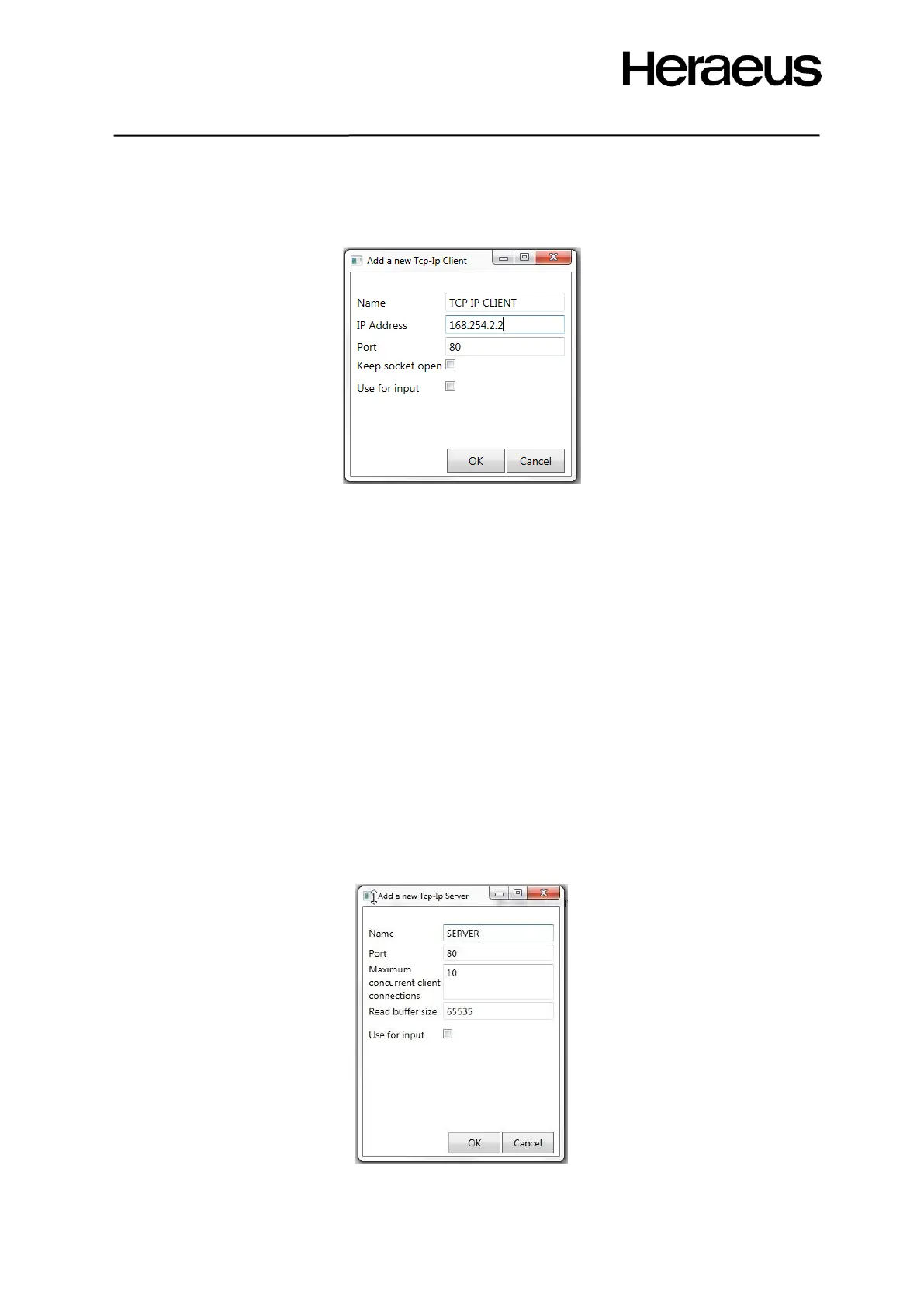
When the TCP-IP client is selected from the physical device options’ menu (Figure 50). Figure 52
shows the configuration window after TCP/IP Client is selected.
Figure 52: TCP/IP Client configuration
Following settings are user configurable:
• Name of the interface – choose a name that will be shown in the physical device list
• IP Address: server IP Address
• Port: server port to which the client must connect to
• Keep socket open: Client has a permanent connection to the server and does not only
connect when it has data.
• Use for input – required for Superheat see section 9.4
6.2.2 TCP-IP Server
The CasTemp Wireless instrument can also be configured as a TCP/IP server. When the TCP-IP
server is selected from the physical device options’ menu (Figure 50). Figure 53 shows the
configuration window after TCP/IP server is selected.
The following settings are user configurable:
• Name of the interface – choose a name that will be shown in the physical device list
• Port: server port that is opened on the CasTemp wireless instrument to which the client must
connect to
• Maximum concurrent client connections: the maximum number of clients the server can
accept
• Buffer size
• Use for input – required for Superheat see section 9.4
Figure 53: TCP/IP Server configuration







 To Next Page