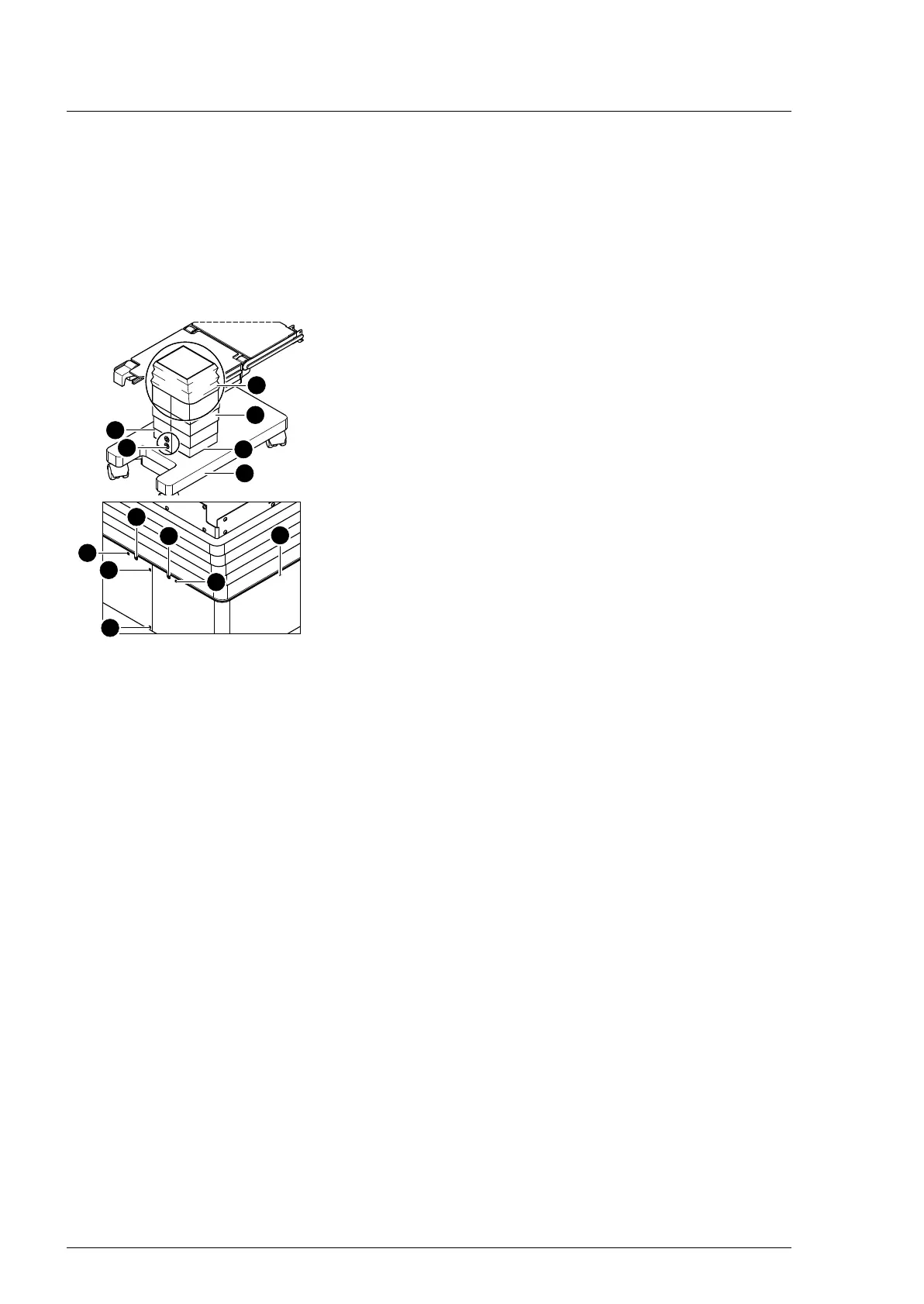
Column mechanical components
54
4990851_002_00 – 2082262 – 2022-01-10
9.2 Column cover
The column cover consists of 4 rings that are not firmly connected
to each other. A ring consists of 2 segments.
The column cover is bolted to the frame of the guide column on
top and to the casing of the running gear at the bottom.
Removal 1. Prepare the operating table (Chapter 5).
2. Disconnect the power supply on the operating table
(Chapter 6.1).
3. Unscrew the lowest column cover [5] from the running
gear [4] (4 screws [3]).
4. Release the bellows [1] from the column cover [2] (1 screw [6]
on both the left and the right below the bellows).
5. Loosen the bellows from the guide column (both the inner
screws [7] below the bellows at the head and foot end).
6. Note the mounting position of the flat conductor. Pull the
bellows upwards and unplug the flat conductor of the column
keypad from the main board (Main Controller Unit).
The flat conductor is clamped to the plug. First push the small
pins at the edge of the plug downwards and then pull the
cable out of the plug.
7. Unscrew the column cover from the frame (4 screws, 1 screw
per side) and place it down on the running gear.
Attention - the column cover will slide down as soon as all the
screws have been removed.
8. Remove the column cover from the outside in segments (2
screws [9] at both the head end and foot end).
Assembly 1. Position the column cover on the column in segments and
install them from the inside to the outside (2 screws at both
the head end and foot end).
2. Guide the column cover upwards and mount it at the head
and foot end of both guide column brackets (2 screws each).
3. Return the flat conductor to its original mounting position.
Pull the bellows upwards and push the flat conductor of the
column keypad into the plug of the main board (Main
Controller Unit) and engage. Push the small pins at the edge
of the plug upwards for this purpose.
4. Mount the lower frame of the bellows on both guide column
brackets at the head and foot end (2 screws each).
5. Mount the bellows on the column cover (1 screw each on the
left and right below the bellows).
6. Mount the lowest column cover on the running gear (4
screws).
7. Put the pad in place.
8. Connect the power supply to the operating table
(Chapter 6.2).












 To Next Page