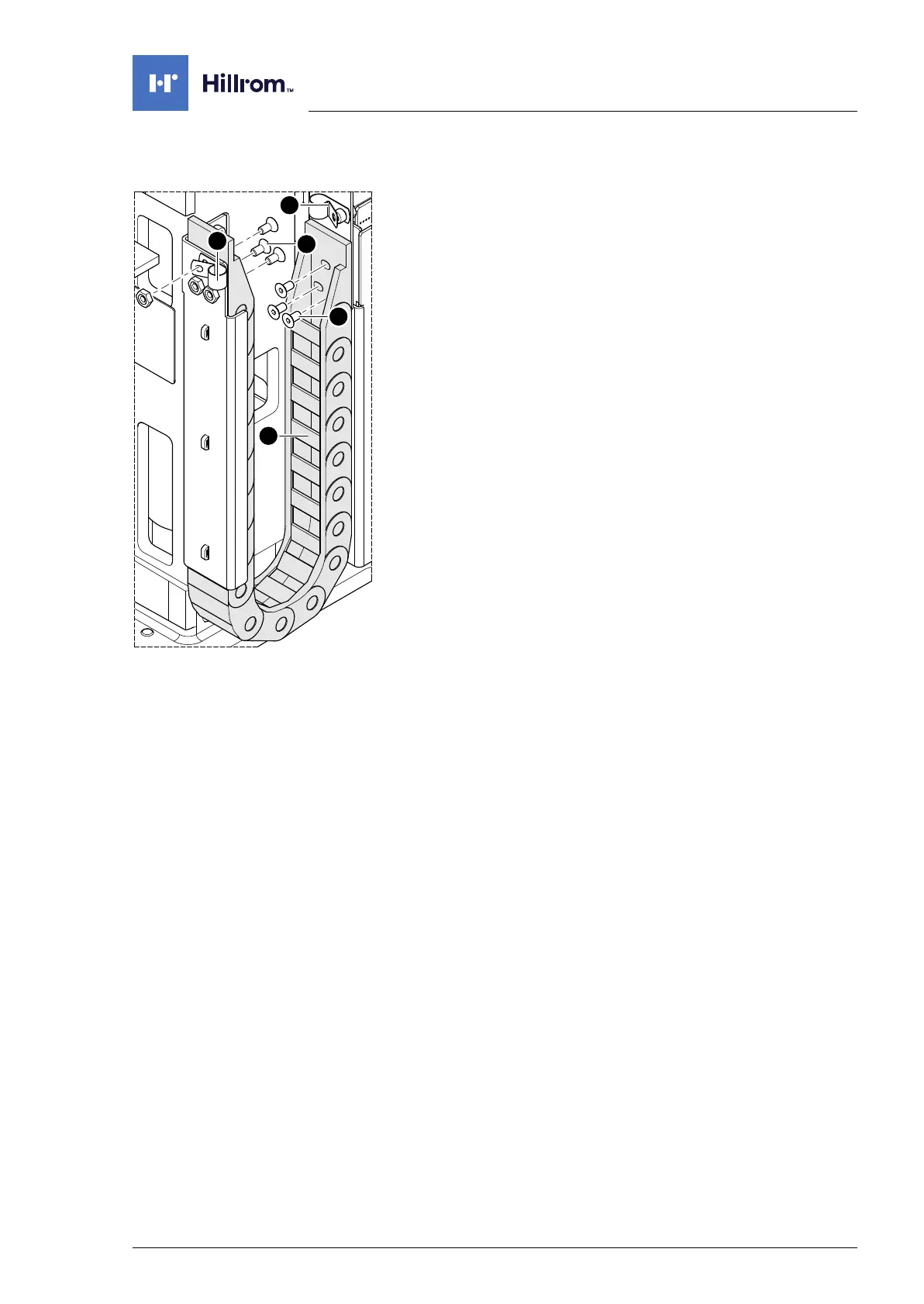
Column mechanical components
4990851_002_00 – 2082262 – 2022-01-10 57
9.5 Power chain
Removal 1. Prepare the operating table (Chapter 5).
2. Disconnect the power supply on the operating table
(Chapter 6.1).
3. Open the column cover on the running gear (Chapter 6.3).
4. Remove the cable fastenings [1] (1 screw each).
5. Release the power chain at the ends (3 screws each [2]/[4]).
6. Open up all cable holders [3] on the power chain.
7. Note the cable routing. Lay the cables in such a way so that
the power chain is free of any cables.
8. Pull out the power chain.
Assembly 1. Mount the power chain at the ends (3 screws each).
2. Return the cable to its original mounting position. Position the
cables in the power chain (do not cross).
Ensure that the cables are not crushed.
3. Close all cable holders on the power chain.
4. Mount any removed cable fastenings.
5. Guide the column cover downwards and close on the running
gear (Chapter 6.4).
6. Put the pad in place.
7. Connect the power supply to the operating table
(Chapter 6.2).












 To Next Page