Running gear electric components
90
4990851_002_00 – 2082262 – 2022-01-10
12.11 Battery fuses
Removal 1. Prepare the operating table (Chapter 5).
2. Disconnect the power supply on the operating table
(Chapter 6.1).
3. Open the column cover on the running gear (Chapter 6.3).
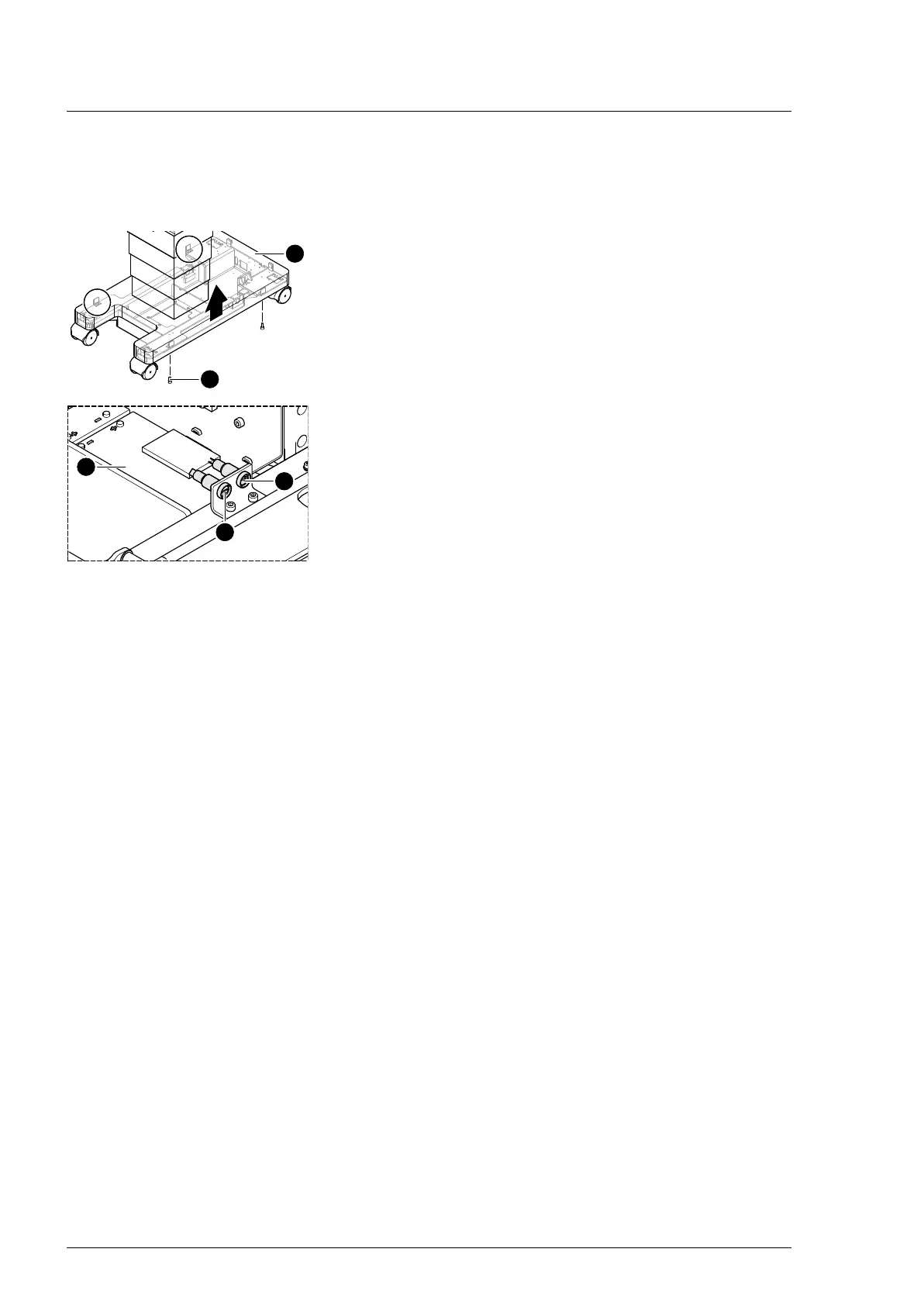
4. Loosen the running gear metal cover [1] (4 screws [2]).
5. Push up the running gear metal cover [1] and fix in the upper
position.
6. Pull out the positive connection on both batteries [3].
7. Remove both fuses [4] one by one; test, and replace if
necessary.
Assembly 1. Insert the tested fuses (fuse layout Chapter 18).
2. Restore the positive connection on both batteries.
3. Mount the running gear metal cover on the running gear
(Chapter 11.2).
4. Guide the column cover downwards and close on the running
gear (Chapter 6.4).
5. Put the pad in place.
6. Connect the power supply to the operating table
(Chapter 6.2).












 To Next Page