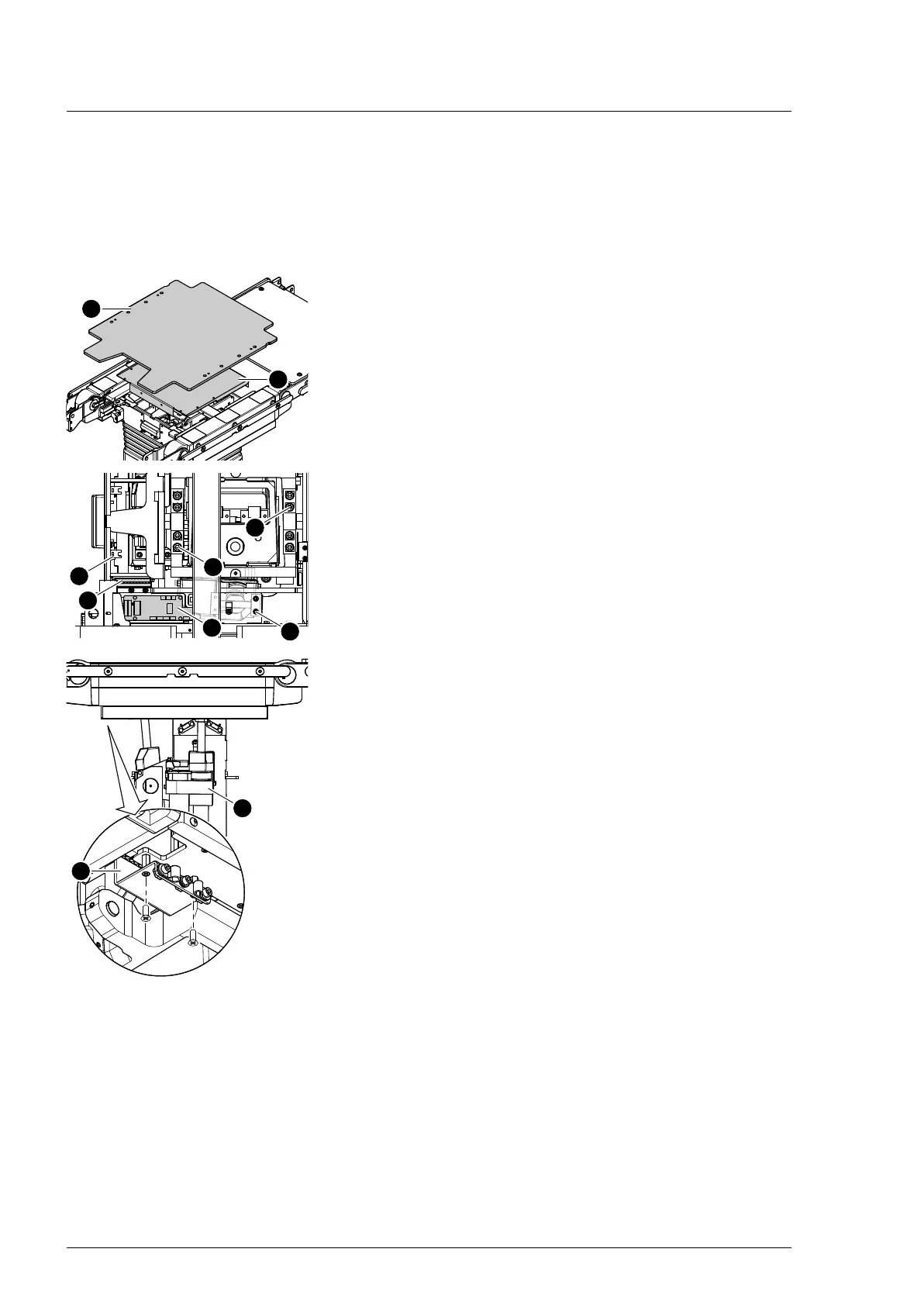
Operating tabletop mechanical components
32
4990851_002_00 – 2082262 – 2022-01-10
7.3 Tabletop
Removal 1. Prepare the operating table (Chapter 5).
2. Disconnect the power supply on the operating table
(Chapter 6.1).
3. Open the column top and guide the column cover
downwards (Chapter 6.5).
4. Remove the pad plate [1] from the seat section (Chapter 7.2).
Attention: Leave the pad plate on the back section attached
so that the adjustment of the struts is maintained.
5. Remove the column head cover [2] (Chapter 9.3).
6. Switch on the operating table using the switch at the running
gear.
7. Shift the longitudinal slide of the tabletop to the zero
position.
8. Switch off the operating table using the switch at the running
gear.
9. Note the cable routing. Remove the protective conductor
W404 from the column head (1 screw [3] with 1 washer and 2
serrated lock washers).
10. Note the cable routing. Pull out the plug of cables W201,
W301 and W305 from the socket [4] of cable W401.
11. Note the cable routing. Pull out the plug of cable W402 from
the PCBA distributor board [5] and loosen the cable shield.
12. Remove the retaining plate W401 [6] (2 screws).
13. Secure edging assembly [7] to the column using cable ties.
14. Release the edging assembly [7] from the top (4 screws [8]).
15. CAUTION! Do not prop up on the tabletop if the screws have
been removed. The tabletop may tip from the column as a
result of the load. Ensure the tabletop is supported by a
second person.
Release the tabletop from the column: Remove 4 screws [9]
each from the bearing blocks on both sides.
16. Note on work protection (health and safety): Due to the heavy
weight of the tabletop, take care not to strain your back when
lifting down. A second person is required for lifting down the
tabletop.
Note the mounting position of the tabletop. Carefully lift the
tabletop [8] from the column and position it securely on a
level and soft pad.
Assembly 1. Note on work protection (health and safety): Due to the heavy
weight of the tabletop, take care not to strain your back when
lifting. A second person is required for lifting and assembling
the tabletop.
Return the tabletop to its original mounting position. Do not
crush the connecting cables. Press the bearing blocks
inwards using the clamping pliers and position the tabletop
on the column.
2. Mount the tabletop on the column: Tighten 4 screws in the
bearing blocks on both sides.












 To Next Page