Operating tabletop mechanical components
40
4990851_002_00 – 2082262 – 2022-01-10
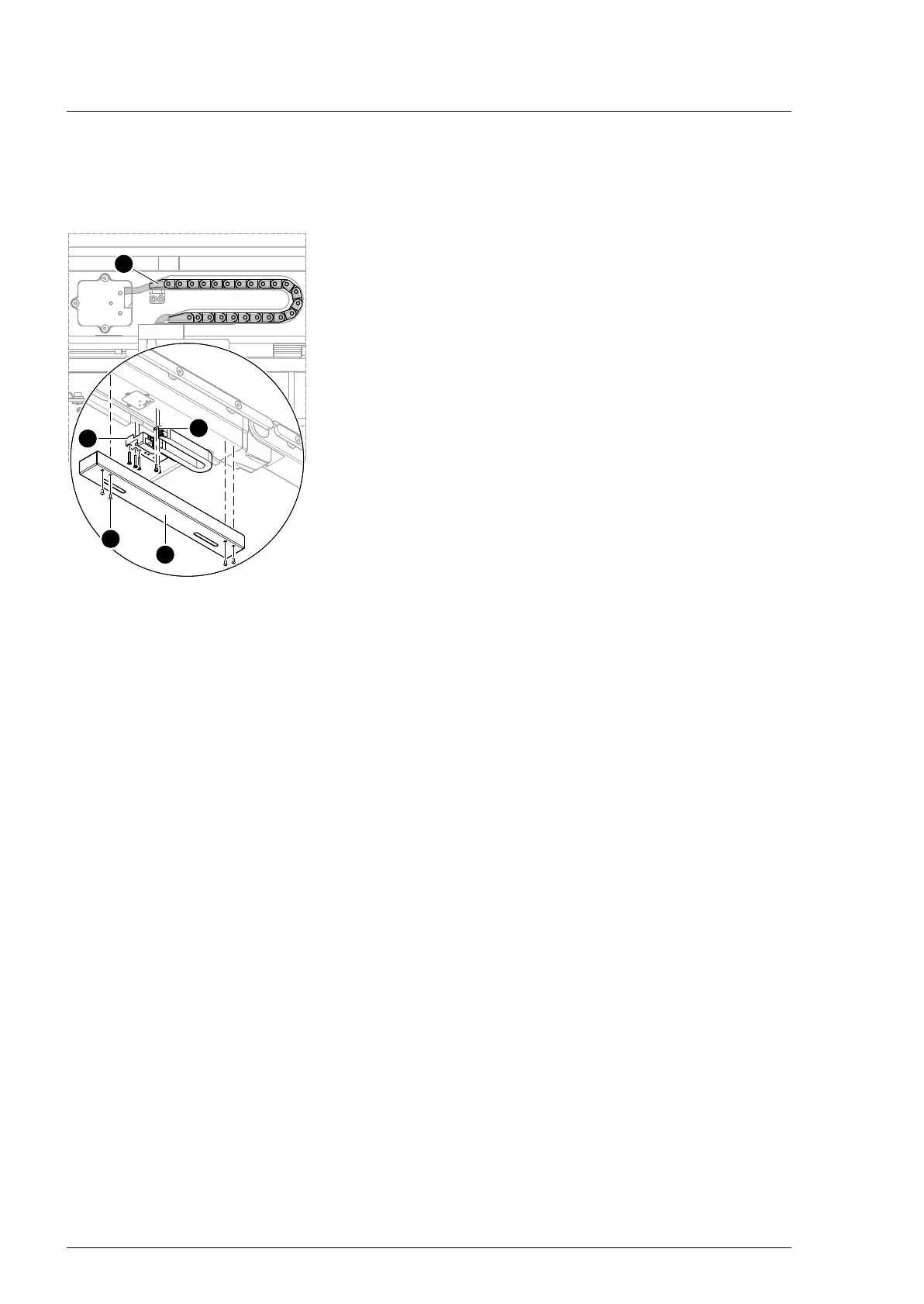
7.9 Power chain (left side)
Removal 1. Prepare the operating table (Chapter 5).
2. Disconnect the power supply on the operating table
(Chapter 6.1).
3. Open the column top and guide the column cover
downwards (Chapter 6.5).
4. Unscrew the cover [1] of the power chain (4 screws [2], do not
unscrew completely) and disengage.
5. Remove the power chain on the top end [4] (2 screws).
6. The 1st Squeeze the link [3] of the power chain and remove
the power chain.
7. Note the cable routing. Carefully open the power chain and
remove the cables from the power chain through the cable
openings.
8. Note the mounting position of the power chain. Remove and
extract the power chain from the bottom end [5] of the
tabletop (3 screws).
Assembly 1. Return the power chain to its original mounting position.
Mount the power chain on the left at the foot end of the end
and reference switch from the tabletop (3 screws).
2. Return the cable to its original mounting position. Carefully
position the cables in the power chain through the cable
openings (do not cross).
Ensure that the cables are not crushed.
3. The 1st link of the power chain must be squeezed and used to
secure the power chain.
4. Mount the power chain to the upper end (2 screws).
5. Position and install the cover for the power chain (4 screws).
6. Guide the column cover upwards and close (Chapter 6.6).
7. Put the pad in place.
8. Connect the power supply to the operating table
(Chapter 6.2).
7.10 Linear guide
No repair work of the linear guides is performed at the customer’s
site. The repairs are carried out at Trumpf Medizin Systeme.
Please contact the Trumpf Medizin Systeme Technical Customer
Service in the event of a defect. The operating table is replaced
entirely.












 To Next Page