15–20 Upgrading a Hitachi Unified Storage 130 system
Hitachi Unified Storage Hardware Service Guide
3. For Drive Boxes other than the DBX:
a. Check that the power cable connected to the chassis of the Drive Box
with the last unit ID number does not have a scratch or flaw.
b. Gently remove the cable from the Drive Box. If the cable cannot be
removed easily, do not pull it by force; pull out the part slightly, and
then remove the cable.
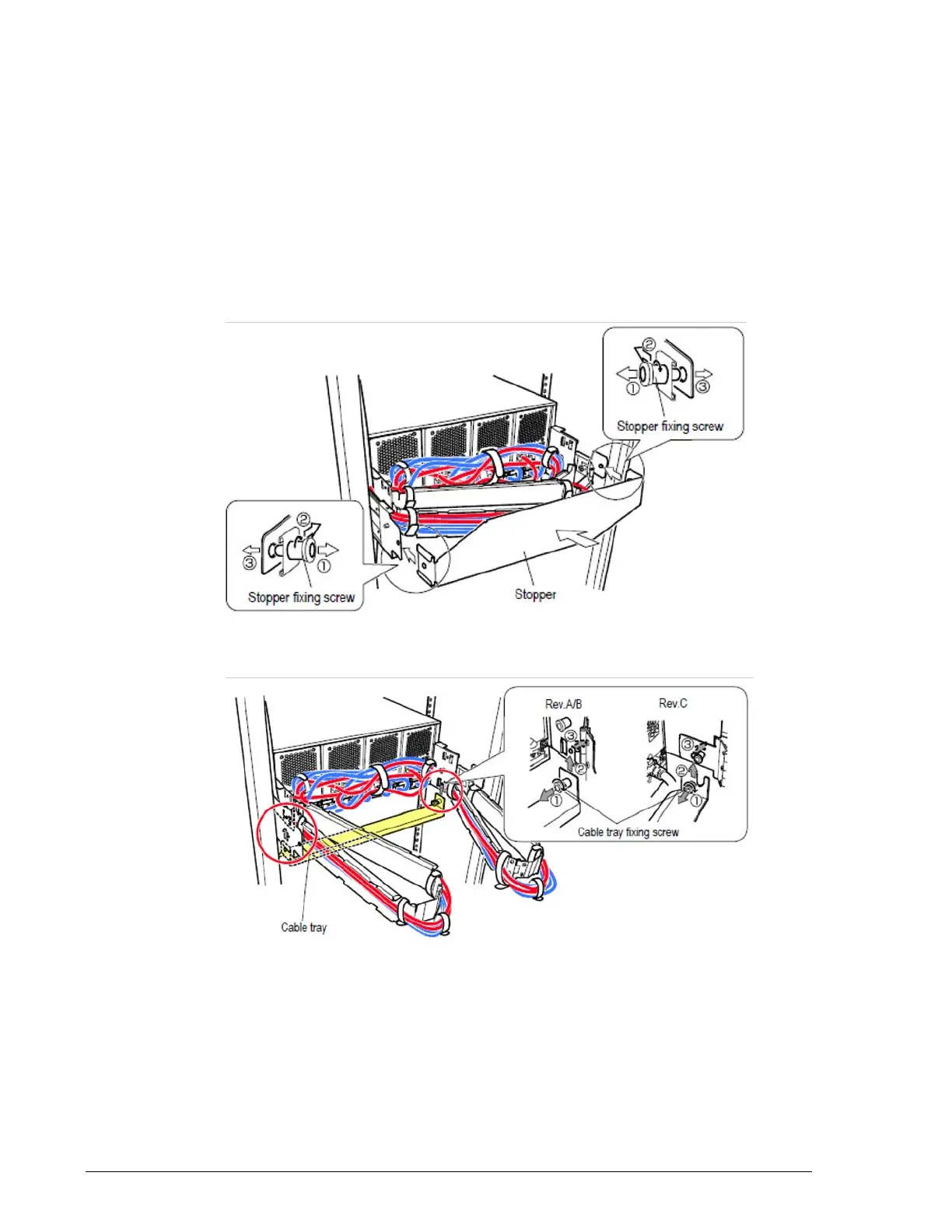
4. For the DBX Drive Box:
a. Turn the right and left screws 90 degrees and remove them according
to the direction of arrow
?
in Figure 15-2 on page 15-20.
b. Remove the stopper at the rear of the storage system and the cable
tray, open the cable routing cover, and remove the power cable.
Figure 15-2: Removing the stopper
c. Release the screw securing the cable tray.
Figure 15-3: Removing the cable tray
d. Remove the power cable.



 To Next Page