Upgrading a Hitachi Unified Storage 130 system 15–27
Hitachi Unified Storage Hardware Service Guide
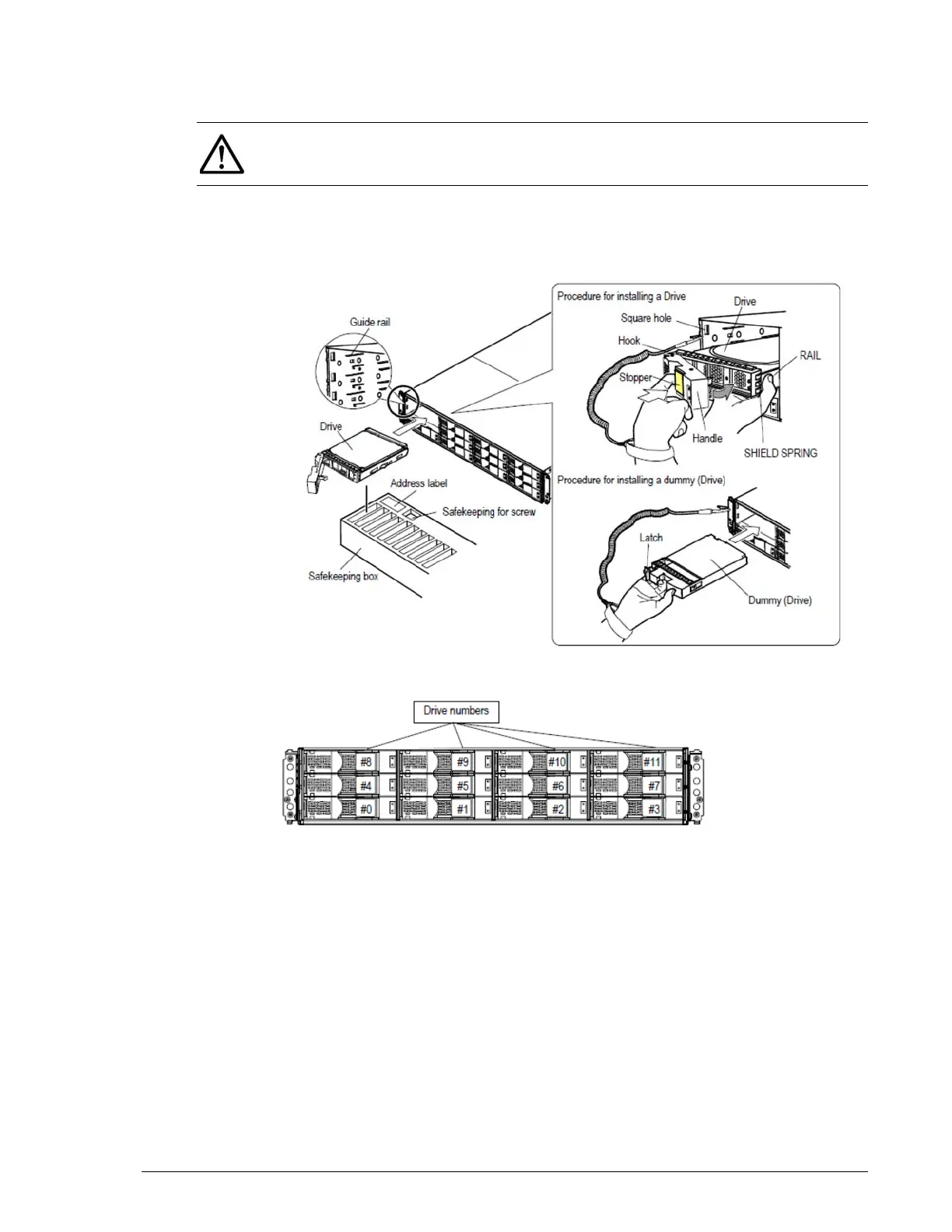
4. Pull the stopper gently, close the handle, and press the stopper to lock
the drive into place.
5. Pull the handle gently to ensure the drive cannot be pulled out.
6. If a drive slot does not contain a drive, insert a dummy drive slowly into
the slot until the drive latch moves to the left side.
Figure 15-11: Installing a drive in a CBXSL/CBSL/DBL
Figure 15-12: Drive mounting locations on a CBXSL/CBSL/DBL
Installing drives in the DBS
To install drives in the DBS:
1. Insert the drive into the guide rail of the slot from which the drive was
removed. Then slide the drive and guide rail in the direction shown by
the arrow.
2. Push until the hook of the handle can be inserted into the rectangular
hole at the lower part of a frame on the front side of the DBS.
3. Raise the stopper, which is tilted toward you, and then press the stopper
to lock the drive into place.
NOTE: If the handle is raised so that its hook cannot be inserted into the
square hole, the drive cannot be installed correctly because it runs into the
frame of the disk array unit.



 To Next Page