6 - USE AND OPERATION SMART320
EN
6 - Pag. 3 / 22
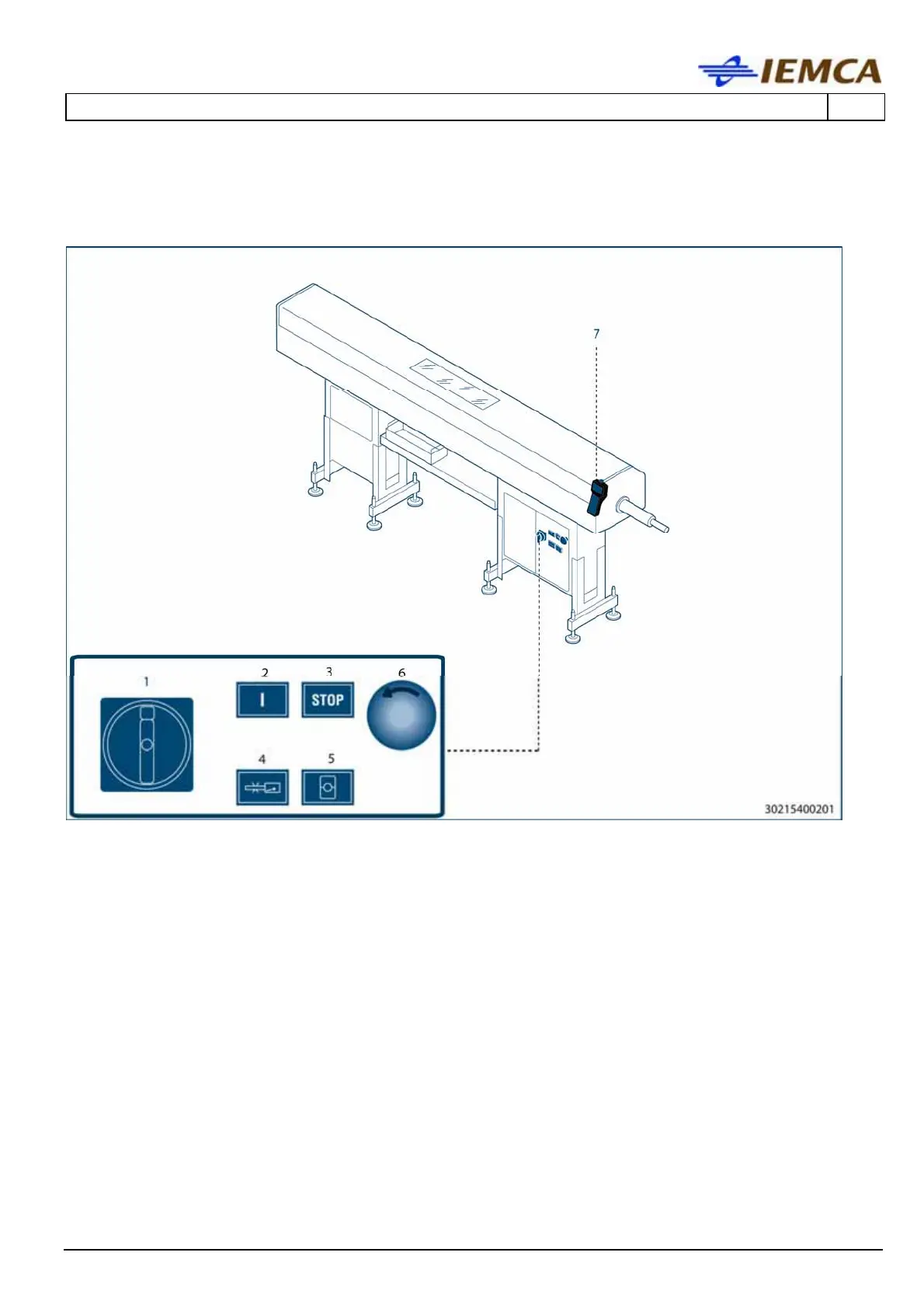
The illustration shows the position of the electrical controls and the keyboard
controls.
1 MAIN SWITCH: turns the power supply on and off.
- Position 0 (OFF) the machine is not powered.
- Position I (ON) the machine is powered.
2 BAR FEEDER START BUTTON (green light): press the button to start the bar feeder and hold
it down until the button lights up.
3 BAR FEEDER STOP BUTTON (red light): press this button to stop the bar feeder and reset
the "Errors".
4 BAR/REMNANT DETECTION DISABLING BUTTON (green)
Press the button to disable the new bar and remnant detection in automatic mode.
5 HALF-BUSH OPENING AND CLOSING BUTTON (white light)
- In "Manual" mode, when the bar feeder is in the required position, the half-bushes will
close when this button is pressed. If pushed again, the half-bush will open.
- In "Automatic" mode, if pressed, the half-bushes will open and close, according to the
selected sequence. If pressed again, the half-bushes will remain open during the entire
operating cycle.





 To Next Page