6 - USE AND OPERATION SMART320
EN
6 - Pag. 5 / 22
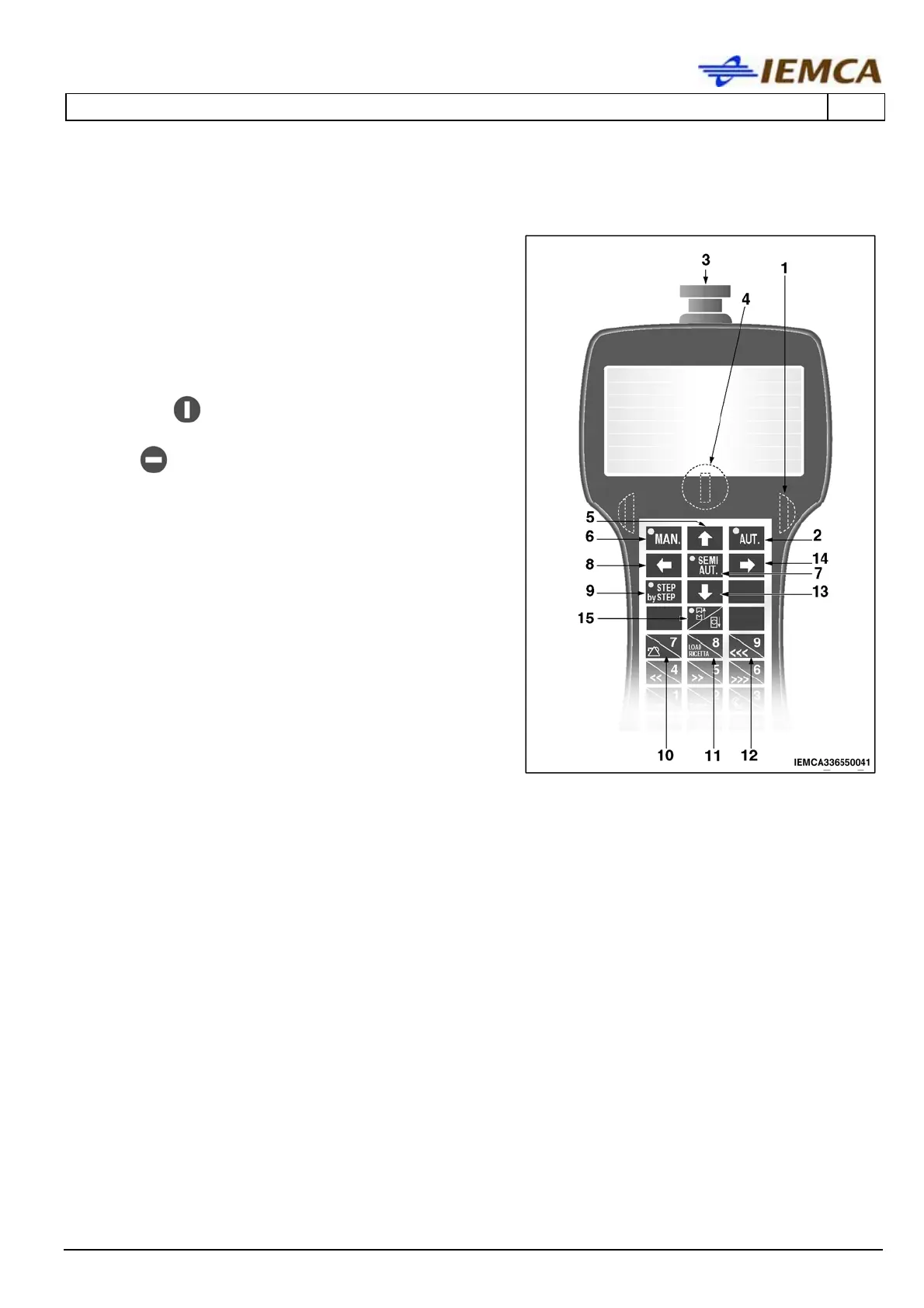
6.2 KEYBOARD CONTROL DESCRIPTION
1 Start buttons: opposite buttons enabling the
keys for some functions. Press both buttons and
simultaneously the button corresponding to the
desired function.
2 Selects the automatic function.
3 It stops the bar feeder: for restart, manually
release the push-button.
4 SELECTS KEYBOARD MODE:
- in the
position selects the "message
display" mode.
- in
position selects the "Main Menu
display" mode.
5 Multifunction
- Allows scrolling the page upwards.
- Moves the selection cursor upwards.
6 Selects the manual function.
Sets the numerical value.
7 Selects the semiautomatic function.
Press the button to select a mode and press
again to deselect it.
8 Multifunction
- Selects the previous parameter.
- Moves the selection cursor leftwards.
9 Activates the "step by step" operating cycle:
every time the button is pressed one step is
performed.





 To Next Page