Radar Field Analyser - RFA641 Edition Date: 28-Feb-18
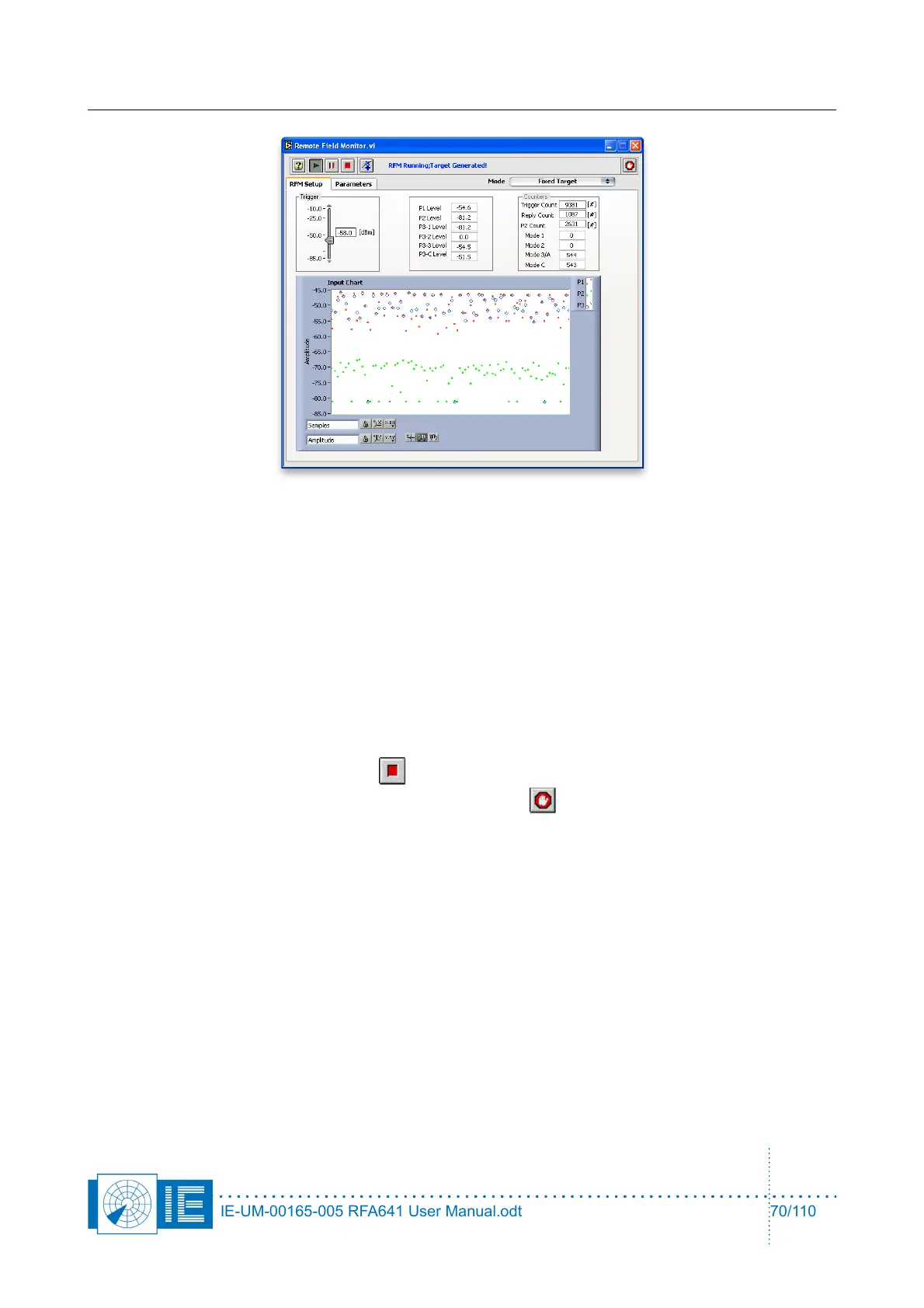
A number of indicators display the detected interrogations:
• The level indicators show the instantaneous levels of the interrogation pulses as they are identified
as P1, P2 or P3. For P3 the levels are indicated depending on the detected interrogation timing.
• Trigger Count: Each valid pulse is indicated in the trigger count.
• Reply Count: Incremented each time a reply is sent
• P2 Count: Single pulses and pulses that correspond to the 2 microsecond delay for a P2 pulse are
counted
• Mode 1,2,3/A,C: Counter for the specific interrogation modes detected (and replies sent).
To stop the RFM operation, click the Stop button. In case you want the RFM to keep on running but
want to disconnect the computer, you can simply click the Done button. The software will stop without
however stopping the device’s RFM operation.
The RFM can also operate in a moving target mode where it will fly a simulated target in range from the
radar. This is invoked by selecting Moving Target in the Mode selection on the Remote Field Monitor.vi.
When selected the Define Speed Scenario window will be invoked.
IE-UM-00165-005 RFA641 User Manual.odt 70/110



 To Next Page