www.javad.com Maxor Operator’s Manual 2-19
CONFIGURATION
MinPad Configuration
MinPad Configuration
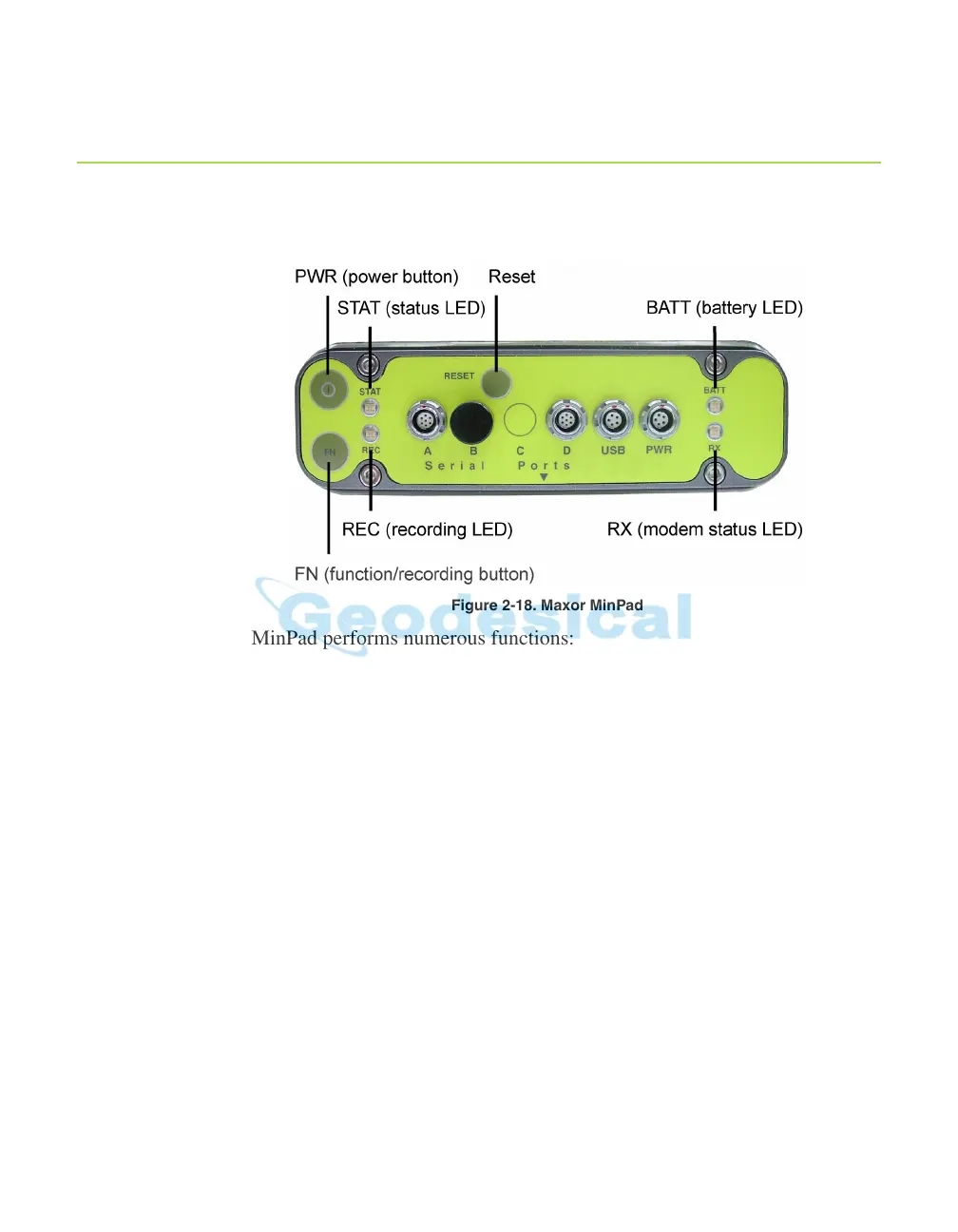
The Maxor's simple user interface (MinPad) consists of three keys (Power, FN,
and Reset) and up to four LEDs (STAT, REC, BATT, and RX) that control and
display the receiver's operation (Figure 2-18).
Figure 2-18. Maxor MinPad
The MinPad performs numerous functions:
• Turn the receiver on/off, put it in Sleep or Zero power mode.
• Turn data recording on or off (FN key).
• Change the receiver's information mode.
• Show the number of GPS (green) and GLONASS (orange) satellites being
tracked (STAT LED).
•
Show data recording status (REC LED).
• Show each time data records to
internal memory (REC LED).
•
Show the status of post-processing mode (static or dynamic) when
performing a Post-Processing Kinematic measuring with the help of FN
key
(REC LED).
• Show the status (high charge, intermediate charge, or low charge) of the
battery (BATT LED).
• Show the
power source for the Maxor (BATT LED).
• Show the modem's status and if it receives signals (RX LED).



 To Next Page