3-8 Maxor Operator’s Manual www.javad.com
SETUP AND MEASURING
Measuring with the Maxor
3
Dual-frequency receivers have two major benefits. First, dual-frequency
receivers can estimate and remove almost all ionospheric effect from the
code and carrier phase measurements, providing much greater accuracy
than single-frequency receivers over long baselines or during ionospheric
storms. Secondly, dual frequency receivers need far less observation time to
reach the desired accuracy requirement.
After the measuring completes, data the receivers collect can be
download
ed onto a computer and processed using post-processing software
(for example, Ensemble).
The procedure that follows describes the steps the operator should take
to
perform a Static Measuring using MinPad.
1. Connect your receiver and computer. See “Connecting the Maxor and a
Computer” on page 2-9 for this procedure.
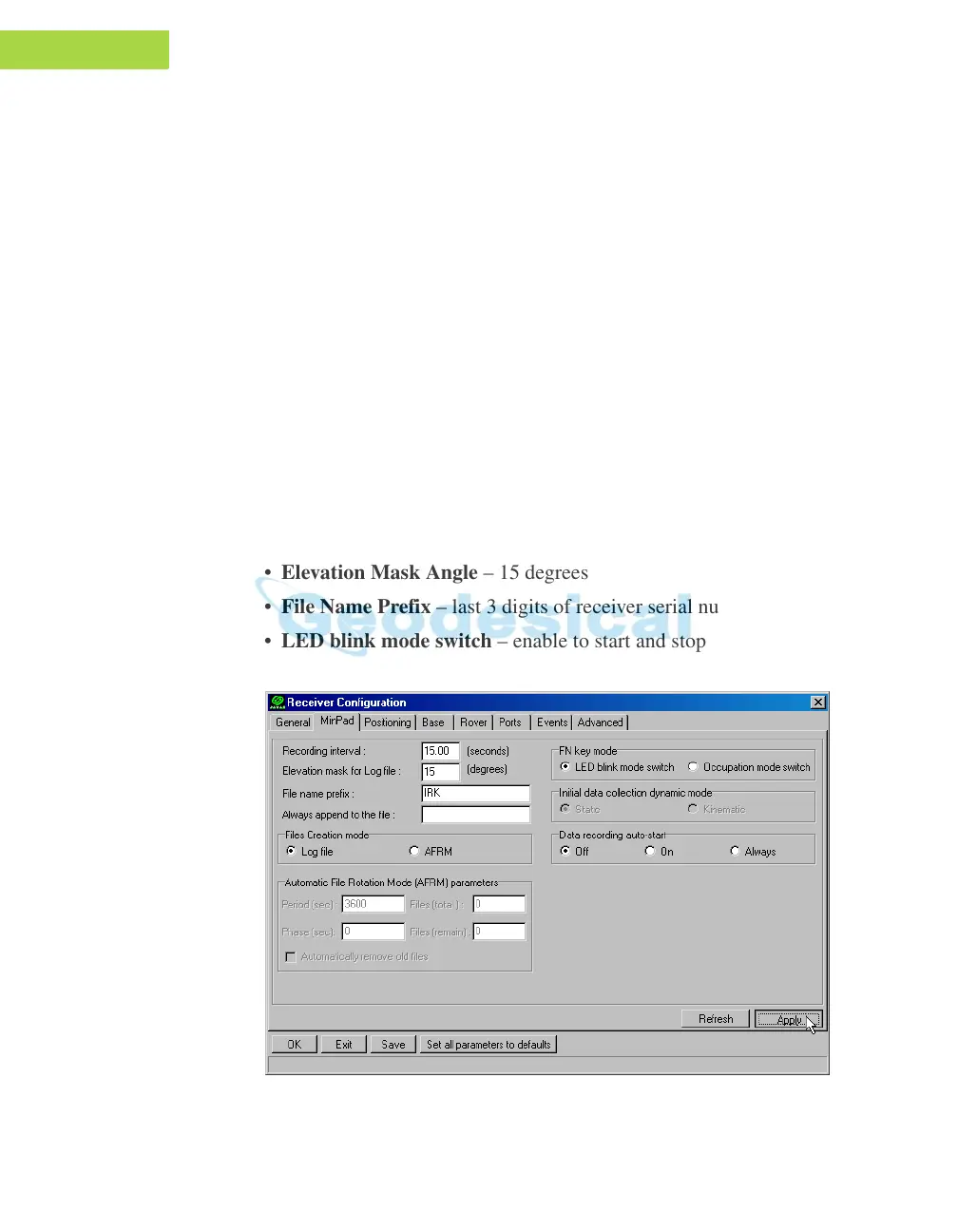
2. Open PCView, click Configuration->Receiv
er->MinPad and specify
the following parameters, then click Apply (Figure 3-5):
• Recording Interval – 15
seconds
• Elevation Mask Angle – 15
degrees
• File Name Prefix – last 3 digits of re
ceiver serial number
• LED blink mode switch – enable to start and st
op static data recording
using the FN key
Figure 3-5. Configuration->Receiver->MinPad



 To Next Page