3-6 Maxor Operator’s Manual www.javad.com
SETUP AND MEASURING
Maxor Receiver Setup
3
3. Record the antenna height, point name, and start time in the field notes.
4. Attach the flexible RF cable from the external antenna to the
antenna
connector on the bottom panel of the Maxor.
5. Turn on the Maxor and continue with step 3 on page 3-4.
The Maxor antenna default is set to Auto, allowing the receiv
er to detect
automatically the available antenna (whether internal or external). If you
have changed this setting, or the receiver does not detect the external
antenna, use the procedure below to set the External Antenna detection
option.
1. Connect your receiver and computer. See “Connecting the Maxor and a
Computer” on page 2-9 for this procedure.
2. Start PCView.
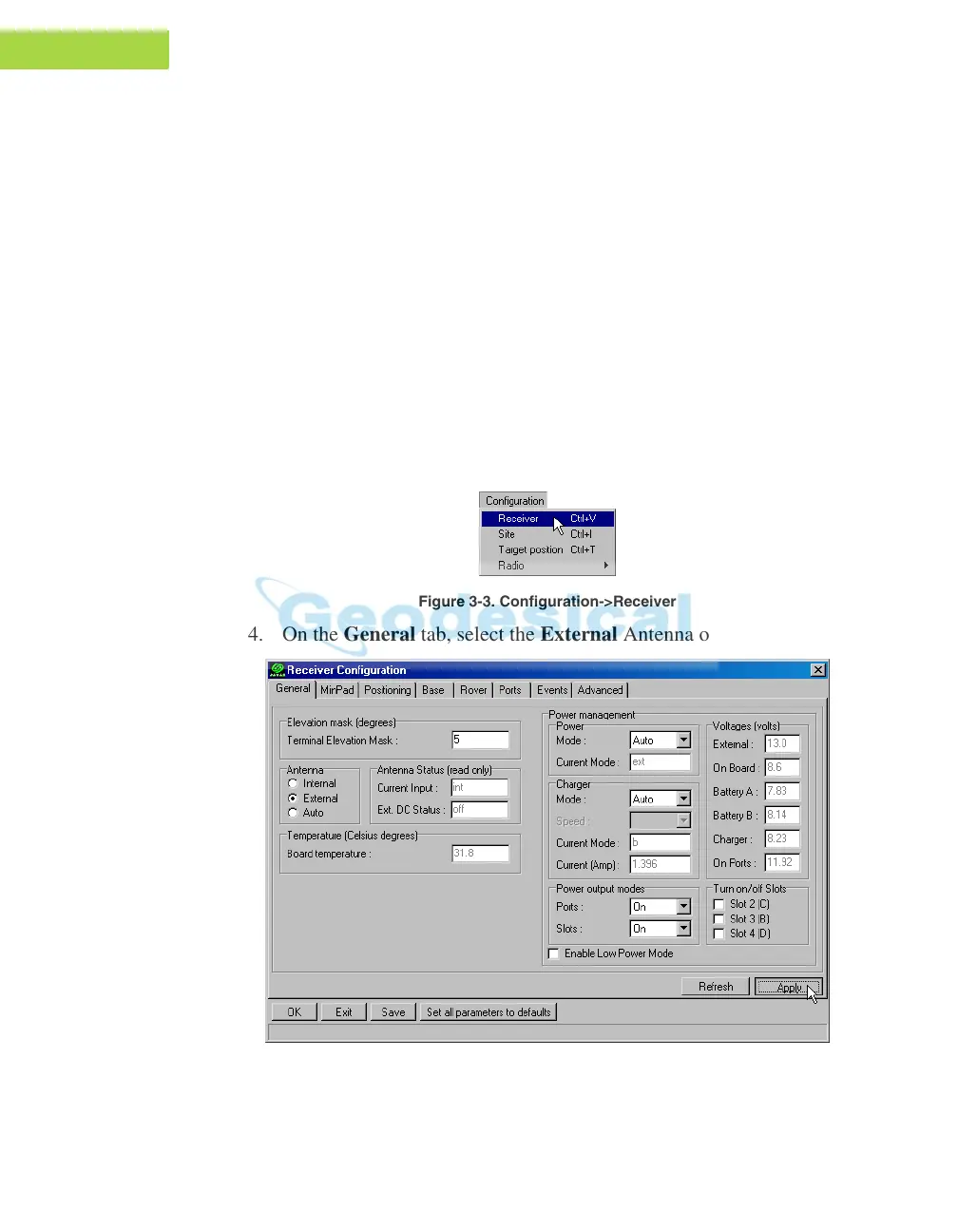
3. Click on Configuration->Receive
r (Figure 3-3).
Figure 3-3. Configuration->Receiver
4. On the General tab, select the External Antenna option (Figure 3-4).
Figure 3-4. Select External Antenna Option



 To Next Page