13 Global menus and settings | 181
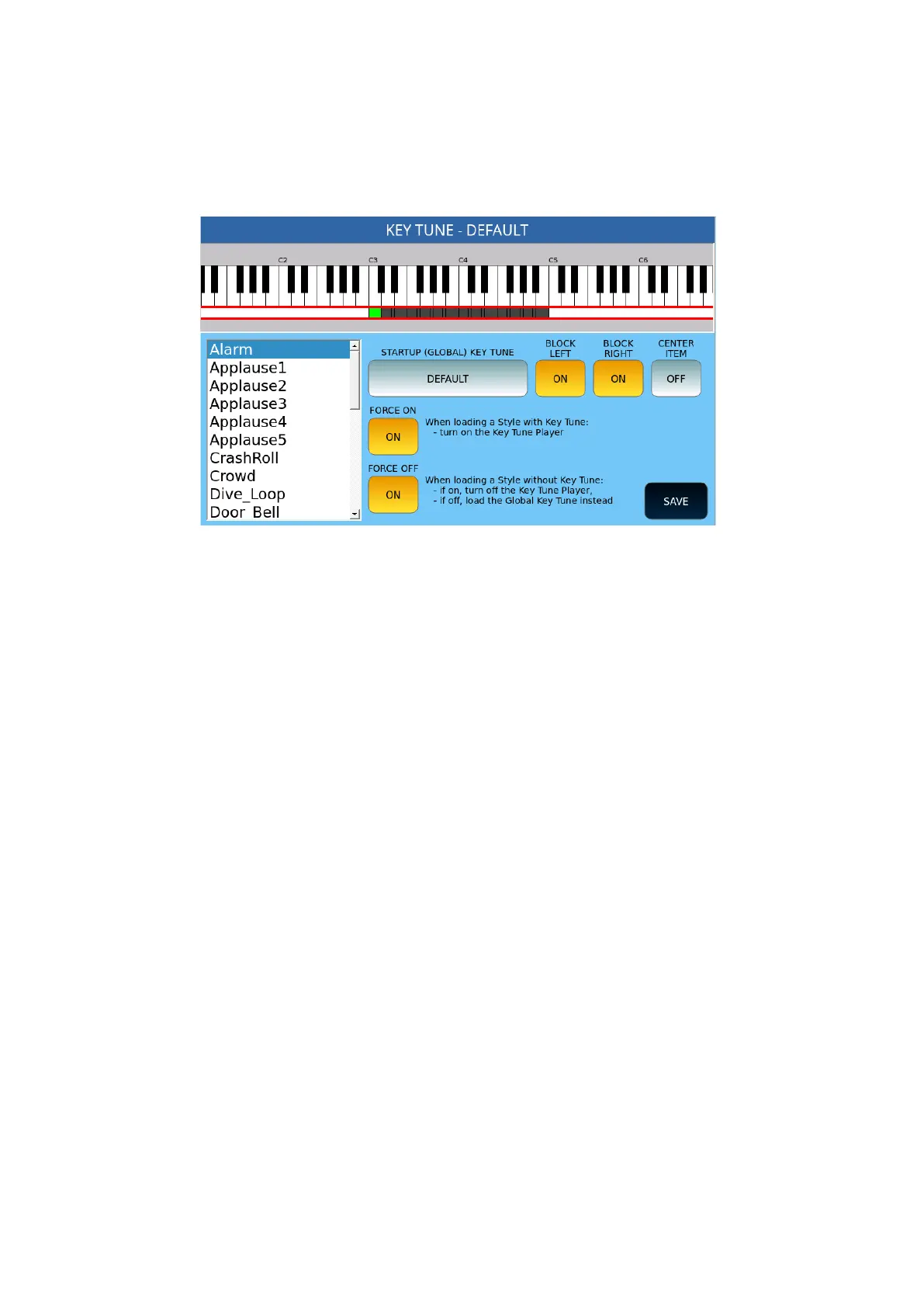
Key Tune Settings
You may get this page by pressing SETTINGS on the previous page and is useful for tuning
the keys.
Options:
• STARTUP (GLOBAL) KEY TUNE: Select the Key Tune to upload to the tool's
startup
• LOCK LEFT: Lock the note to the left part of the keyboard if there is a Key Tune
element on that button.
• BLOCK RIGHT: Locks the note to the right side of the keyboard, if there is a Key
Tune voice on that key.
• CENTER ITEM: If ON, moves the keyboard widget to the selected item.
• FORCE ON: When loading a style with Key Tune, turn on Key Tune Player (default
is ON).
• FORCE OFF: When loading a style without Key Tune, if ON turns off the Key Tune
Player, if OFF, load Global Key Tune instead (default setting is ON).
• SAVE: Saves the current settings.
How to create a new Key Tune
Step by step:
1. Open MENU on the panel and select KEY TUNE.
2. On the following page, tap CLEAR on the screen to create a blank Key Tune.
3. Press ADD to browse for a .wav file to add.
4. Select it and press ENTER on the panel to confirm (or ABORT to stop the activity).
5. Press a button on the keypad to set the value of the startup key.



 To Next Page