26 | 03 Playing with the styles
The accompaniment styles – details
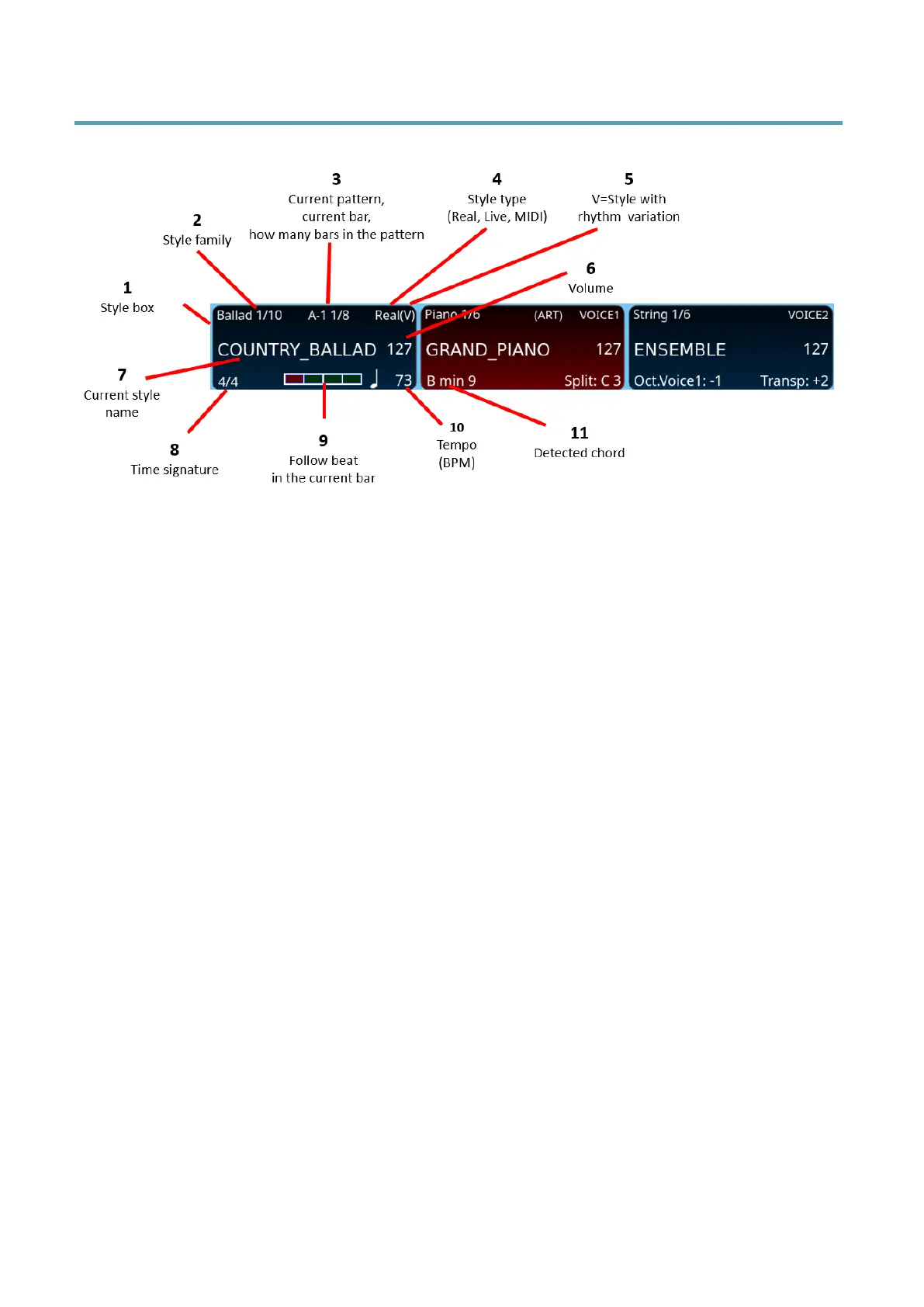
On the HOME page, the main screen shows the accompanying style:
1. The frame of the style is always the first in the upper left corner.
2. Style family.
3. The pattern being played (ABCD, IN for Intro, END for Ending, BRK for BREAK, FIL
for FILL), the rhythmic variation (1 or 2 – e.g. A1 or A2), the measure in progress /
how many measures the pattern being played consists of. In the example A-1 1/8
(V) means: Pattern A is playing. Rhythmic variation 1 of Arranger A is on. Measure
1 of pattern A is playing. When it comes to the end of the count, it starts from 1
once more. Total measures in pattern A: 8.
4. Style type can be Real, Live or MIDI.
5. The mark (V) indicates that the style has a rhythmic variation.
6. Volume: you may adjust it by the slider STYLE in the panel.
7. The name of the selected style.
8. Time Signature of the style (in this example, 4/4).
9. The representation of a measure within the beat that lights up in real time when
the style/MIDI file is being played (always keep an eye on it: it will help you play in
time with accuracy).
10. BPM tempo is on.
11. The chord played on the keyboard is shown in the centre box of VOICE 1.



 To Next Page