56 | 05 Player
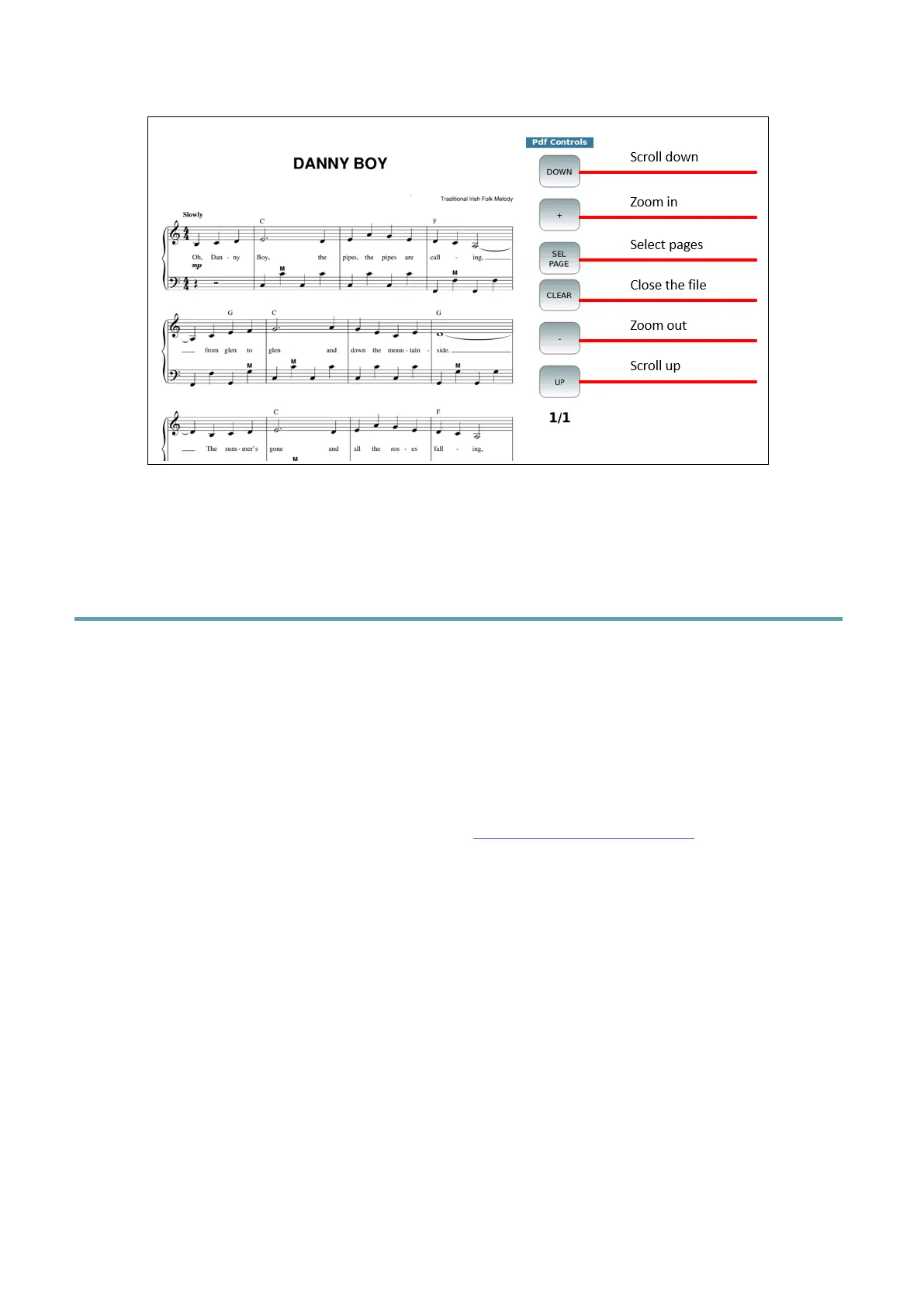
When displaying PDF files, you can control the view using the buttons on the right.
PLEASE NOTE: You can enable/disable this feature through the SKIP FILE LINK option
available in the SETTINGS | GENERAL pages.
Synchronizing your own text with audio files
If a text file is linked to an audio file (WAV or MP3), you can program it to scroll
automatically (like MIDI files with built in lyrics), while the music is playing.
To do this, the following is required:
• The audio file and text file must have the same name (except for the extension).
• Must be in the same folder.
• The SHOW AUTOLYRIC option on the Settings page of the Player must be
enabled.
Step by step:
1. Assign the Text Record option to one of the switches on the optional
FOOTSWITCH.
2. Assign the Text Page + and Text Page - options to two of the switches on the
FOOTSWITCH (optional).
3. Start playing the audio file.
4. Press the RECORD button on the panel or the text recording switch on the
FOOTSWITCH to start recording. A "TXT Rec" warning text will appear on the
STATUS BAR at the top of the screen.



 To Next Page