05 Player | 59
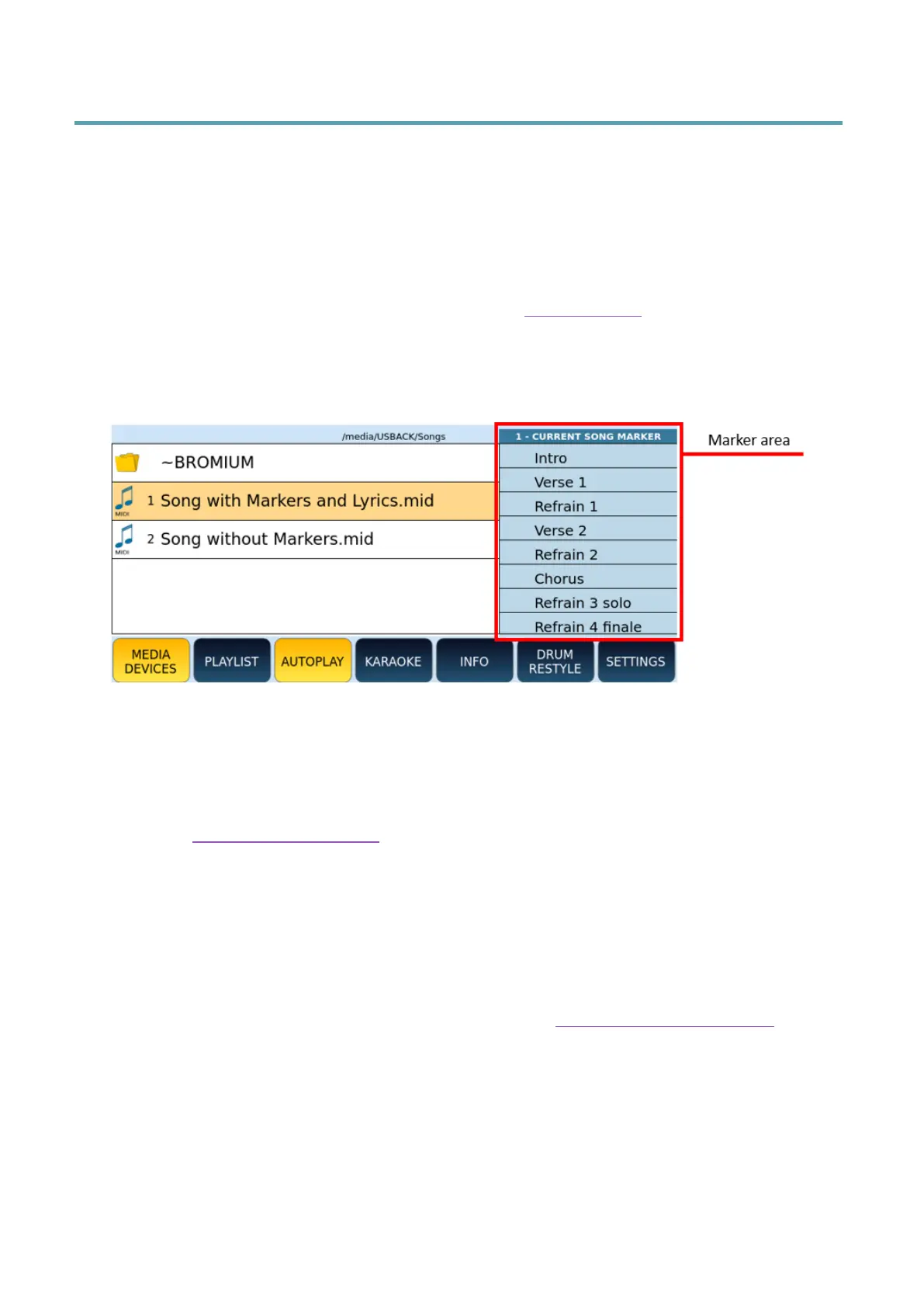
Markers in Songs
Markers of a MIDI file allow you to quickly switch from one point to another of a piece of
music (verse, chorus, ending). They can also be used to repeat a step multiple times in a
loop.
EVM displays markers under two conditions:
• You have activated the AUTO SHOW on the MARKER page of the SETTINGS
function.
• The MIDI file contains MARKER MIDI events (you can insert these events via any
DAW software application).
How to use Markers:
1. Open the MIDI file containing the marker events with the PLAYER.
2. If the markers do not appear, make sure that the AUTOSHOW setting is active in
the Settings of the PLAYER.
3. Start playback.
4. Press the various Markers to immediately move the playback to that point.
5. You can loop two marking points between them:
6. The premise is that the LOOP option is active in the Settings of the PLAYER.
7. Start playback of the song.
8. Once you have passed the return Marker, press the ENTER button.
9. A green icon appears showing that when the next Marker is reached, you return to
the position of the selected Marker.
10. To exit the loop, press the marked Marker again.



 To Next Page