110 | 10 Creating your own styles
10 Creating your own styles
Building your accompaniments with existing content
This feature does not require extraordinary executive and technical skills and, in any case, allows you to
customize the arrangements in the Drum, Bass, Chord, and Lower parts, with great ease. You have a
vast database of MIDI patterns on various musical repertoires and are entirely editable: BPM, voices,
levels, and effects. Mixing patterns and customizing them allows you to create hundreds, even
thousands, of original styles tailored to your musical choices.
View and Modelling
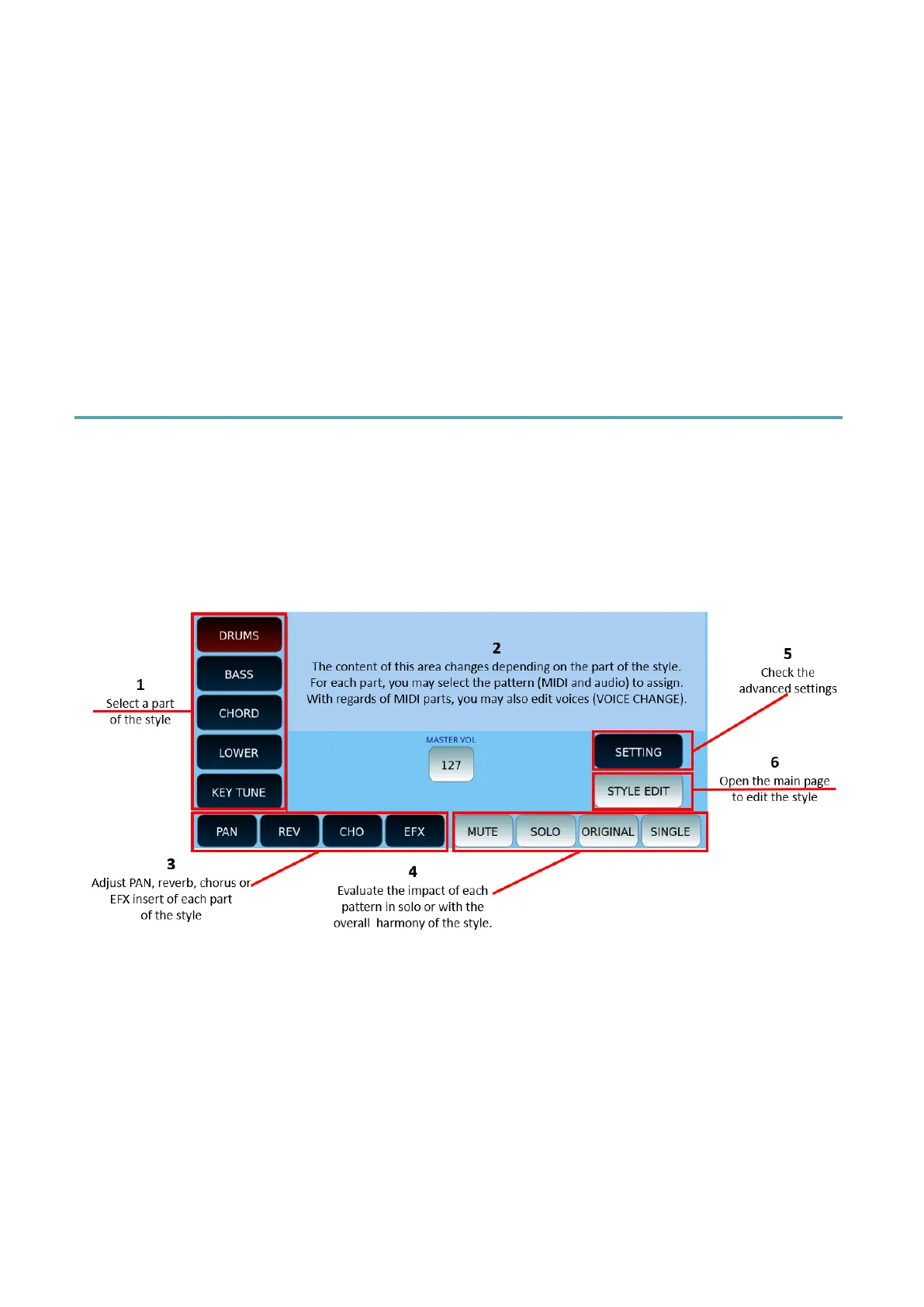
In the style home page, touch the VIEW & MODELLING icon to display the relevant page of
the Arranger section of EVM.
In the lower part of the screen, you may find the functions which are common to all parts,
while the central part of the screen varies according to the part of the style. Let us start with
the common parts of VIEW & MODELLING.
How to use
1. Choose the part you want to work on: DRUMS, BASS, CHORD, LOWER or KEY
TUNE.
2. For each part, the content of the central screen changes. See below the specific
description of each part.
3. At the bottom of the screen, a first part of the buttons (PAN, REV, CHO, EFX)
allows you to customize stereo panorama, reverb, Chorus and Insert effect (EFX).



 To Next Page