180 | 13 Global menus and settings
Key Tune
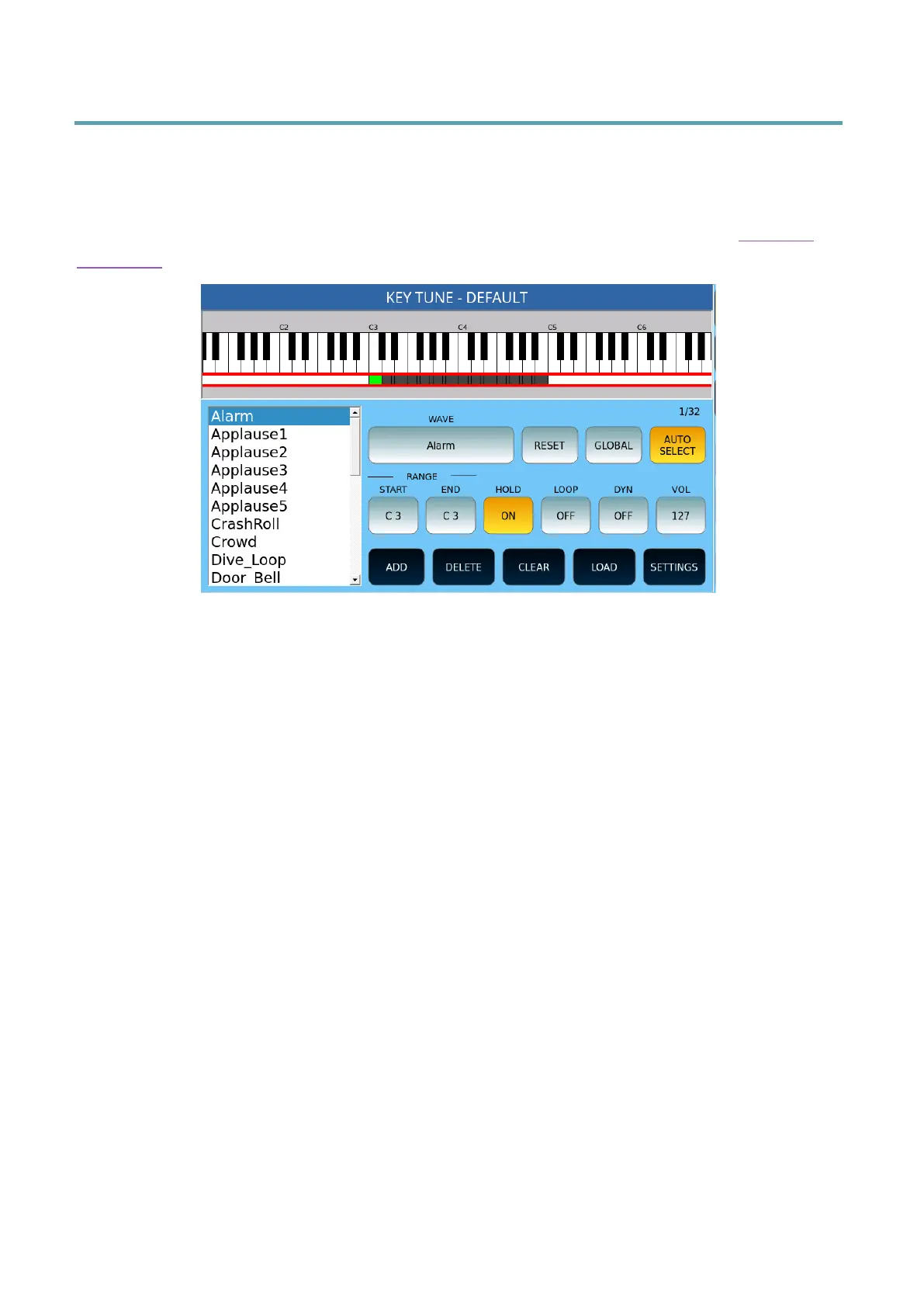
Press the MENU button on the panel and then tap KEY TUNE to access the Key Tune
Management page.
You can use Key Tunes to recall audio files from keyboard keys, as we saw in the Key Tune
paragraph.
Options:
• WAVE: Press this button to select the .wav file you want to associate with a button
on your keyboard.
• RESET: Restores the current effect to its default values.
• GLOBAL: If enabled, adjustments are made for all effects on the list.
• AUTOSELECT: Automatically selects the corresponding item when you press a
button.
• RANGE START/END: Defines the range on the keyboard that that effect will be
played.
• HOLD: Defines whether the effect continues to play even after the button is
released.
• LOOP: Defines whether the effect will play in a loop.
• DYN – Defines whether the volume of the effect is determined by velocity.
Replaces
• setting VOL.
• VOL: Defines the volume.
Bottom screen options:
• ADD: Adds a .wav file to the list of managed bills of exchange.
• DELETE: Removes the effect from the list of managed effects.
• CLEAR: Clears the melody of the key.
• LOAD: Loads a previously saved Key Tune from the KEYTUNE folder.
• SETTINGS: Opens the settings page. See the following paragraph.



 To Next Page