66 | 05 Player
Settings of the PLAYER
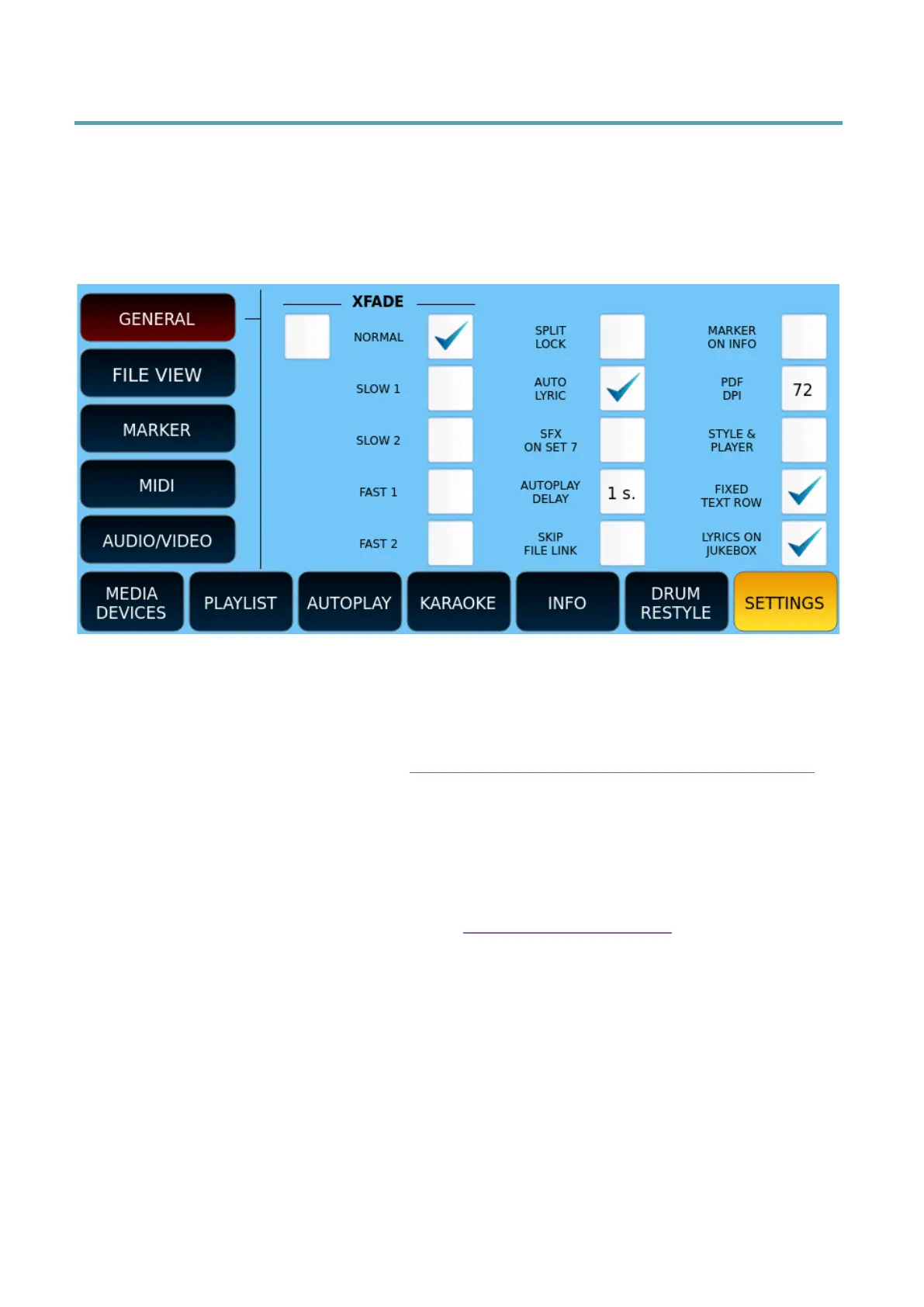
The basic settings of the PLAYER are managed in the SETTINGS pages that can be called up
via the SETTINGS button on the screen of the main page of the PLAYER. Here is a rundown
of the various icons found on this page:
GENERAL
Options:
• XFADE: Change the speed of the crossfade. You can enable/disable Cross Fade and
then set a value between NORMAL, SLOW 1, SLOW 2, FAST 1 and FAST 2. Cross
Fade can also be done via the Fade procedure between PLAYER 1 and PLAYER 2.
• SPLIT LOCK: You can lock the Split point.
• AUTO LYRIC: automatically shows lyrics (if present in the file) when starting a song.
• SFX ON SET 7: Replaces JUKEBOX set 7 with the SFX effects folder.
• AUTOPLAY DELAY: Establishes the second interval between the performance of
one song and the next.
• SKIP FILE LINK: Enables the ability to view texts, scores, images as soon as you
select a piece of music, going to open automatically, a TXT file, PDF or image with
the same name, if it exists.
• MARKER ON INFO: It replaces the MARKER button below.
• PDF DPI: You can adapt the resolution from 72 to 100 DPI.
• STYLE & PLAYER: If you enable this option, you can play an accompainment style
and a PLAYER song at the same time.
• FIXED TEXT ROW: sets the number of lines of text that can be displayed with a txt
file to 9. It is always possible to change the ZOOM +/- value, but when you open a
new txt file, the rows displayed will return to 9.
• LYRICS ON JUKEBOX: allows the visualization of lyrics and PDF files in the JUKEBOX
environment.



 To Next Page