06 Stem | 71
06 Stem
Playing with Multi tracks
Imagine having an audio track divided into several audio tracks and, in this way, you can easily exclude
the tracks you intend to perform live: the singer's part or an instrumental part. Here you will find useful
the innovative Stem function that KETRON has recently introduced on its new generation of musical
instruments. This allows you to use your studio projects (individual tracks) with your performance on
the EVM.
What is a Stem?
While mixing, it is widespread practice to create groups of audio tracks to process together
before combining them into a final master stereo mix. These groups are referred to as sub-
mixes, subgroups or Stem and are used by sound engineers to facilitate the mixing process.
A Stem could be the mix of all the audio signals coming from the microphones of the drums
or the mix of all the voices of a choir.
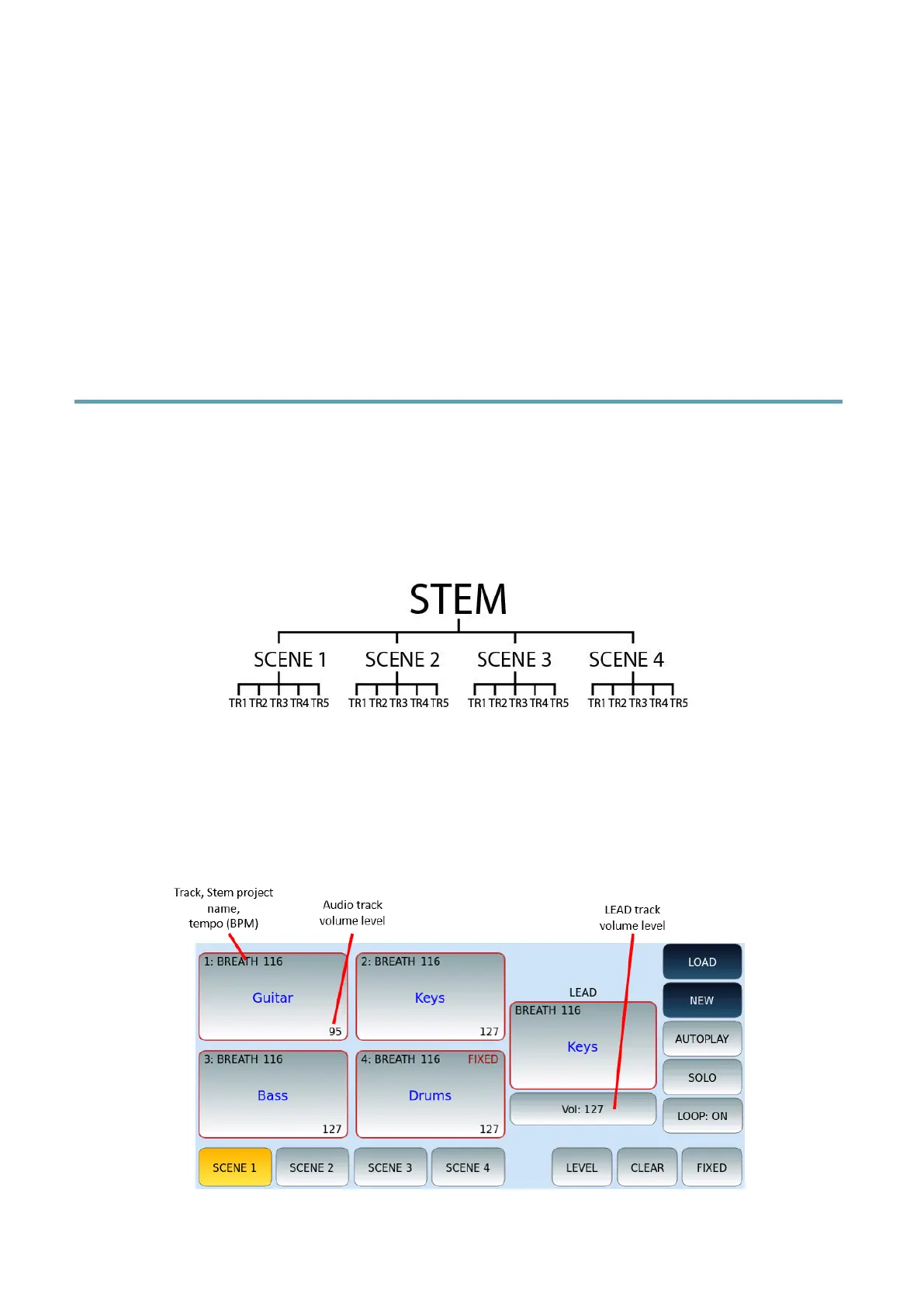
In this instrument, a Stem (or Stem project) consists of four scenes, and each scene consists
of five audio tracks for a total of 20 tracks. Within each scene, the five audio tracks can be
looped simultaneously.
Press the STEM button on the panel. The LED button lights up and the STEM page appears
on the screen.



 To Next Page