03 Playing with the styles | 27
When you power on EVM, the instrument is ready to be played with accompaniment styles.
How to select an accompaniment style
To choose the style you want to play:
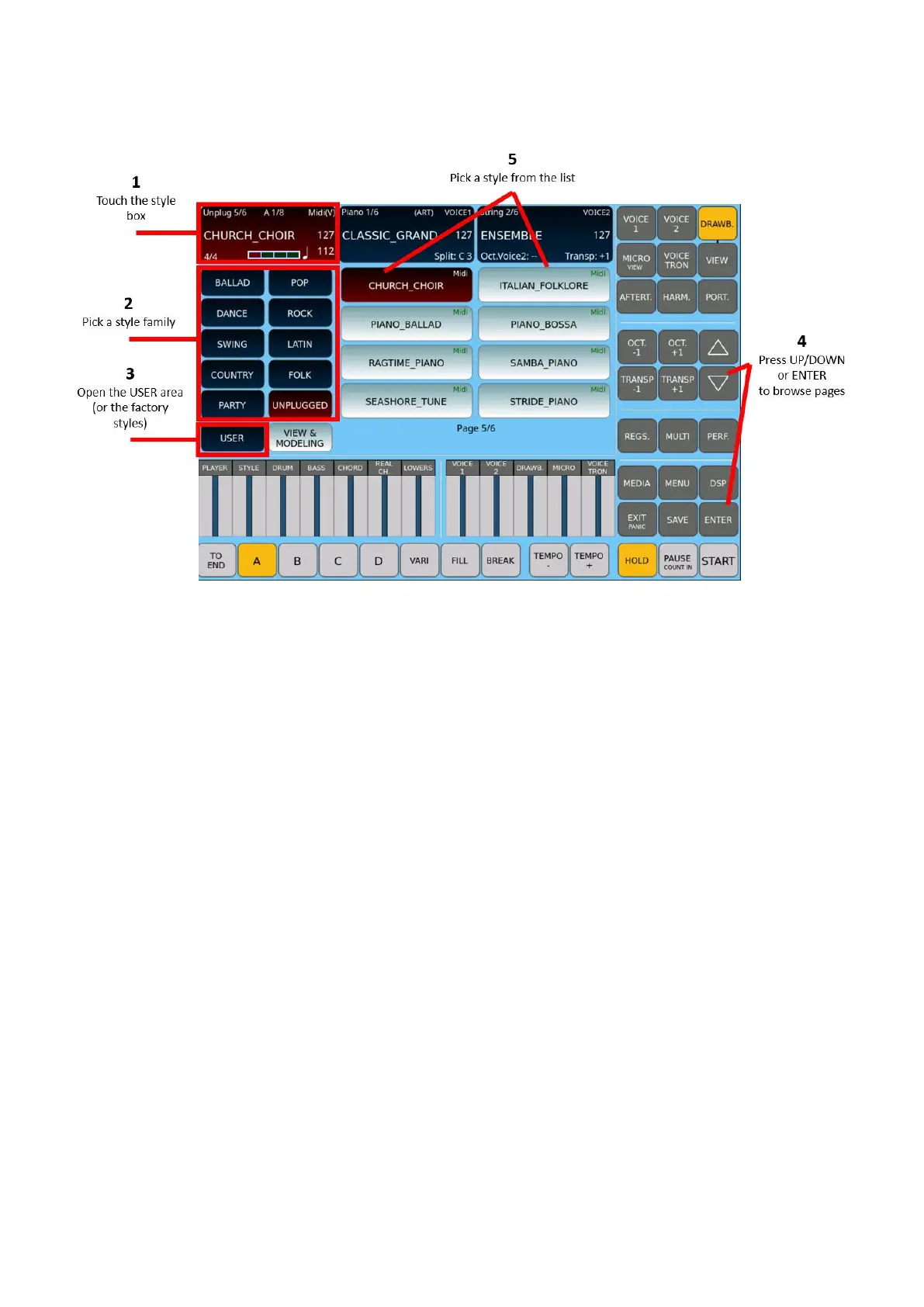
1. Touch the style control frame, in the top left corner of the screen.
2. Press the button corresponding to one of the ten families of styles: BALLAD, POP,
DANCE, ROCK, SWING, LATIN, COUNTRY, FOLK, PARTY and UNPLUG.
3. If you do not find the style you are looking for, check the USER STYLE button:
o if it is Off, you are navigating through factory styles.
o If it is On, you are looking in the User styles area.
4. Scroll through the list on the screen by pressing UP/DOWN or ENTER buttons.
5. Touch the desired style on the screen.
Attention! If you were just using the PLAYER and now want to return to the accompanying
styles, you must exit the PLAYER mode by deactivating both PLAYER buttons (1 and 2) on
the panel.



 To Next Page