Section 4 Windows Driver 4-13
3.3 Installation Process - Manual
The printman.exe utility is designed to automate the installation of the KIP Port Monitor
(KIP0) and the KIP Unified Windows Printer Driver (KUWPD). It is possible to install both
components manually. Manual installation techniques may be necessary to satisfy IT
and/or corporate requirements.
a) Depending on your operating system, locate the appropriate folder that contains the
monitor.inf for your system platform.*
KUWPD \ WINNT4 = Microsoft Windows NT 4 Workstation / Server
KUWPD \ WIN2000 = Microsoft Windows 2000 Workstation / Server
KUWPD \ WINXP = Microsoft Windows XP, Microsoft Windows 2003 Server
KUWPD \ AMD64 = Microsoft Windows XP 64-bit Edition
* Alternatively, you can use the Microsoft Standard TCP/IP port monitor (configured
for LPR/LPD), however some functionality and transport speed will be lost. See
Printing Hints section in Appendix.
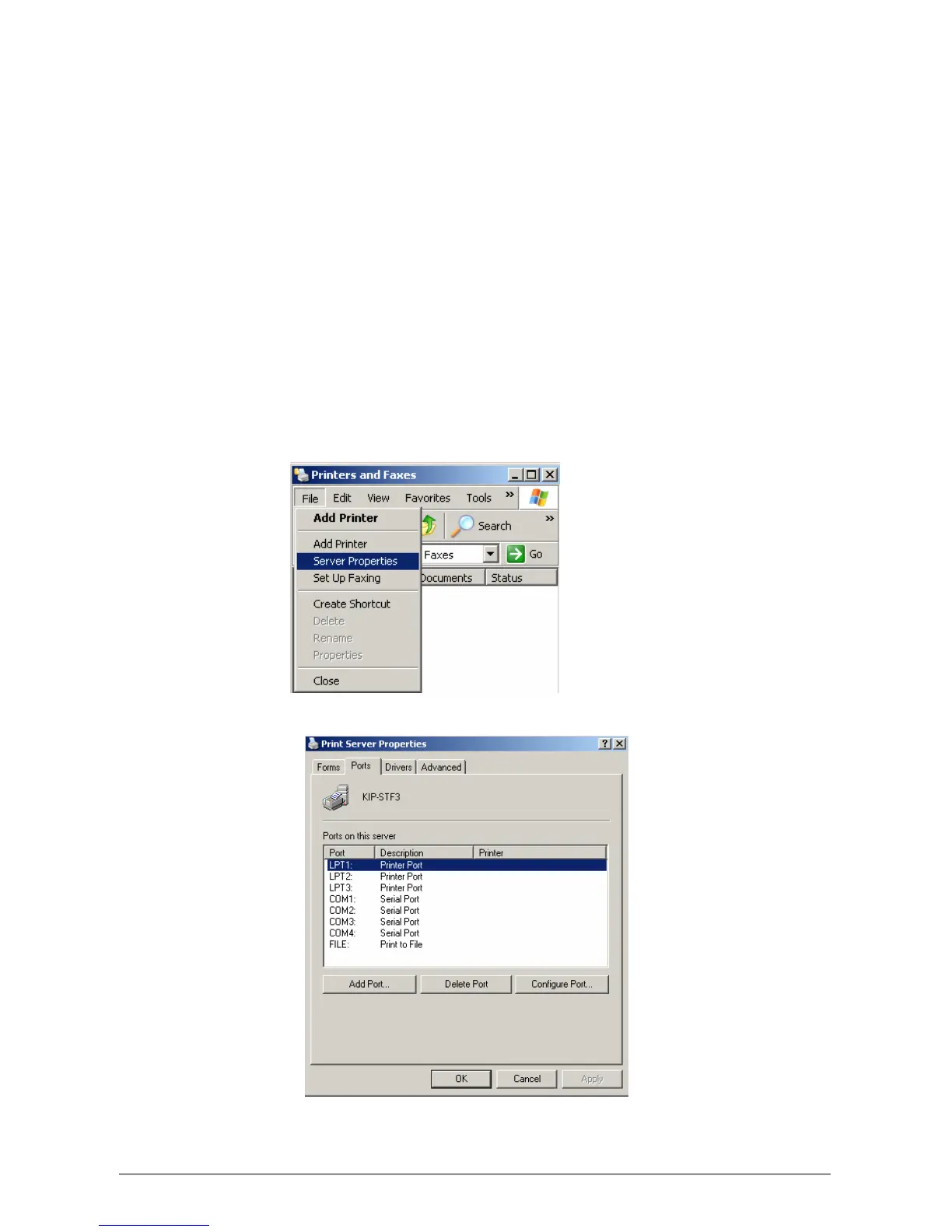
b) From the Printers control panel, select File, Server Properties.
c) Print Server Properties is displayed. Select Ports from available tabbed headings.
d) Select Add Port. Printer Ports dialog is displayed. Select New Port Type.



 To Next Page