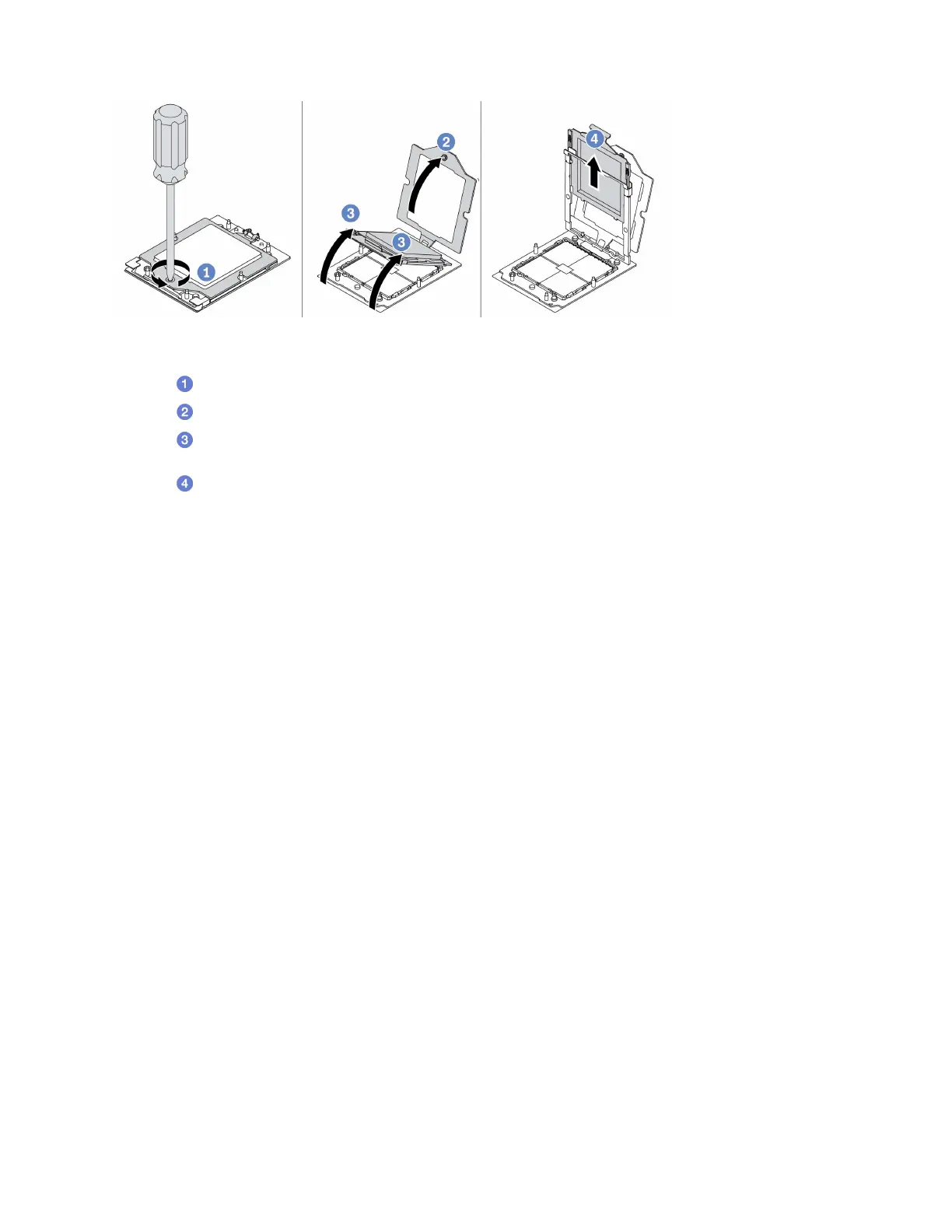
Figure 94. Processor removal
Step 1. Use a Torx T20 screwdriver to loosen the captive screw.
Step 2.
Slightly lift up the retention frame in the direction shown.
Step 3.
Slightly lift up the rail frame in the direction shown. The processor in the rail frame is spring-
loaded.
Step 4.
Hold the blue tab of the processor carrier and slide the processor carrier out of the rail frame.
After you finish
• If you are going to install a new processor, see
“Install a processor” on page 153.
• If you are instructed to return the component or optional device, follow all packaging instructions, and use
any packaging materials for shipping that are supplied to you.
Install a heat sink
Follow the instructions in this section to install a heat sink. This procedure must be executed by a trained
technician.
About this task
Attention:
• Read
“Installation Guidelines” on page 45 and “Safety inspection checklist” on page 46 to ensure that you
work safely.
• Power off the server and peripheral devices and disconnect the power cords and all external cables. See
“Power off the server” on page 60.
• Prevent exposure to static electricity, which might lead to system halt and loss of data, by keeping static-
sensitive components in their static-protective packages until installation, and handling these devices with
an electrostatic-discharge wrist strap or other grounding system.
Watch the procedure
A video of this procedure is available at YouTube:
https://www.youtube.com/playlist?list=PLYV5R7hVcs-
DrpxDWLMfgtXO4O6BVYTim
.
Note: Prepare the following screwdrivers to ensure you can install and remove the corresponding screws
properly.
Chapter 5. Hardware replacement procedures 151

 To Next Page
 Loading...