enable investigations to reduce or eliminate the noise to improve metal detection
performance and reduce false triggering.
Tap on the Product icon to display the Product screen which is used to display
current detector settings, displays communications statistics between the detector
head and the control panel
and to capture and display raw data from the detector
head for analysis.
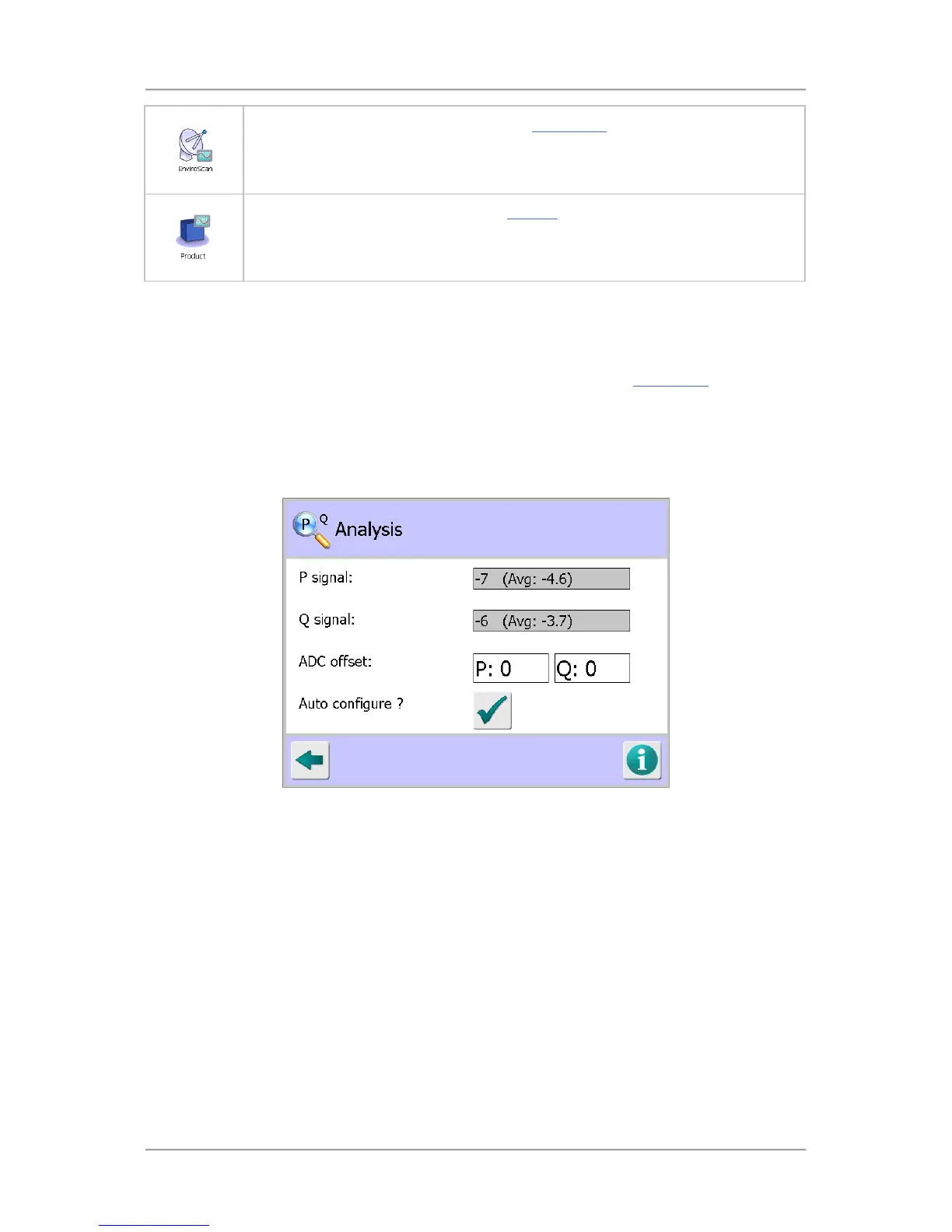
PQ Analysis
Purpose
The PQ Analysis screen is displayed by tapping on the Analysis icon in the Diagnostics
screen.
This screen is intended for use by Loma Service Engineers or Customer Engineers only following the
replacement of a Control board.
It is used to balance out the P and Q channel signals being received from the Receiver board, when
the detector is transmitting a signal but not inspecting products, by applying a positive or negative DC
offset to each channels analogue to digital convertor on the Control board.
Screen Contents
The screen contains the following:
■
P signal
The current P channel quiescent signal value is displayed, along with the average signal value.
■
Q signal
The current Q channel quiescent signal value is displayed, along with the average signal value.
■
ADC offset
Tap in each field to display a pop-up numeric keypad and enter a positive or negative DC offset
value for the P and Q channels.
■
Auto configure?
Tap on this button to set the P and Q ADC offset values automatically. Ensure that the readings
are as stable as possible when using this feature.



 To Next Page