The User Interface
138
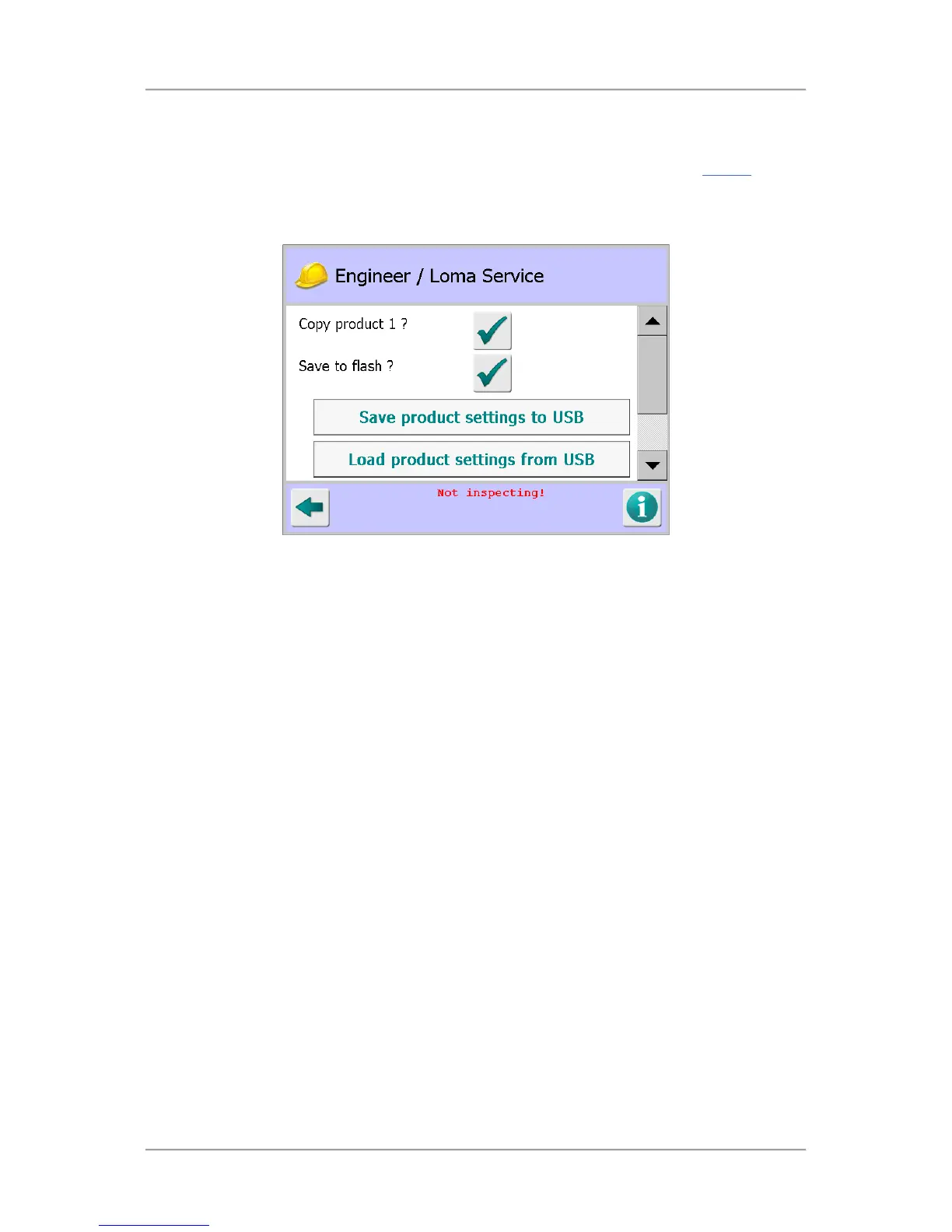
Engineer / Loma Service
Purpose
The Engineer / Loma Service screen is display be tapping on the Engineer icon in the Service
screen.
The purpose of the screen is to enable Engineers and Loma Service Engineers to copy and load
product settings using a USB memory stick, use the detector setting for Product #1 for all products set
up in the system and carry out advanced actions to debug the system.
Screen Contents
The screen contains the following items:
■
Copy product 1?
Tap on this button to use the settings for Product #1 for all other product added to the system.
■
Save to flash?
Tap on this button to save the metal detector settings for the currently running product onto the
onboard SD flash memory card as an XML file. The file will be named IQ3ProdSettings.xml
■
Save product settings to USB
Tap on this button to save the metal detector settings for all currently stored products onto the
USB memory stick as an XML file. The file will be named IQ3ProdSettings.xml. This option
allows backup of product memory data.
■
Load product settings from USB
Tap on this button to load the product settings xml file contained on the USB memory stick onto
the metal detector. This option allows quick setup of multiple detectors that are inspecting the
same products.
■
Debug system
Tap the arrow to the right of the field to display a drop down list of options for selecting the
debug system to be used.
■
Debug mask
Tap in the field to display a pop-up numeric keypad then enter the required debug mask value.



 To Next Page