214713 94 Revision A
1026350
A
B
C
D
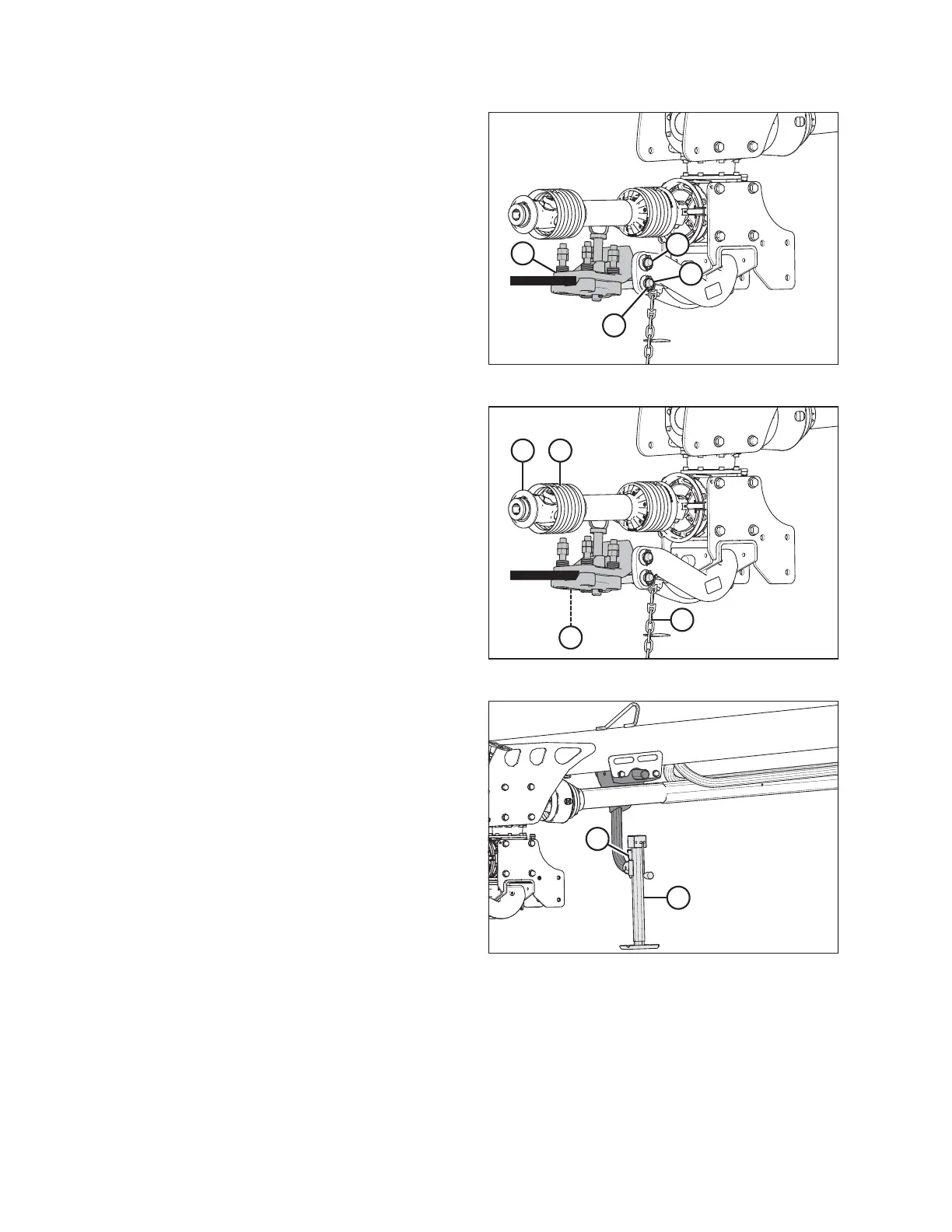
Figure 5.5: Disc Mower Hitch
4. Lower hitch with the jack so that pin (A) engages
drawbar hitch adapter (B).
5. Install clevis pin (C) and secure with lynch pin (D).
1026351
AB
C
D
Figure 5.6: Primary Driveline
6. Position primary driveline (A) onto tractor power take-
off (PTO).
7. Pull back collar (B) on driveline (A), and push driveline
until it locks. Release collar.
8. Route safety chain (C) from disc mower through chain
support (D) on drawbar hitch adapter and around tractor
drawbar support. Lock hook on chain.
IMPORTANT:
If the tractor has a three-point hitch, lift the links as far
as possible to prevent damage to the hitch.
1026352
A
B
Figure 5.7: Hitch Jack
9. Raise jack (A), and remove pin (B).
SETTING UP THE TRACTOR





 To Next Page