214713 178 Revision A
9.3 Installing the Conditioner
CAUTION
Ensure spreader bar is secured to the forks so that it cannot slide off the forks or towards the mast while
detaching the conditioner from the mower.
NOTE:
If installing a finger conditioner, deflector plates must be removed. Refer to 9.2.1 Removing Cutterbar Deflectors,
page 177.
NOTE:
Install deflector plates (A) when installing a roll conditioner and when replacing faulty or damaged deflector plates.
Refer to 9.3.1 Installing Cutterbar Deflectors, page 180.
NOTE:
If you are replacing a roll conditioner and the deflector plates (A) are already installed on the machine, proceed to
Step 1, page 178.
1015380
A
B
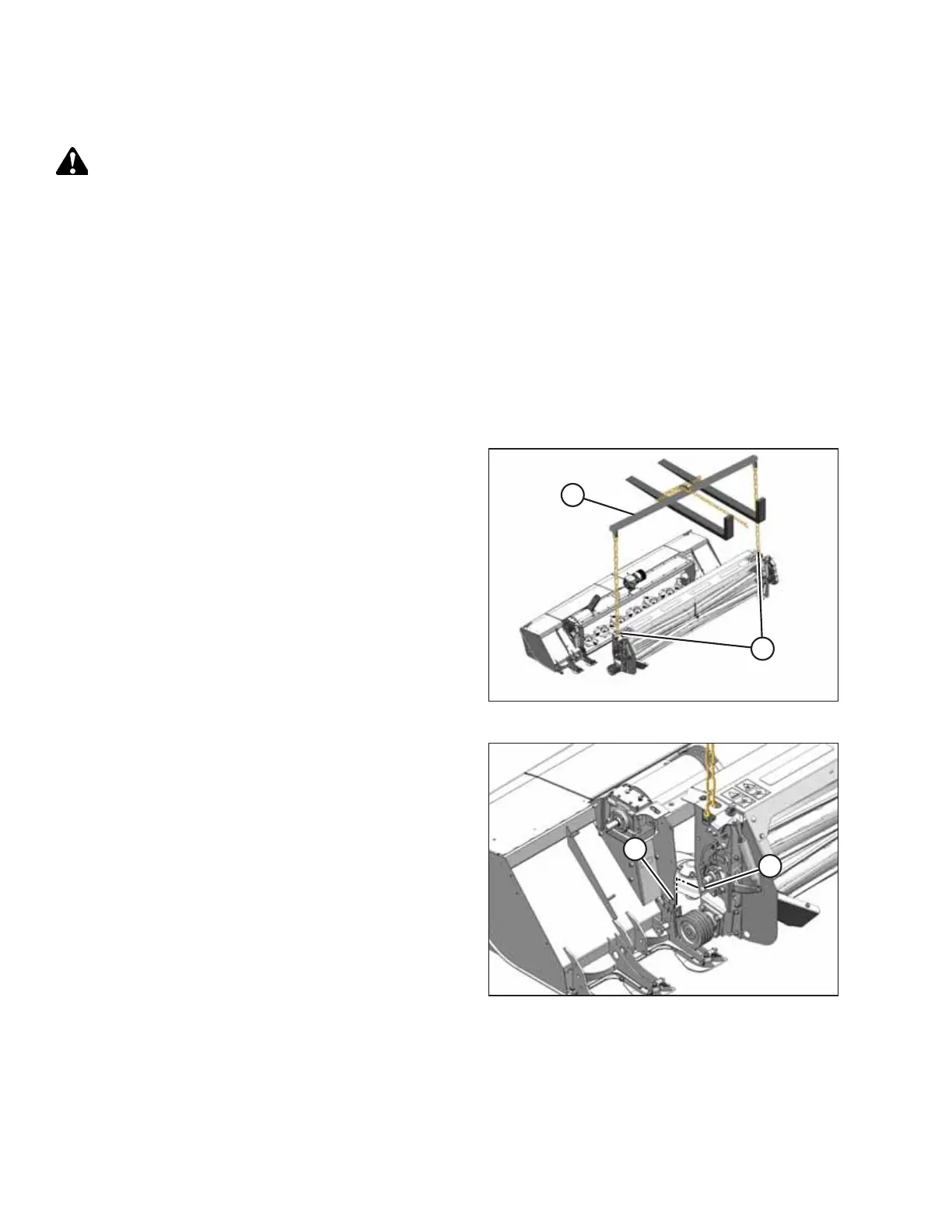
Figure 9.17: Conditioner Lift
1. Attach a spreader bar (A) to a forklift or equivalent lifting
device and attach chains to lugs (B) on the conditioner.
Use a chain rated for overhead lifting with a minimum
working load of 1135 kg (2500 lb.).
2. Lift conditioner and position it into disc mower opening.
1010997
A
B
Figure 9.18: Conditioner Pins
3. Carefully align pin (A) at each end of conditioner with
lug (B) on disc mower, and lower conditioner so that
pins (A) engage lugs (B) on disc mower.
CHANGING THE CONDITIONER





 To Next Page