214713 74 Revision A
4.5 Attaching Clutch Driveline
This procedure describes how to attach the clutch driveline to the header drive gearbox.
IMPORTANT:
If a conditioner swap is required before delivery to the customer, do NOT perform this step at this time. Skip to and
then return to this topic to complete the setup.
1011377
A
B
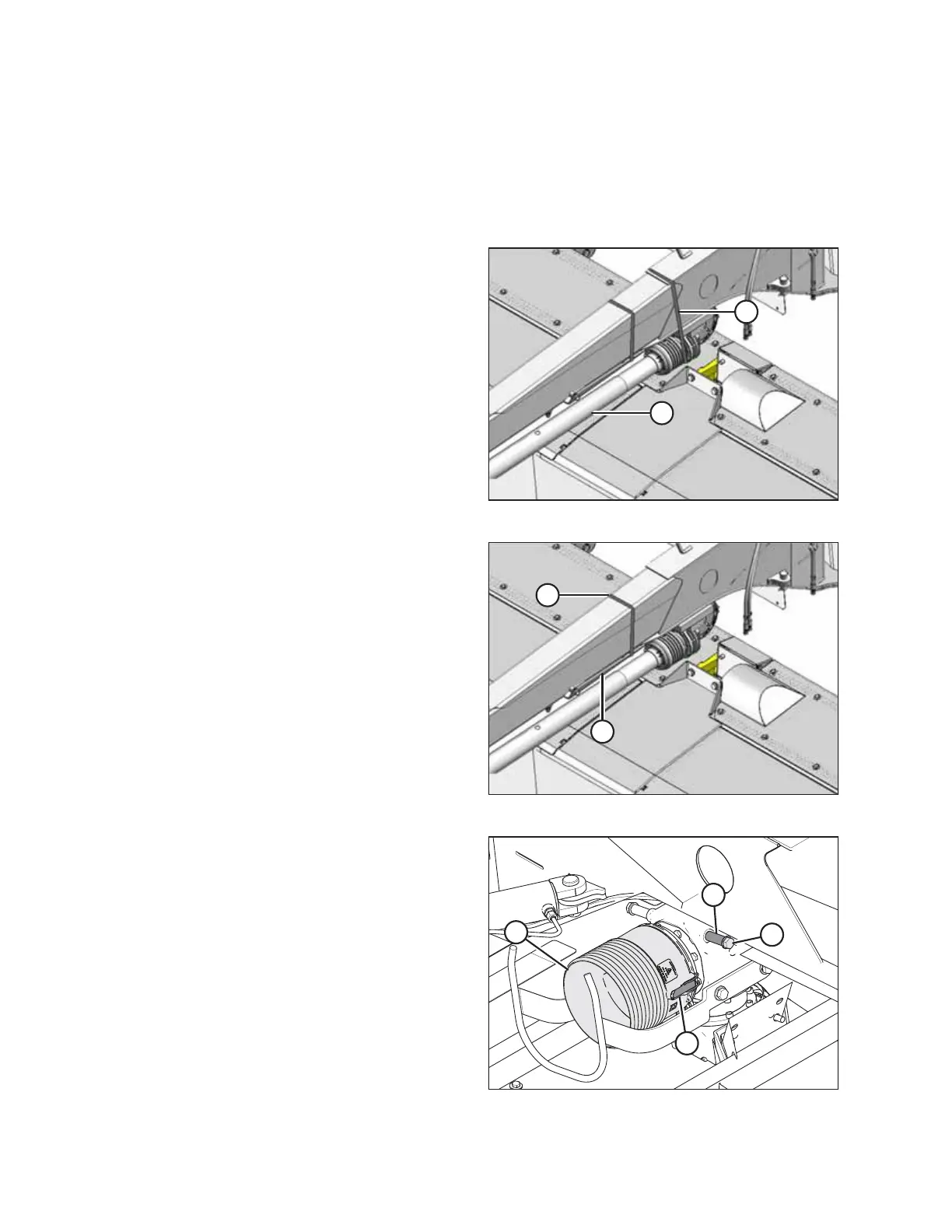
Figure 4.45: Driveline Strapping
1. Support driveline (B) and remove strapping (A) securing
it to hitch. Remove all packing material.
1011397
A
B
Figure 4.46: Steering Arm Strapping
2. Remove strapping (A) and packing material securing
steering arm (B) to hitch. Pivot steering arm to the side
for now.
NOTE:
Strapped contents may be under pressure.
1015161
A
B
C
D
Figure 4.47: Driveline Shield
3. At the top of the upper rear swivel gearbox, remove two
bolts (A) with spacers (B). Retain hardware.
4. Undo latches (C) securing driveline shield (D) to the
upper rear swivel gearbox and remove the shield. If
necessary, use a screwdriver or equivalent to undo
latches (C).
5. Rotate the upper rear swivel gearbox until the input
shaft is facing towards the driveline.
ASSEMBLING THE DISC MOWER (FACTORY-INSTALLED TRANSPORT)





 To Next Page