214713 174 Revision A
9.2 Removing the Conditioner
CAUTION
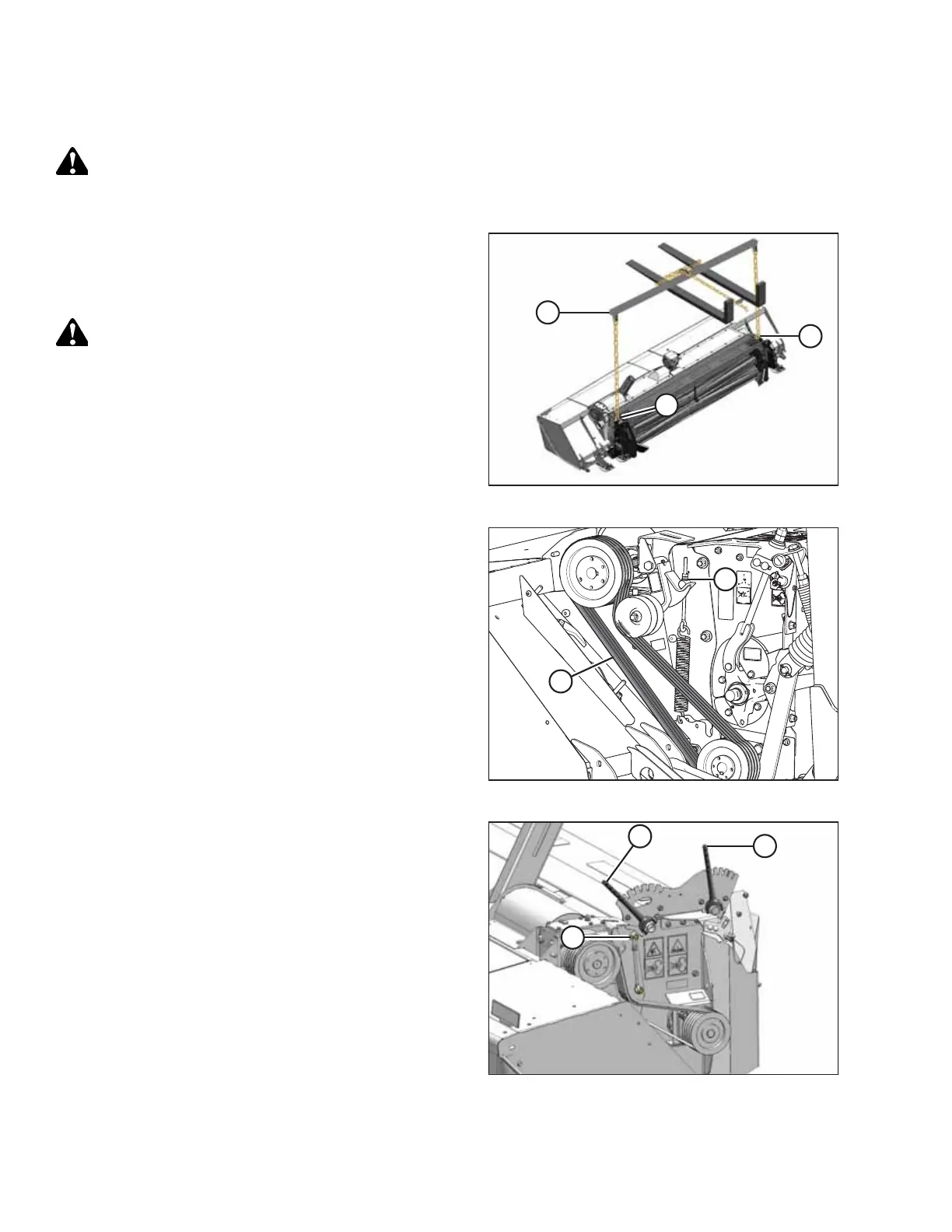
Ensure spreader bar is secured to the forks so that it cannot slide off the forks or towards the mast while
detaching the conditioner from the mower.
1011047
A
B
B
Figure 9.9: Spreader Bar
1. Attach a spreader bar (A) to a forklift or equivalent lifting
device, and attach chains to lugs (B) on conditioner.
Use a chain rated for overhead lifting with a minimum
working load of 1135 kg (2500 lb.).
DANGER
To prevent the conditioner from falling backward, ensure
lifting chains are secure and tight. Failure to do so may
result in death or serious injury.
1024911
A
B
Figure 9.10: Conditioner Drive
2. On the left side of the disc mower, remove the
conditioner drive belt as follows:
a. Back off jam nut and tensioner nut (B) on belt idler
until belts (A) are loose and can be removed.
b. Remove the four belts.
1011472
A
B
C
Figure 9.11: Left Side of Finger Conditioner
3. For finger conditioner, move forward baffle adjustment
handle (A) to fully lowered position, as shown.
4. Move rear baffle adjustment handle (B) to fully raised
position as shown.
NOTE:
Access to upper bolts (C) is easiest from the rear of the
conditioner.
CHANGING THE CONDITIONER





 To Next Page