214713 182 Revision A
1022671
B
A
C
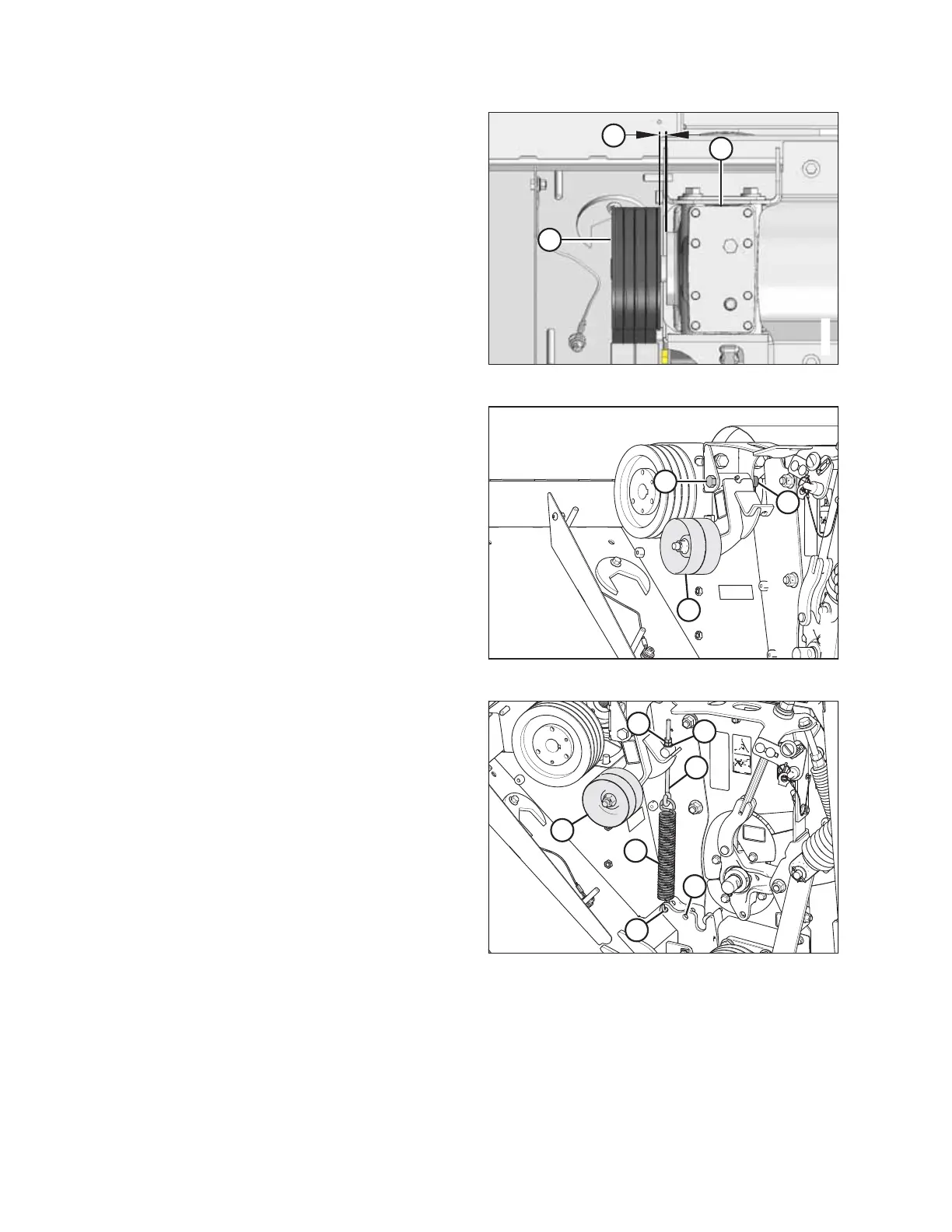
Figure 9.24: Drive Pulley
4. Tighten the three M10 bolts while maintaining 11 mm
(7/16 in.) dimension (B) between pulley (A) and
gearbox (C). Torque bolts to 39 Nm (29 lbf·ft).
1022670
A
B
C
Figure 9.25: Tensioner
5. Position tensioner assembly (A) as shown, and secure
with M16 x 120 bolt (B) and nut (C). Torque nut (C) to
47–54 Nm (35–40 lbf·ft).
1022672
A
B
C
D
E
F
G
Figure 9.26: Tensioner
6. Install spring (A) into rear hole (B) for finger conditioner,
and forward hole (C) for roll conditioner.
7. Install eyebolt (D) onto tensioner (E) and spring (A).
Secure eyebolt with hardened washer (F) and two M10
nuts (G).
NOTE:
Install conditioner drive belt after reattaching header to
carrier.
CHANGING THE CONDITIONER





 To Next Page