3-32
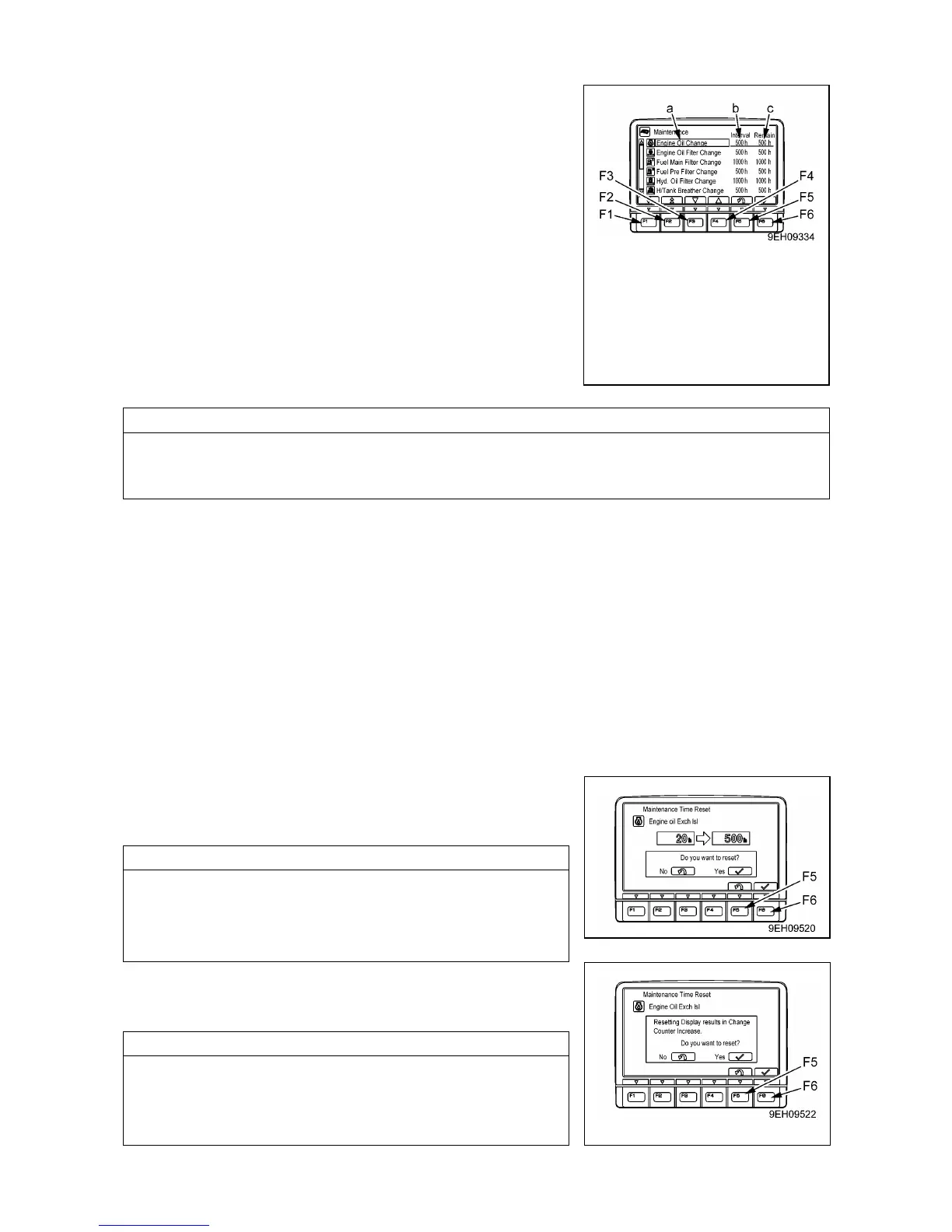
[OPERATIONS ON MAINTENANCE LIST SCREEN]
On the maintenance list screen, it is possible to carry out the
following operations with function switches (F1 to F6).
• Switch (F1): Displays next page. After the last page, it displays
the first page.
• Switch (F2): Displays previous page. After the first page, it
displays the last page.
• Switch (F3): Moves to next item (1 line down). After the last line, it
moves to the first line on the next page.
• Switch (F4): Moves to previous item (1 line up). After the first line,
it moves to the last line on the previous page.
• Switch (F5): Returns to standard screen.
• Switch (F6): If this switch is kept pressed, the screen changes to
the screen for resetting the remaining time for the
selected item (item highlighted in yellow).
When resetting the remaining time, keep switch (F6) pressed for at least 1.5 seconds. If switch (F6)
isnot kept pressed for at least 1.5 seconds, the switch operating sound can be heaard, but the screen
does not switch to the screen for resetting the remaining time.
• If no switch is operated for 30 seconds on the maintenance list screen, the screen automatically returns
to the standard screen.
• On the maintenance list screen, if the time remaining until maintenance for any item is less than 30 hours,
the remaining time display is highlighted in yellow. If the time remaining until maintenance becomes 0
hours, the remaining time display is highlighted in red.
• If you want to change the setting for the maintenance interval, please consult us or our sales service
agency.
[OPERATIONS ON MAINTENANCE INTERVAL RESET SCREEN]
On the maintenance list screen, if switch (F6) is kept pressed for at 1.5 seconds, the screen changes to
the maintenance time reset screen.
Reset the remaining time on this screen.
1. Press switch (F6) when the reset screen is in the condition
shown in the diagram on the right. The screen switches to the
reconfirmation screen.
• It is desired to cancel the reset, press switch (F5). The screen
returns to the maintenance list screen.
• On the reset screen, if no switch is operated for more than 30
seconds, the screen automatically switches to the maintenance
list screen.
2. The reconfirmation screen shown on the right is displayed.
3. If switch (F6) is pressed again. The remaining time is reset and
the screen switches to the maintenance list screen.
• If it is desired to cancel the reset, press switch (F5). The screen
returns to the maintenance list screen.
• On the reconfirmation screen, if no switch is operated for more
than 30 seconds, the screen automatically switches to the
maintenance list screen.
(a): Maintenance items
(b): Default maintenance interval
settings (h)
(c): Time remaining until mainte-
nance (h)



 To Next Page