3-33
[4] USER MODE SELECTOR SWITCH
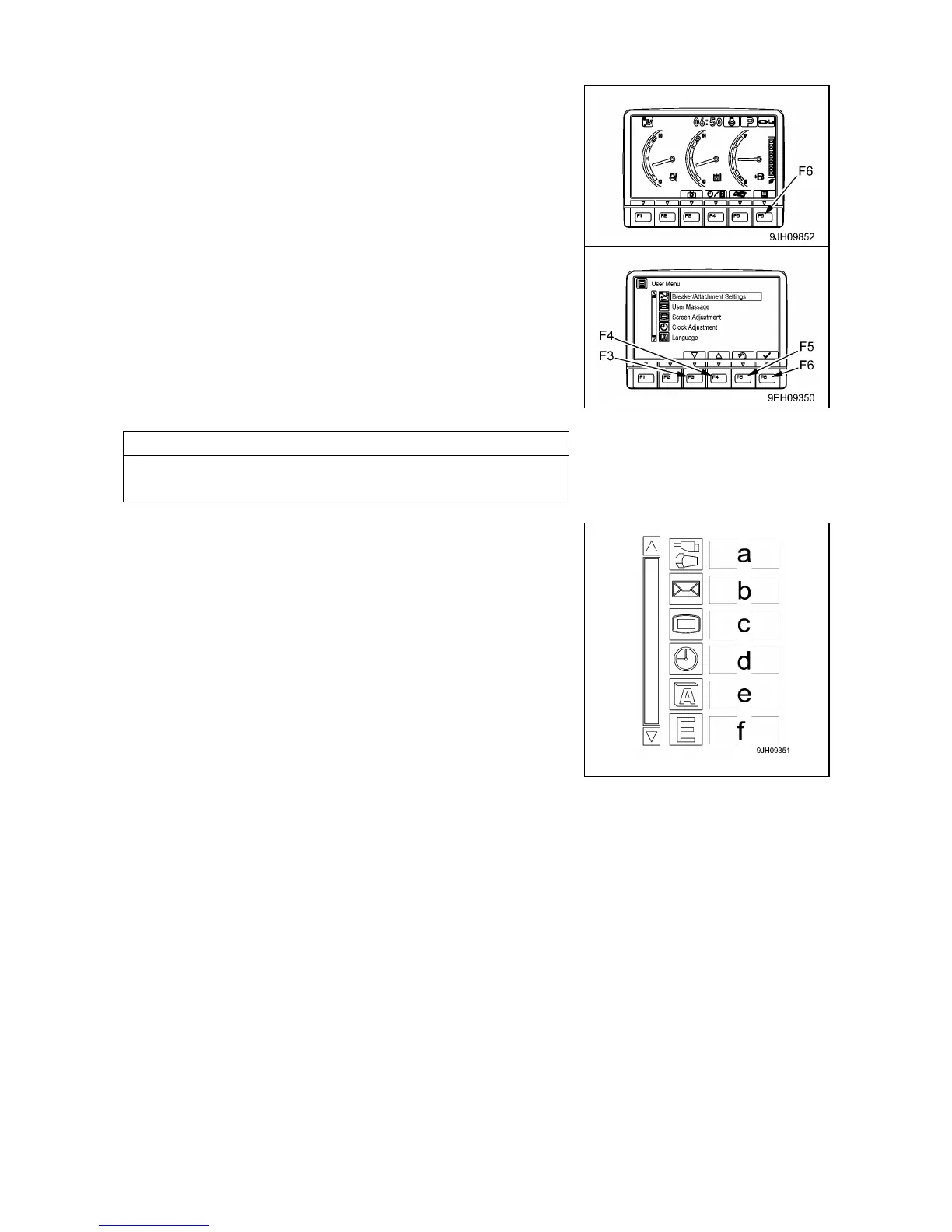
When the switch (F6) pressed, the monitor display screen
switches to the setting mode screen for the machine.
On the user menu screen, it is possible to carry out the following
operations with function switches (F3 to F6).
• Switch (F3): Moves to next item (1 line down). When on the last
line, it moves to the first line on the next page.
• Switch (F4): Moves to previous item (1 line up). When on the first
line, it moves to the last line on the previous page.
• Switch (F5): Returns to standard screen.
• Switch (F6): Switches to setting screen for selected item.
If no switch is operated for 30 seconds on the user menu screen,
the screen automatically returns to the previous screen.
• The following item can be set.
(a): Not available for this machine
(b): Not available for this machine
(c): Screen adjustment
(d): Clock adjustment
(e): Language selection
(f): Economy mode adjusting
The operation for setting (a) to (f) as follows.



 To Next Page