3-34
(c) Adjusting screen
Use this screen adjustment menu to adjust the brightness, contrast,
and back light of the screen.
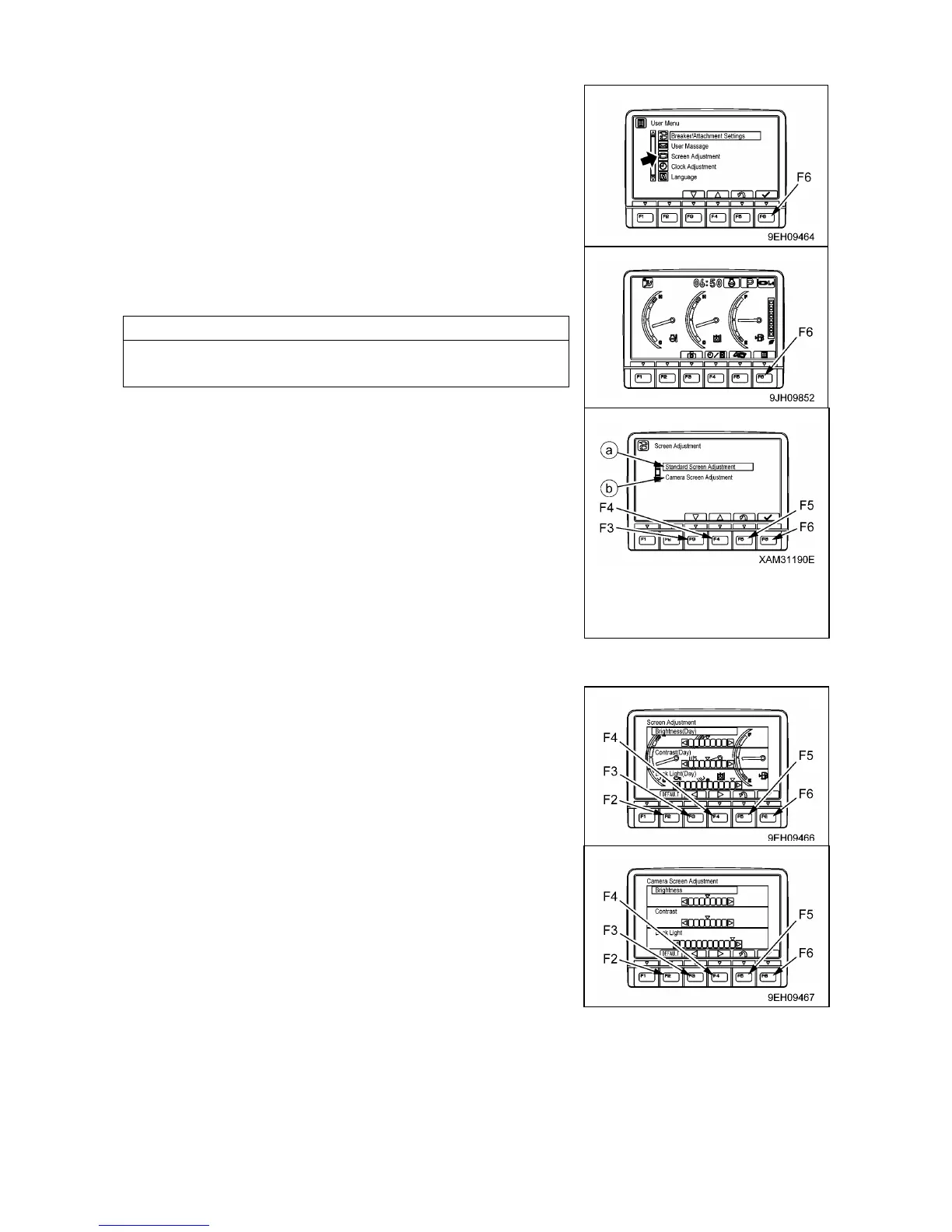
1. On the standard screen, presses switch (F6).
2. Select screen adjustment on the user menu screen, then press
switch (F6). The screen switches to the selection menu screen
for screen adjustment.
3. Select item to be adjusted (a) or (b) from the selection menu
screen for screen adjustment, then press switch (F6).
The screen switches to the setting screen for the selected item.
On the mode selection screen shown on the right, it is possible
to carry out the following operations with switches (F3 to F6).
• Switch (F3): Moves to next item (1 line down).
• Switch (F4): Moves to previous item (1 line up).
• Switch (F5): Returns to user menu screen.
• Switch (F6): Switches to setting screen for selected item.
4. Use switches (F2 to F6) to adjust the brightness, contrast, and
back light of the selected screen.
(1) Adjusting standard screen
• If the light switch is at night mode ON, and the standard screen
is adjusted, it is possible to adjust the brightness of the monitor
screen (night mode).
• If the switch is at day mode ON or OFF, and the standard
screen is adjusted, it is possible to adjust the brightness of the
monitor screen (day mode).
(2) Adjusting camera screen
• The background when adjusting the camera image is the
image for the No. 1 camera.
• When displaying the camera screen, the screen may become
dark if the image is on snow. In such cases, we recommend
adjustment of the screen.
On the screen for items (1) or (2), it is possible to carry out the
following operations with switches (F2 to F6).
• Switch (F2): Resets all adjusted values to default value.
• Switch (F3): Indicator of selected item moves 1 segment to left.
• Switch (F4): Indicator of selected item moves 1 segment to right.
• Switch (F5): Returns to user menu screen.
• Switch (F6): Accepts change and switches to next item setting.



 To Next Page